


Gmail in Firefox shows emails as having arrived four hours later than they in fact did. Google Chrome shows the correct time.
Firefox Version 80.0, Build ID 20200818235255
Gmail in the above version of Mozilla Firefox shows emails as having arrived four hours later than they in fact did. Google Chrome shows the correct time. The system time zone and clock are and were correctly set.
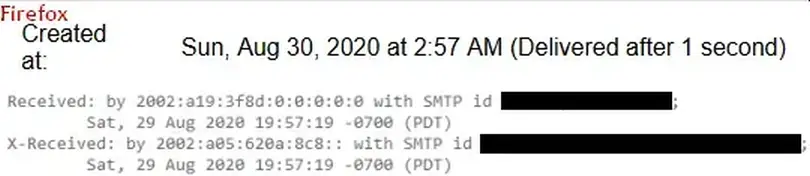
Header of the email: Received: by 2002:a19:3f8d:0:0:0:0:0 with SMTP id *****************;
Sat, 29 Aug 2020 19:57:19 -0700 (PDT)
X-Received: by 2002:a05:620a:8c8:: with SMTP id ********************************;
Sat, 29 Aug 2020 19:57:19 -0700 (PDT)
Time as shown in Firefox: Created at: Sun, Aug 30, 2020 at 2:57 AM (Delivered after 1 second)
Time as shown in Chrome: Created at: Sat, Aug 29, 2020 at 10:57 PM (Delivered after 1 second)

すべての返信 (3)
Just after posting this I found the answer at https://support.mozilla.org/en-US/questions/1288587. That resolved the problem after I cleared the cache.
選ばれた解決策
Hmm, that's odd. Normally if you use privacy.resistFingerprinting, Firefox disguises your version as the most recent ESR (Extended Support Release), which was 68 or 78. But yours identified as Firefox 80. ???
The reason for that must be that I had set privacy.resistFingerprinting to false having read somewhere else (just where I cannot remember) that that might fix the problem, but I didn't then for some reason think either to force a refresh or to clear the cache. Then I made the initial post. And then I saw the article referenced above and I thought to clear the cache. I hope that it is no longer odd. Sorry!