How do I remove the blue star - NOT the bookmark
I want to get rid of the fugly blue star that suddenly appeared next to my bookmarked sites. I don't want to remove the bookmark itself, just the star. I have a vague memory I did it in the past, but I forgot how and now that I installed the new version, the fugly star is back.
すべての返信 (3)

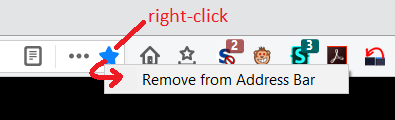
Right-click on it and select Remove From Address Bar
To Restore it later: click on the 3-dot (Page Actions) menu button right-click on Bookmark This Page and select Add To Address Bar
I didn't want to remove the bookmarks from the address bar. Especially not one by one. I wanted to remove the fugly blue star.
Whatever. I did find the the command to remove it. But I'm tired of wasting my time trying to get it to work the way I want again despite the 'improvements'. Mozilla has apparently decided to follow the Google policy 'users are idiots who need to be protected from themselves at all cost'."
I'm switching to Vivaldi.
Hi Lucia, what was the solution you found?
RobertJ gave you the instructions to remove the blue star from the Page Actions area of the address bar (it remains available on the ••• menu):

Was that not what you were referring to? Was it about the tiny blue stars on the site icons for bookmarked sites on the autocomplete drop-down?