


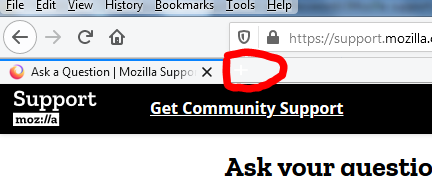
New tab (+) invisible unless cursor over
The new tab (+) is not visible unless I cursor over the area.
How may I set Firefox 70.0.1 such that the new tab is always visible, whether I cursor over the area, or not?
The new tab (+) is not visible unless I cursor over the area.
How may I set Firefox 70.0.1 such that the new tab is always visible, whether I cursor over the area, or not?
すべての返信 (1)
Are you possibly using a theme in Firefox that might be causing this?
Start Firefox in Safe Mode to check if one of the extensions ("3-bar" menu button or Tools -> Add-ons -> Extensions) or if hardware acceleration is causing the problem.
- switch to the DEFAULT theme: "3-bar" menu button or Tools -> Add-ons -> Themes
- do NOT click the "Refresh Firefox" button on the Safe Mode start window
- https://support.mozilla.org/en-US/kb/troubleshoot-firefox-issues-using-safe-mode
- https://support.mozilla.org/en-US/kb/troubleshoot-extensions-themes-to-fix-problems
You can try a different Windows theme and Windows background image (wallpaper) to see if that helps.
- Control Panel -> Personalization -> Theme & Window Color and Appearance