


auto update to 69.0 and now I have extreme slow, crashing, and "timed out" messages?
since the last automatic update, v69.0, firefox has "timed out" on every page two and three times before loading which takes an abnormal time, 7 minutes for this screen, I have uninstalled and reinstalled the program and no change. I assume there may be a bug in the update?
すべての返信 (6)

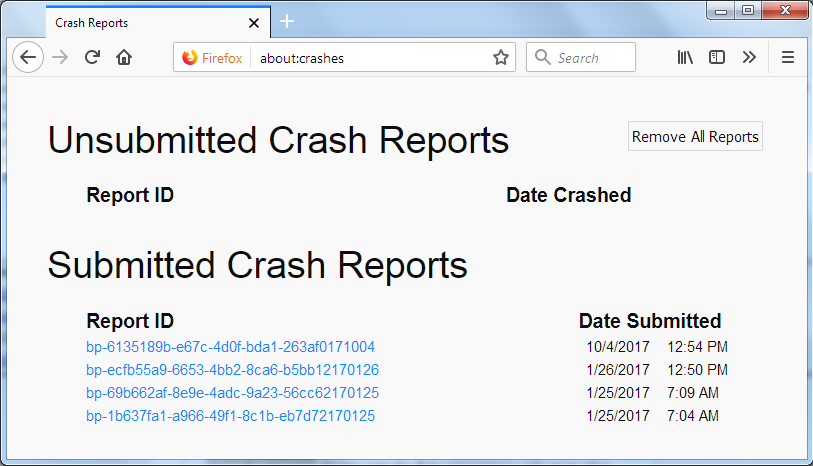
In the address bar, type about:crashes<enter>. Note: If any reports do not have BP- in front of the numbers/letters, click it to submit them.
The crash report is several pages of data. We need the report numbers to see the whole report.
Using your mouse, mark the most recent 7 - 10 Submitted crash reports, and copy them. Now go to the reply box and paste them in.
For more help on crash reports, see; https://support.mozilla.org/en-US/kb/firefox-crashes-asking-support
Start Firefox in Safe Mode {web link}
A small dialog should appear. Click Start In Safe Mode (not Refresh). Is the problem still there?
safe mode acts the same and after reinstalling the crash reports say I have none. thanks for the aid, I learned something new.
Start your Computer in safe mode with network support. Then start Firefox. Try Secure websites. Is the problem still there?
http://encyclopedia2.thefreedictionary.com/Linux+Safe+Mode Starting Any Computer In Safe Mode; Free Online Encyclopedia
again thank you. the problem does not affect firefox in safe mode but does in normal windows. The only thing I find is "Widevine Content Decryption Module provided by Google Inc. will be installed shortly." in the add-ons? This may be the problem?
As a test, disable your protection programs. Is the problem still there?