


i why is Google Untrusted? its an website everyone uses!

its saying this.
This Connection is Untrusted
You have asked Firefox to connect securely to www.google.co.uk, but we can't confirm that your connection is secure.
Normally, when you try to connect securely, sites will present trusted identification to prove that you are going to the right place. However, this site's identity can't be verified. What Should I Do?
If you usually connect to this site without problems, this error could mean that someone is trying to impersonate the site, and you shouldn't continue.
This site uses HTTP Strict Transport Security (HSTS) to specify that Firefox only connect to it securely. As a result, it is not possible to add an exception for this certificate.
www.google.co.uk uses an invalid security certificate.
The certificate is not trusted because the issuer certificate is unknown. The server might not be sending the appropriate intermediate certificates. An additional root certificate may need to be imported.
(Error code: sec_error_unknown_issuer)
すべての返信 (6)
hi, this problem might be happening in windows 10 accounts restricted by microsoft family parental controls. if you don't want to use this feature intentionally, you could turn that off for your account like described at: http://windows.microsoft.com/en-us/windows-10/turn-off-microsoft-family-settings
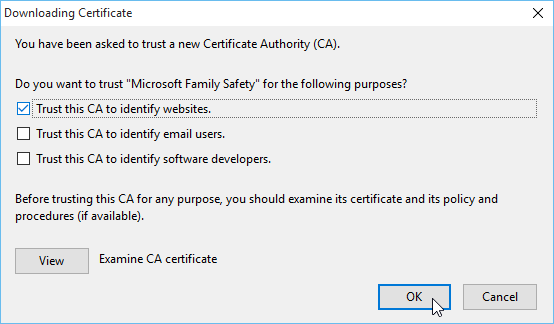
in case you want to have it on on purpose, you'd need to some configuration work in firefox, and install the certificate of ms family safety that is getting used to intercept secure connections into the browser's trust store. open this link in firefox - then a dialog about adding a cert should display. please check the box to Trust this CA to identify web sites & confirm the change.
alternatively you could also try the manual steps described at https://support.microsoft.com/en-us/kb/2965142 in the section about firefox.
選ばれた解決策
Is that the only site giving you an untrusted connection or is it occurring with multiple sites? Before creating exceptions, we recommend investigating the cause of the problem. In some cases, Firefox just isn't set up to work with your security software or the parental filter mentioned earlier. In other cases, however, a malware infection could be reading all your browsing and you'd want to clean that out.
As a starting point, do you use any of these: BitDefender, ESET, Kaspersky, or Avast?
jscher2000 said
Is that the only site giving you an untrusted connection or is it occurring with multiple sites? Before creating exceptions, we recommend investigating the cause of the problem. In some cases, Firefox just isn't set up to work with your security software or the parental filter mentioned earlier. In other cases, however, a malware infection could be reading all your browsing and you'd want to clean that out. As a starting point, do you use any of these: BitDefender, ESET, Kaspersky, or Avast?
is something to do with google related search engines such as youtube but for some reson google play works! and also i have AVG free
この投稿は notaKtiks により に変更されました
It was avg that was blocking the websites with "search sheild"
Thank you for reporting back on that. There probably is a way to keep using that feature, setting Firefox to trust AVG to issue "fake" certificates for Google, but if it's not important to you, we can skip the research.
great, avg starting with this man-in-the middling approach as well :-/