


Windows 10 reached EOS (end of support) on October 14, 2025. If you are on Windows 10, see this article.

Cerca nel supporto

Attenzione alle mail truffa. Mozilla non chiederà mai di chiamare o mandare messaggi a un numero di telefono o di inviare dati personali. Segnalare qualsiasi attività sospetta utilizzando l'opzione “Segnala abuso”.

Ulteriori informazioni

Questa discussione è archiviata. Inserire una nuova richiesta se occorre aiuto.

Not getting prompted for new password

  • 2 risposte
  • 0 hanno questo problema
  • 155 visualizzazioni
  • Ultima risposta di B Budd

I successfully updated my password on my email provider website. I can access my email on my cell phone via a Gmail client but I can't access my email on Thunderbird. I actually started having problems in July but I didn't have time to try to fix the problem at that time.

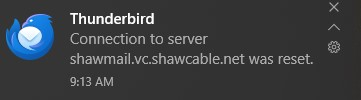
As per some other instructions (see below), I deleted the entries for my password, expecting to get prompted to re-add it after restarting Thunderbird. This doesn't happen yet. I do see a message saying that the 'Connection to server shawmail.vc.shawcable.net was reset'.

Thanks, Byron


To change an email password in Thunderbird, go to the menu icon (☰), then Settings (or Preferences), navigate to Privacy & Security > Passwords > Saved Passwords. Delete the old entry for your email account, close and restart Thunderbird, and the program will prompt for the new password when you next try to send or receive email. Steps to Change Your Email Password in Thunderbird Open Thunderbird: and click the menu icon (the three horizontal lines) in the top right. Select Settings (or Preferences on a Mac). In the settings or preferences window, select the Privacy & Security tab from the left-hand menu. Scroll down to the Passwords section and click the Saved Passwords button. In the pop-up window, locate your email account's entry in the list. Right-click: on the entry, then select Edit Password to change it, or select Remove to delete it. If you deleted the password, you can also click Remove All to clear any other stored passwords for that account. Close: the password window, then close the Thunderbird application. Restart Thunderbird . When you next try to send or receive email, a pop-up will appear asking for your new password; enter it there.
I successfully updated my password on my email provider website. I can access my email on my cell phone via a Gmail client but I can't access my email on Thunderbird. I actually started having problems in July but I didn't have time to try to fix the problem at that time. As per some other instructions (see below), I deleted the entries for my password, expecting to get prompted to re-add it after restarting Thunderbird. This doesn't happen yet. I do see a message saying that the 'Connection to server shawmail.vc.shawcable.net was reset'. Thanks, Byron ------------------------------------------------------- To change an email password in Thunderbird, go to the menu icon (☰), then Settings (or Preferences), navigate to Privacy & Security > Passwords > Saved Passwords. Delete the old entry for your email account, close and restart Thunderbird, and the program will prompt for the new password when you next try to send or receive email. Steps to Change Your Email Password in Thunderbird Open Thunderbird: and click the menu icon (the three horizontal lines) in the top right. Select Settings (or Preferences on a Mac). In the settings or preferences window, select the Privacy & Security tab from the left-hand menu. Scroll down to the Passwords section and click the Saved Passwords button. In the pop-up window, locate your email account's entry in the list. Right-click: on the entry, then select Edit Password to change it, or select Remove to delete it. If you deleted the password, you can also click Remove All to clear any other stored passwords for that account. Close: the password window, then close the Thunderbird application. Restart Thunderbird . When you next try to send or receive email, a pop-up will appear asking for your new password; enter it there.
Immagini allegate

Tutte le risposte (2)

Have you enabled IMAP or POP in webmail settings?

https://support.mozilla.org/en-US/questions/1533790#answer-1762492

Thanks for finding this. IMAP was checked, but not POP. This gives me more to work with!

Byron