


Windows 10 reached EOS (end of support) on October 14, 2025. If you are on Windows 10, see this article.

Cerca nel supporto

Attenzione alle mail truffa. Mozilla non chiederà mai di chiamare o mandare messaggi a un numero di telefono o di inviare dati personali. Segnalare qualsiasi attività sospetta utilizzando l'opzione “Segnala abuso”.

Ulteriori informazioni
Questa discussione è archiviata. Inserire una nuova richiesta se occorre aiuto.
Archiviato

Disable floating video while scolling on a website

firefox3136

Hi all,

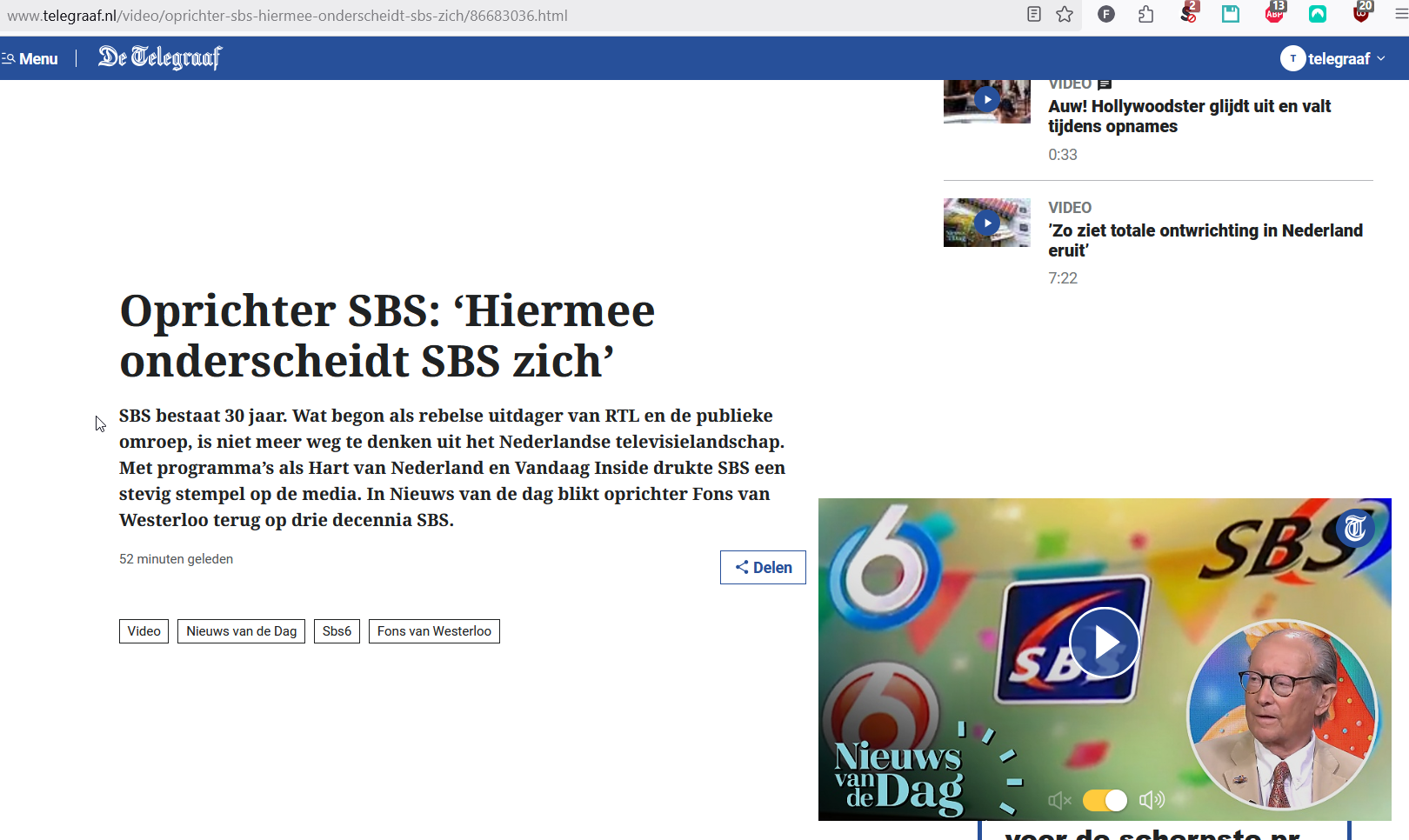
Just updated to version 142.0.1. I now have the annoying behaviour back that video's on a website pop out on the screen while scrolling on a webpage and they are in the way of the text. I don't want any videos popping out. In the past I had it resolved somehow, so it looks like the update "undid" these. If I'm correct I might have changed a setting in the about:config.

I found multiple articles stating to uncheck "Enable PIP controls" in the setings, section [General] - [Browsing]. This options was moved to the [Firefox Labs] section within the setting. This option however is already disabled.

This page does not resolve the issue: https://support.mozilla.org/en-US/kb/about-picture-picture-firefox#w_why-dont-i-see-the-picture-in-picture-toggle

How can I prevent a video popping out on the screen an float above the web page? I just want to keep it in the window\frame where it belongs.

Link of a page where I have the issue: https://www.telegraaf.nl/video/oprichter-sbs-hiermee-onderscheidt-sbs-zich/86683036.html Also attached a screenshot.

Thanks in advance.
Hi all, Just updated to version 142.0.1. I now have the annoying behaviour back that video's on a website pop out on the screen while scrolling on a webpage and they are in the way of the text. I don't want any videos popping out. In the past I had it resolved somehow, so it looks like the update "undid" these. If I'm correct I might have changed a setting in the about:config. I found multiple articles stating to uncheck "Enable PIP controls" in the setings, section [General] - [Browsing]. This options was moved to the [Firefox Labs] section within the setting. This option however is already disabled. This page does not resolve the issue: https://support.mozilla.org/en-US/kb/about-picture-picture-firefox#w_why-dont-i-see-the-picture-in-picture-toggle How can I prevent a video popping out on the screen an float above the web page? I just want to keep it in the window\frame where it belongs. Link of a page where I have the issue: https://www.telegraaf.nl/video/oprichter-sbs-hiermee-onderscheidt-sbs-zich/86683036.html Also attached a screenshot. Thanks in advance.
Immagini allegate

Tutte le risposte (1)

This is not a Firefox issue. This is a feature of that website and it works like this in every browser. You can't disable it with PiP controls.

You could eventually use ublock origin to disable it.