


Cannot Remove Separator from Tab Context Menu

Hi All,
I would like to hide the "New Tab to Right" option on the Tab Context Menu, and also remove the separator line right below that menu item.
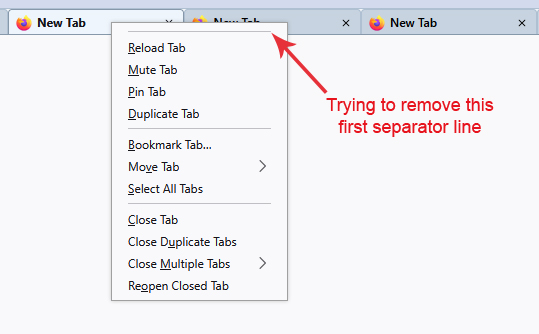
The first line in the following code removes the Menu Item, but none of the 4 remaining lines succeed in removing the separator line. It remains at the top of the menu (see attached image).
Could anyone suggest some code to also remove the separator line at the top?
This is in FF 135.
Thank you.
#context_openANewTab,
#context_openANewTab + menuseparator,
#context_openANewTab_separator,
#context_reloadTab_separator,
#context_reloadTab + menuseparator::before {
   display: none !important;
}
This code below removes the first menu item and ALL separators from ALL menus, which is "ok" but not optimal.
menuseparator,
#context_openANewTab {
   display: none !important;
}
This solution provided by cor-el a few years ago appears to no longer work (the separator remains):
https://support.mozilla.org/nl/questions/1340761
Modificato da Slouch il
Soluzione scelta
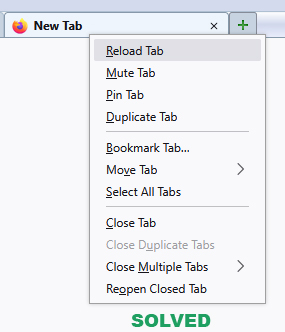
Here's what finally worked...
#context_openANewTab,
#context_moveTabToNewGroup,
#context_moveTabToGroup,
#context_ungroupTab + menuseparator {
   display: none !important;
}
Three of the menu items above (tab grouping options) are apparently hidden by default in Firefox.
I needed to mention all the items before the separator, even if they are hidden, in order to remove the separator.
Not sure why that worked, but it was one of the iterations I thought to try :)
Leggere questa risposta nel contesto 👍 0Tutte le risposte (2)
Here's what finally worked...
#context_openANewTab,
#context_moveTabToNewGroup,
#context_moveTabToGroup,
#context_ungroupTab + menuseparator {
   display: none !important;
}
Three of the menu items above (tab grouping options) are apparently hidden by default in Firefox.
I needed to mention all the items before the separator, even if they are hidden, in order to remove the separator.
Not sure why that worked, but it was one of the iterations I thought to try :)
Modificato da Slouch il
Soluzione scelta
Here's what finally worked...
#context_openANewTab,
#context_moveTabToNewGroup,
#context_moveTabToGroup,
#context_ungroupTab + menuseparator {
   display: none !important;
}
Three of the menu items above (tab grouping options) are apparently hidden by default in Firefox.
I needed to mention all the items before the separator, even if they are hidden, in order to remove the separator.
Not sure why that worked, but it was one of the iterations I thought to try :)
Modificato da Slouch il