


How can the thunderburd layout be changed to improve efficiency
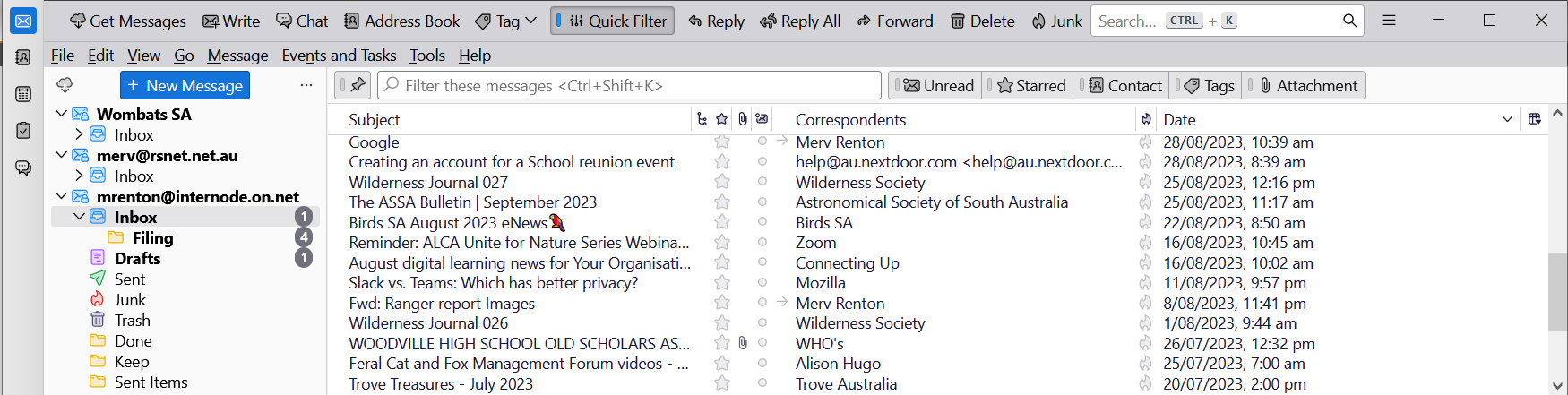
Thunderbird 115.2.2 on my W10 Laptop crams the list of emails together and they are much harder to read.
Plus the "File Edit View ..." menu row is now below the often-used "Get messages Write Chat ..." menu row so every action I take needs more mouse movement!
See attached Image.
How can I get the view to be better as per many previous versions of Thunderbird?
Do I have to/can I reverse the upgrade? Or is there a way to make the changes?
Thanks,
Merv
Thunderbird 115.2.2 on my W10 Laptop crams the list of emails together and they are much harder to read.
Plus the "File Edit View ..." menu row is now below the often-used "Get messages Write Chat ..." menu row so every action I take needs more mouse movement!
See attached Image.
How can I get the view to be better as per many previous versions of Thunderbird?
Do I have to/can I reverse the upgrade?
Or is there a way to make the changes?
Thanks,
Merv
Tutte le risposte (1)
Regarding "cramming"
1. How does it all look after Help > Troubleshoot Mode? 2. Set all your fonts and font sizes back to default 3. Check your settings for zoom and density https://support.mozilla.org/en-US/kb/new-thunderbird-115-supernova#w_other-look-and-feel-improvements