


Windows 10 reached EOS (end of support) on October 14, 2025. If you are on Windows 10, see this article.

Cerca nel supporto

Attenzione alle mail truffa. Mozilla non chiederà mai di chiamare o mandare messaggi a un numero di telefono o di inviare dati personali. Segnalare qualsiasi attività sospetta utilizzando l'opzione “Segnala abuso”.

Ulteriori informazioni
Questa discussione è archiviata. Inserire una nuova richiesta se occorre aiuto.
Stato della soluzione Archiviato

lost windows, can't set up Thunderbird to iMAP logon verification

bclat risposto
bclat

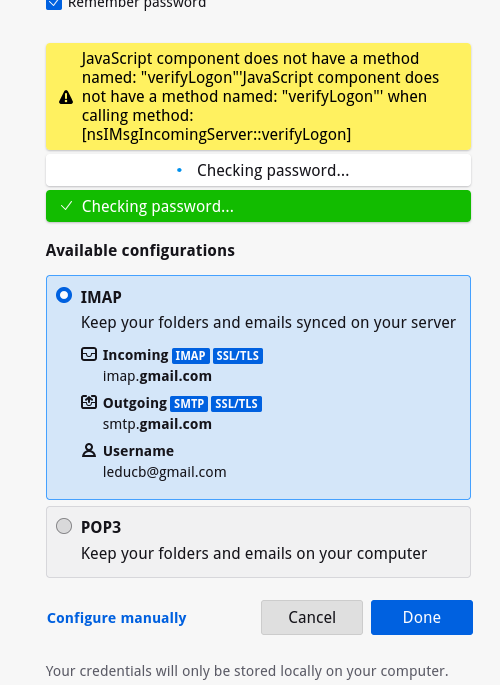
everything happens at once. phone and windows computer both died. I want to use IMAP to synchronize my gmail on my RHEL 9 machine, but can't connect with IMAP IMAP is enabled on my gmail, configuration found in Mozilla ISP database when I click done I get the yellow "JavaScript component does not have a method named:"verifyLogon" when calling method: [nsIMsgIncomingServer::verifyLogon] and below that [checking password with a dot moving back and forth. cannot proceed. I also have a lung issue and am on prednisone so my brain is mush. Don't know what all I've tried but it involved changing auth and clearing cookies and setting up with POP3 in the mean time. I'd rather not break anything else while I recover.. I didn't get a verification notice that I recognized in push, sms, or email. Please help. TIA Brian
everything happens at once. phone and windows computer both died. I want to use IMAP to synchronize my gmail on my RHEL 9 machine, but can't connect with IMAP IMAP is enabled on my gmail, configuration found in Mozilla ISP database when I click done I get the yellow "JavaScript component does not have a method named:"verifyLogon" when calling method: [nsIMsgIncomingServer::verifyLogon] and below that [checking password with a dot moving back and forth. cannot proceed. I also have a lung issue and am on prednisone so my brain is mush. Don't know what all I've tried but it involved changing auth and clearing cookies and setting up with POP3 in the mean time. I'd rather not break anything else while I recover.. I didn't get a verification notice that I recognized in push, sms, or email. Please help. TIA Brian
Immagini allegate

Tutte le risposte (1)

Soluzione scelta

Figured it out. after setting it up on a different machine successfully, realized it was the installation, and the remove and reinstall had not completely removed everything removed Thunderbird again, then sudo root found all Thunderbird files and renamed, moved, or removed them then reinstalled Thunderbird, and it installed, configured, and synchronized flawlessly. Yay!