Questa discussione è archiviata.
Inserire una nuova richiesta se occorre aiuto.

Risolto
Archiviato
How do I CC and BCC with the new Thunderbird?
Prior to updating to 78.7, whenever I would send a message, it showed like this for the addressees:
To: CC: BCC:
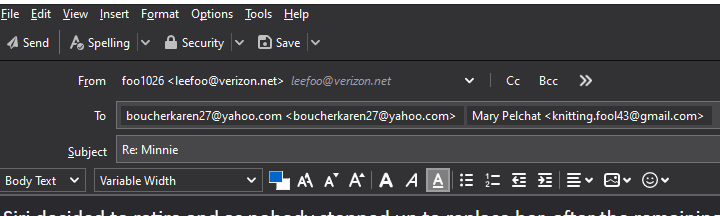
Now, in the pic, as you can see, it is all in one straight line. Now, while I enjoy that more than the original, I have absolutely no idea how to send something BCC or CC.
Can you tell me how?
Thx
Prior to updating to 78.7, whenever I would send a message, it showed like this for the addressees:
To:
CC:
BCC:
Now, in the pic, as you can see, it is all in one straight line. Now, while I enjoy that more than the original, I have absolutely no idea how to send something BCC or CC.
Can you tell me how?
Thx