


Windows 10 reached EOS (end of support) on October 14, 2025. If you are on Windows 10, see this article.

Cerca nel supporto

Attenzione alle mail truffa. Mozilla non chiederà mai di chiamare o mandare messaggi a un numero di telefono o di inviare dati personali. Segnalare qualsiasi attività sospetta utilizzando l'opzione “Segnala abuso”.

Ulteriori informazioni
Questa discussione è archiviata. Inserire una nuova richiesta se occorre aiuto.
Archiviato

can't install an add-on

Paul Raworth Bennett

Help! (I know, everyone says that... )

I'm trying to install an add-on and am following the instructions at https://support.mozilla.org/en-US/kb/installing-addon-thunderbird

(this might not be relevant, but the add-on I'm trying to install is called "Manually Sort Folders, at https://addons.thunderbird.net/en-US/thunderbird/addon/manually-sort-folders/?src=ss" )

Anyways, I've downloaded the XPI file to my desktop.

And within Thunderbird, I've opened up the "Add-ons Manager" tab.

So I'm supposed to click on a "gear" icon that's to the left of the search box so that I can "Install Add-on from File".

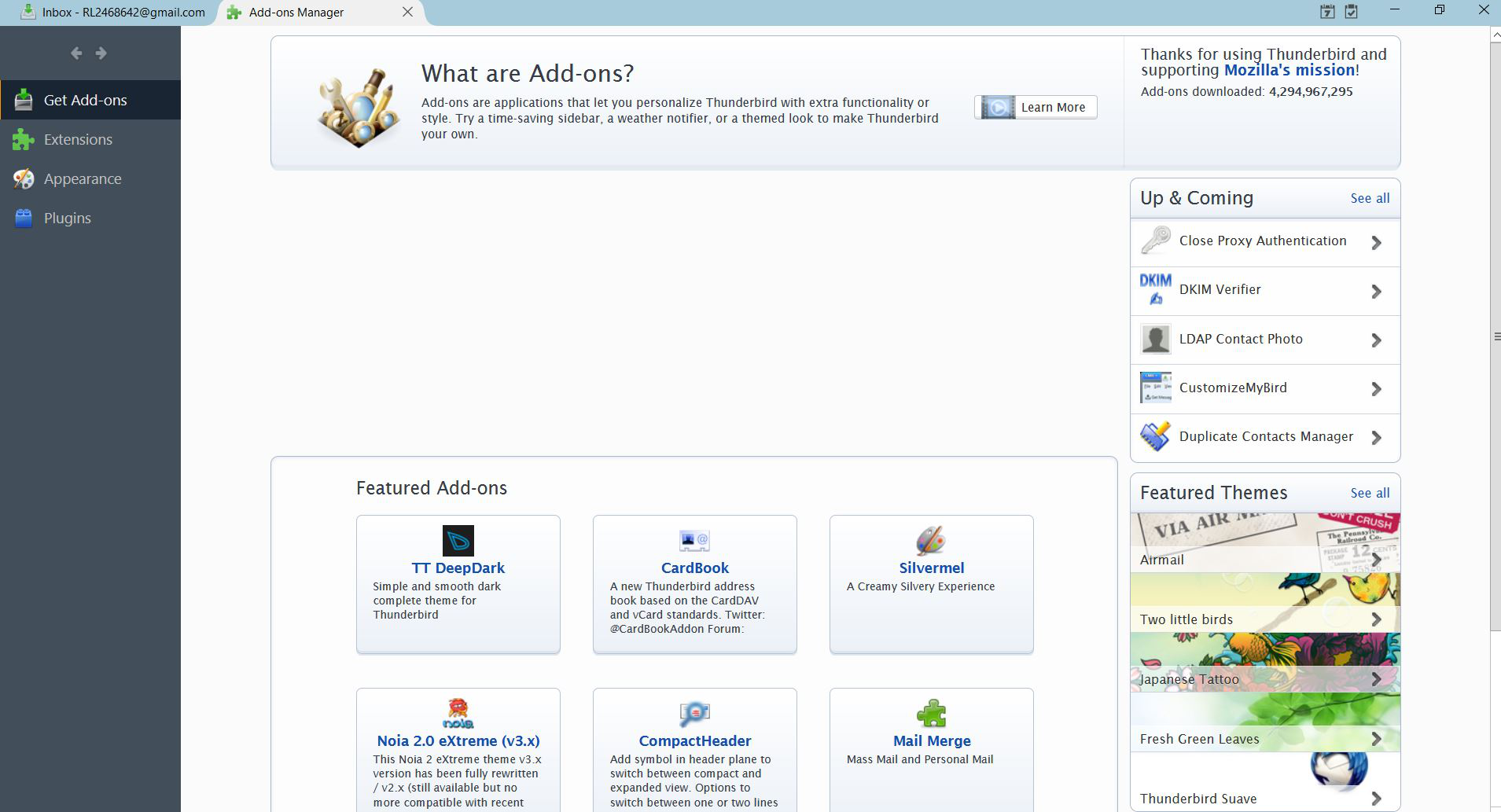
But I can't find the search box, much less the gear icon!

Where on the screen is this search box supposed to be? My screenshot is attached.

Perhaps my Thunderbird isn't installed correctly? I'm running version 52.9.1 32-bit.

Thanks for your help and have a great day.
Help! (I know, everyone says that... ) I'm trying to install an add-on and am following the instructions at https://support.mozilla.org/en-US/kb/installing-addon-thunderbird (this might not be relevant, but the add-on I'm trying to install is called "Manually Sort Folders, at https://addons.thunderbird.net/en-US/thunderbird/addon/manually-sort-folders/?src=ss" ) Anyways, I've downloaded the XPI file to my desktop. And within Thunderbird, I've opened up the "Add-ons Manager" tab. So I'm supposed to click on a "gear" icon that's to the left of the search box so that I can "Install Add-on from File". But I can't find the search box, much less the gear icon! Where on the screen is this search box supposed to be? My screenshot is attached. Perhaps my Thunderbird isn't installed correctly? I'm running version 52.9.1 32-bit. Thanks for your help and have a great day.
Immagini allegate

Tutte le risposte (1)

When in the add ons tab click Extensions to see the gear icon.