


How can I move/copy a mailing list between address books?

I have two address books. Personal Address Book and Contacts. Each contains various mailing lists. I wish to drag and drop the mailing lists between them as the need arises. I do not want to manually create a new mailing list in the other address book and copy the contacts from the previous list there.
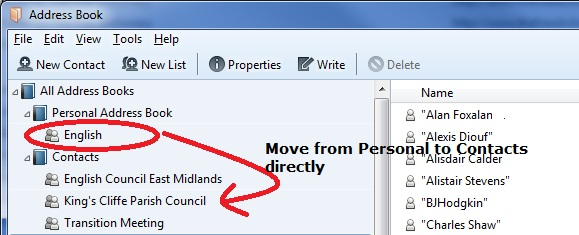
Lets say Personal Address Book has a list called 'English'. I want to move 'English' from Personal Address Book to contacts. I want to drag and drop (or copy) the actual list 'English' - in other words using the left hand pane only.
Modificato da Flaster il
Tutte le risposte (1)
Soluzione scelta
Drag and drop works for me.
Select Personal Address Book at the left and its contents, including "English" will be listed on the right. You can drag and drop "English" from the right hand pane onto another address book in the left hand pane.
Be aware that any Contacts within the "English" Mailing List which are not already in the "Contacts" address book will be added to the "Contacts" address book when you do this, since a Mailing List is merely a collection of pointers. Hence you will get duplicated Contacts across multiple address books, because a Mailing List in "Contacts" needs to be able to see its member contacts in its host address book.
Do you have any strong reason for keeping Contacts and Personal Address Book ("PAB") as two distinct address books? Why not merge one into the other? (And since you can't remove PAB, I'd merge Contacts into PAB.)
Modificato da Zenos il