


How to create a Mailing List in Thunderbird v156.0.1

I'm still learning Thunderbird after years of using/supporting Outlook. So far, so good. Today I wanted to create a Mailing List. I found a support article on this dated 2/13/15. It said:
Create a mailing list
   Open the Address Book.
   Select File > New > 'Mailing List'.
   Enter a suitable name for the mailing list.
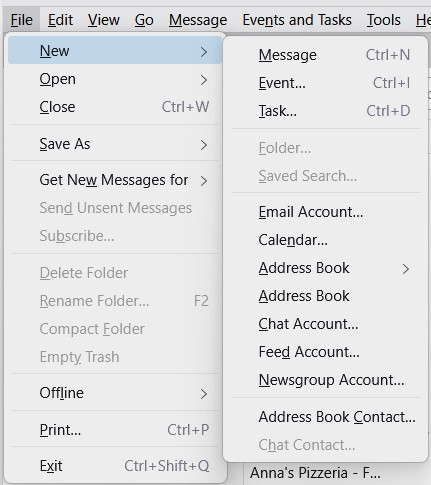
In version 156.0.1 this doesn't seem correct any more. I've uploaded an image of the menu I get. There doesn't seem to be any Mailing List option. 2015 was a long time ago, so I'm guessing this Article is WAY out of date and Mailing List creation has changed. Any guidance?
Semua Balasan (2)
Solusi Terpilih
You are referring to https://support.mozilla.org/en-US/kb/how-create-and-use-mailing-lists-thunderbird
You are correct, the article was outdated. I have reviewed and approved the changes which bring it up to date.
Thanks for bringing this to our attention.
Thanks for the stunningly fast reply. This does, indeed, solve the issue. Thanks!