


remove recent browsing button from tab bar

'bold textHow do I remove the recent browsing button from tab bar. I get shaky hand sometimes and this annoying button messes Firefox up. It is the most annoying new feature ever.
Solusi terpilih
Yep, that's what I thought about.
Actually, there's a simpler way: right-click the icon and select Remove from Toolbar.
Alternatively (the way I mentioned previously), you can right-click your toolbar (located below the tab strip), select "Customize Toolbar..." (don't believe the label, it's not just for the toolbar) and then drag the icon away, to the grid with other unused icons.
Baca jawaban ini dalam konteks 👍 0Semua Balasan (9)
Hi,
Not sure what exact button you are referring to, but you should be able to remove it in the Customize Firefox view (right-click the toolbar > Customize Toolbar...)
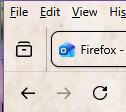
Denys, here is a small screenshot of the annoying thing I want to remove it's to the left of the Firefox tab. I cannot find any way to edit the tab bar.
Solusi Terpilih
Yep, that's what I thought about.
Actually, there's a simpler way: right-click the icon and select Remove from Toolbar.
Alternatively (the way I mentioned previously), you can right-click your toolbar (located below the tab strip), select "Customize Toolbar..." (don't believe the label, it's not just for the toolbar) and then drag the icon away, to the grid with other unused icons.
Denys, thank you so much. It is very confusing to not find the tab bar in the list that can be edited. But now I managed to right click it to get rid of it.
One more question if I may. I seem to have lost the purple top margin on Firefox today after trying to edit that tab bar. It appears on Free Cell, Task Manager, Crystal Disk Info, but not on Windows Update or Firefox when they are the application I am currently using. This just started today. Here is a quick screenshot of what I mean.

If you right-click the toolbar and select Menu Bar (so that it's checked), will it do the trick?
No the menu bar is there, just does not have the purple colouring. I seem to have lost it yesterday. Then again it could be a windows 10 problem. The difference is easier to see here, both were the active application when I took each of the PrtSc into Paint.
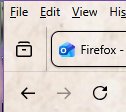

It is so confusing looking at the toolbar settings now, we used to have a separate row for each one. Thank you so much Denys, I did discover that the menu bar tick was missing and now it is ticked the menu bar is back to it's purple glory again. I swear my ageing brain gets confused far too easily these days.
Oh, it was the title bar... Sorry, it got completely out of my head, since I haven't used it for ages...
We only have to click it one time and it always just works after. I have a very bad misbehaving mouse that is soon to be replaced, it was probably the culprit. It gives both right and left click popups with some clicks!