


"Table of Contents" button inhibits text; how ro remove, permanently?

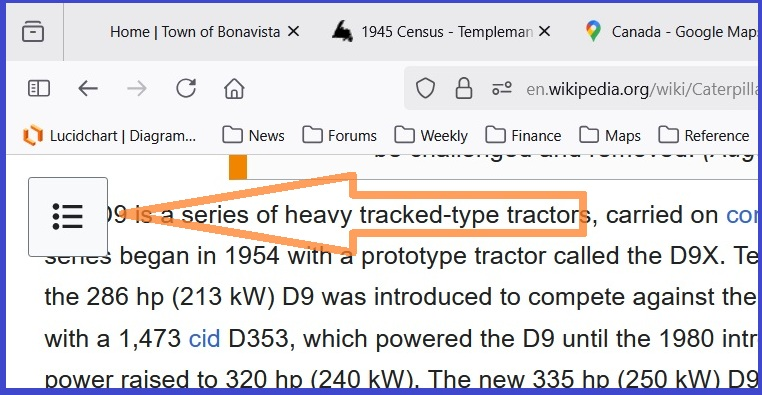
image of problem Some, but not all, pages browsed throw up a "hamburger" menu, top left of the window. (the link above should link you to a screenshot taken this morning in Firefox 142.0.1 (64) running on Win11.)

The menu button floats eternally over the text in that top-left corner. This irritates me because I read text, and am frustrated by the browser covering readable text.
I can't remember ever (20+ years) needing the Table Of Contents of a web page. I use Mozilla Firefox's excellent Edit, Find if I want to jump directly to a key word.
Anyone who can suggest a perpetual dismissal of this menu button will earn my lifelong admiration!
I can deal with Settings, About:Config, and even RegEdit. Thanks, Chris
Diperbarui oleh Christopher Greaves pada
Solusi terpilih
Hi,
Looks like Wikipedia is about to change that... The first time I tried to reproduce, I got the same layout as in your screenshot, but after the second time, the button just went to the top pane and stopped floating.
If it doesn't change for you though, you can add an ad-blocking extension to Firefox (such as uBlock Origin or AdGuard AdBlocker) and block exactly that element (they have such a feature).
Baca jawaban ini dalam konteks 👍 1Semua Balasan (4)
Solusi Terpilih
Hi,
Looks like Wikipedia is about to change that... The first time I tried to reproduce, I got the same layout as in your screenshot, but after the second time, the button just went to the top pane and stopped floating.
If it doesn't change for you though, you can add an ad-blocking extension to Firefox (such as uBlock Origin or AdGuard AdBlocker) and block exactly that element (they have such a feature).
Diperbarui oleh Denys pada
Denys, thank you for this response. With your help I appear to have resolved this "hamburger menu" problem and, I think, a gazillion other unwanted elements that pop up.
I visited this page https://www.freecodecamp.org/news/how-to-block-content-from-web-pages-using-ublock-origin/ and followed the instructions there. It seems that the offending item was two elements; I did the "select, right-click, create" trick once, which eliminated the horizontal lines, then repeated that step to remove the enclosing box. Once again: THANK YOU Being conservative I shall wait a few days and then essay (evil grin!) with a few other obstructions to data on web pages.
Cheers, Chris
P.S. the offending item (hamburger menu top-left of Wikipedia page) can be found here https://en.wikipedia.org/wiki/Caterpillar_Inc. Cheers, Chris
I am appending another finding. I prefer to have a stable platform, and am annoyed by needing to "Dismiss" the Firefox pop-up at the top-right-hand corner of the screen. The pop-up (re-)appears at every build release of Firefox. Seems like (but isn't) every two days. This page https://www.computerhope.com/issues/ch001902.htm suggests creation of a folder and creation of a text file - well within my capabilities - and resolves my annoyance. Of course, i can choose to d/l the latest version of Mozilla Firefox on my own schedule - for example 1st day of the month - and not be too risky of malevolent hackers - while avoiding obstruction of the screen, without disabling the disabling mechanism! Cheers, Chris