


receiving emails

Since the latest update 128.2.0 I am getting message "The certificate for pop3.go-plus.net is not valid for that server. Someone could be trying to impersonate the server and you should not continue." when I try to receive emails. Everything worked fine up until today, even though I had to click an "Certificate Exemption" box after re-starting. How can I get to receive emails? They appear to send ok.
Diperbarui oleh Mike Raw pada
Solusi terpilih
Unable to post a screenshot of Certificate Exemption prompt, as it was in a previous version of Thunderbird, which was updated to 128.2.0 yesterday. It was in a box which appeared after restarting the program when I tried to get messages from that email address. I would click on something like "Continue" and it would continue to work ok each time I clicked "Get all Mail" However, the new warning appears briefly from the bottom right of the screen and wont let me access the email address in question. See screenshot.
Baca jawaban ini dalam konteks 👍 0Semua Balasan (3)

Please post a screenshot of the certificate exception prompt. https://support.mozilla.org/kb/how-do-i-create-screenshot-my-problem
Solusi Terpilih
Unable to post a screenshot of Certificate Exemption prompt, as it was in a previous version of Thunderbird, which was updated to 128.2.0 yesterday. It was in a box which appeared after restarting the program when I tried to get messages from that email address. I would click on something like "Continue" and it would continue to work ok each time I clicked "Get all Mail" However, the new warning appears briefly from the bottom right of the screen and wont let me access the email address in question. See screenshot.
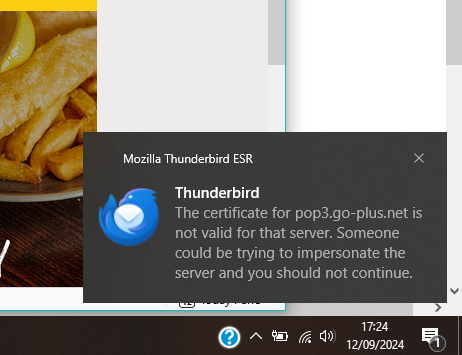

I am seeing almost the exact same message. The only difference is the domain name past the pop3.
I also tried:
- Clearing the previously saved exception.
- Unchecking the Query OSCP responder servers to confirm the current validity of certificates.
When I go into Manage Certificates and attempt to add an exception using pop3.nolans.us, it informs me that "The site provides valid, verified information. There is no need to add an exception"