


Bookmark and History Dropdown Menus Get Cut Off
I'm having an issue when I select the Bookmarks or History menus from the toolbar. The final button on the bottom is cut off, which I think takes you to the pop-out window to view your library. The attached screenshot kind of shows what's going on. The cut off point is where the Windows taskbar starts, I wasn't able to capture it in the screenshot.
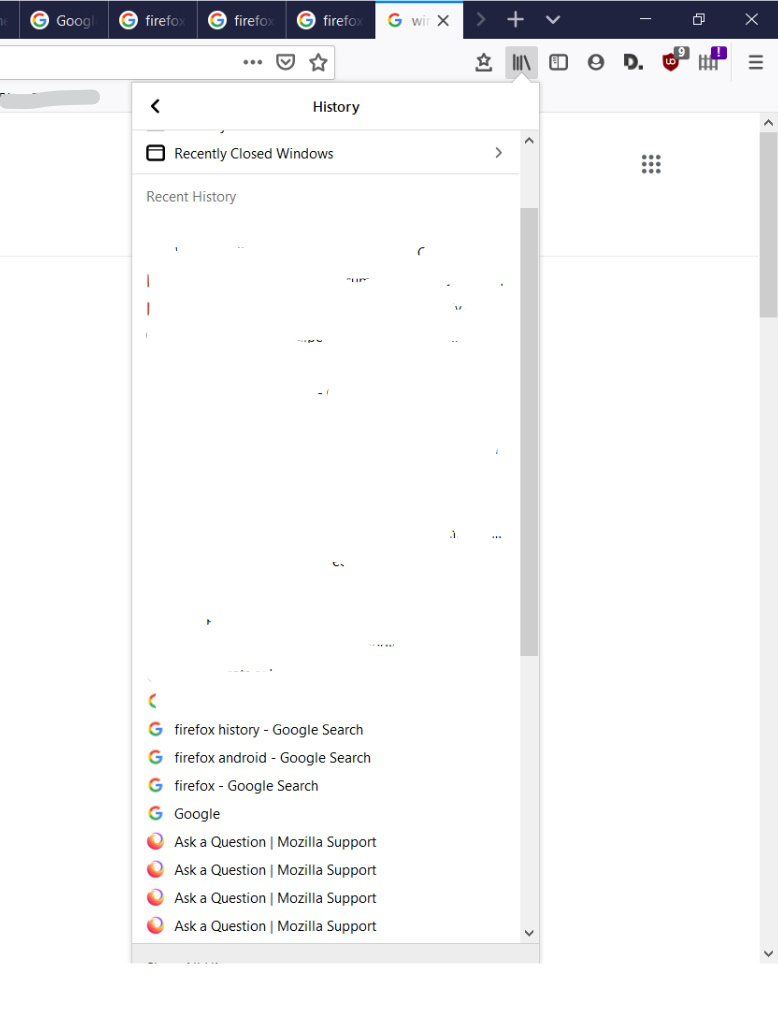
Solusi terpilih
Start Firefox in Safe Mode to check if one of the extensions ("3-bar" menu button or Tools -> Add-ons -> Extensions) or if hardware acceleration is causing the problem.
- switch to the DEFAULT theme: "3-bar" menu button or Tools -> Add-ons -> Themes
- do NOT click the "Refresh Firefox" button on the Safe Mode start window
- https://support.mozilla.org/en-US/kb/troubleshoot-firefox-issues-using-safe-mode
- https://support.mozilla.org/en-US/kb/troubleshoot-extensions-themes-to-fix-problems
Semua Balasan (2)
Solusi Terpilih
Start Firefox in Safe Mode to check if one of the extensions ("3-bar" menu button or Tools -> Add-ons -> Extensions) or if hardware acceleration is causing the problem.
- switch to the DEFAULT theme: "3-bar" menu button or Tools -> Add-ons -> Themes
- do NOT click the "Refresh Firefox" button on the Safe Mode start window
Well, I tried safe mode and the problem didn't occur there, but when I restarted in normal mode the problem went away! I'm not sure if it is solved per se, but I'm marking it as solved. At least I have another tool to try if I need to eliminate some possibilities. Thanks for your help.