


Google Fonts rendering problems on accented characters

Hello,
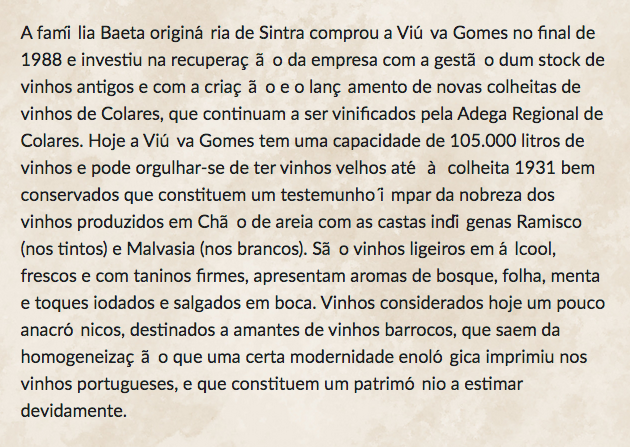
Has anyone come across this weird bug? If you look at the attached screenshot, you'll see that every accented character gets a space after. This doesn't happen in any other browser, only Firefox. If Google Fonts is turned off (using a fallback font), the issue doesn't exist. I suppose there might be a fix?
Thanks,
Frederico
Diperbarui oleh zehfred pada
Semua Balasan (1)
This could be related with the recent switch in Firefox 52+ from Cairo to Skia for canvas/content rendering.
Firefox 52+ has changed from Cairo to Skia for canvas/content rendering.
- https://www.mozilla.org/en-US/firefox/52.0/releasenotes/
- When not using Direct2D on Windows, Skia is used for content rendering
You can modify these gfx.*.azure.backends prefs on the about:config page to revert to the old font rendering swap the skia,cairo order to cairo,skia or remove the skia and leave cairo.
- gfx.canvas.azure.backends = direct2d1.1,cairo,skia
- gfx.content.azure.backends = direct2d1.1,cairo,skia
You can open the about:config page via the location/address bar.
You can accept the warning and click "I'll be careful" to continue.