


My drop-Down menus became distorted when I changed my computer display to 125% & did not correct when I changed back to 100%. Help!

All my drop-down menus are distorted from this change, both my browser's menus and menus on websites. The distortion is so bad that I cannot read the menu or choose a selection on the menu without moving my cursor around, and sometimes not even then. The menu items appear extremely small or gigantic and the images are distorted too.
I've re-installed FF beta 26.0 just to see if that made a difference, but it didn't. I've taken screenshots of the problem and loaded then into my Goggle photo at https://plus.google.com/photos/105852729254799413734/albums/5941369764239347457?authkey=CNXwwpfOrZ-gAQ
Wšě wotmołwy (2)
Wubrane rozrisanje
hello stephericsson, this is likely an issue with hardware acceleration - please try updating your graphics driver, or in case this doesn't solve the issue or there is no new version available at the moment, disable hardware acceleration in firefox > options > advanced > general.
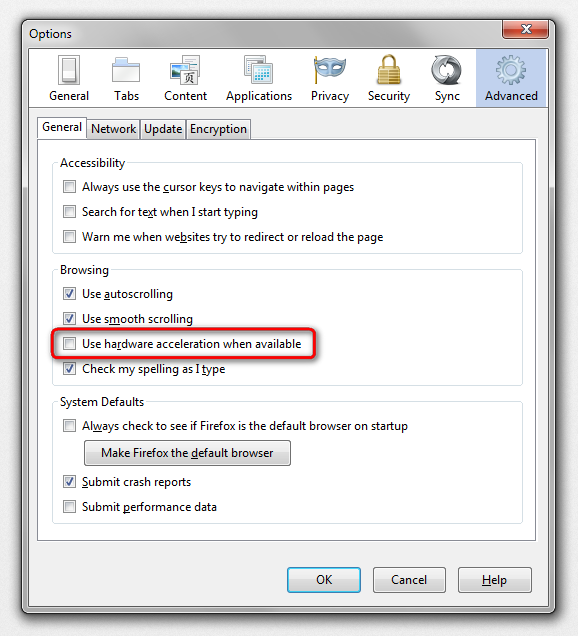
Thank you sooo much. All my drivers are up to date so I turned of the hardware acceleration in Options, restarted and voila! Problem solved! YAY!