


IMAP connection times out

Couple months back had to restore computer. Wouldn't let me add my POP gmail account, said had to use IMAP. POP was no longer accepted or something to that effect. So I got IMAP set up. (Of course, I did save my old POP folder with some messages in it.) Ever since setting up the IMAP folder I only get maybe 30 messages each morning. Never more. Which is no way right. I've googled and tweeked the synchronization/storage settings and the server settings. Nothing works. I'll spend hours googling suggestions and trying them, then get frustrated and move on. Then a week or so later I go thru it all again. Nothing changes!! Still only get the very few emails each morning. About 30 or so minutes after the initial download of messages, I'll get a pop up saying imap connection lost. This is SO frustrating. I have no idea what to try next. I never had this kind of issue with any of my POP accounts. Any suggestions? I've probably already tried them but will certainly give it another try. Thanks! Lynn
Wšě wotmołwy (13)
So this morning I started off with 91 messages in my main inbox. Was watching the bottom bar and it said "downloading 1 of 82". Not sure where the other 81 messages went, but only 1 new one came in. Not in Spam, not showing in webmail either. Does anyone have ANY suggestions for me? Thanks! Lynn
re Couple months back had to restore computer.
Did you locate a 'windows.old' folder in the C:drive ? It would have stored all your original thunderbird profile data.
re : I did save my old POP folder with some messages in it
Save it where ? If you want to view all those old pop emails - are they visible in the 'Local Folders' mail account ?
I'm assuming you had to reinstall Thunderbird program. did you get the download/install from the official thunderbird download website : https://www.thunderbird.net/en-US/thunderbird/all/ OR did you get Thunderbird from the 'Windows App Store' ? That option presents a load of issues as MS decide to store profiles in a completely different location.
re : I've googled and tweeked the synchronization/storage settings and the server settings.
I would need to know what you have now set up in that area. . Account Settings > Server SEttings Post images - you should not have needed to do anything, so it's important o understand the current set up.
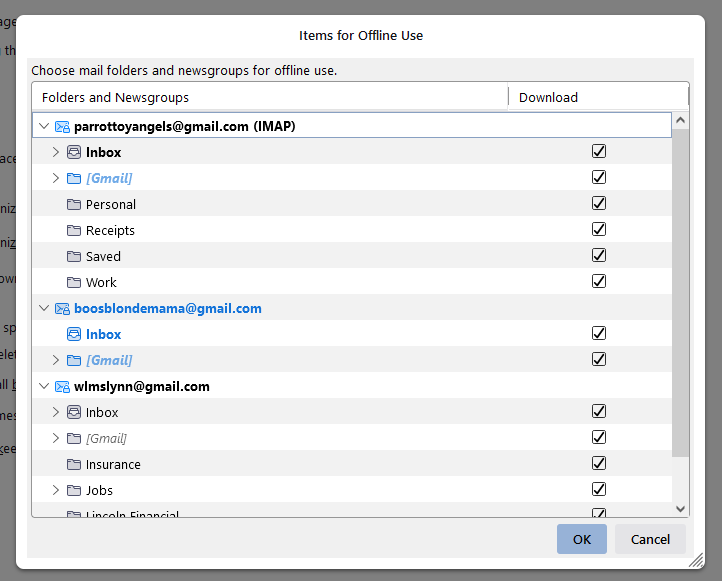
Account Settings > Synchronisation & Storage Upload some images of the 'Synchronisation & Storage' settings. Also tell me - click 'Advanced' button - have you selected all the folders and subfolders ? Post image.
Imap account folders can only display whatever is on the server. Using a browser like Firefox - Logon to the gmail webmail account and tell me how many emails are in the 'Inbox'. Do you see exactly the same in the Thunderbird gmail imap Inbox folder ? Does the webmail Inbox label contents look identical to the Imap Inbox folder contents? Check all the other folders...Whatever you see in the webmail account labels, you should see identical in the Imap account folders of same name. Is this true?
Wot Toad-Hall změnjeny
Toad-Hall said
re Couple months back had to restore computer. Did you locate a 'windows.old' folder in the C:drive ? It would have stored all your original thunderbird profile data. No, my computer guy had cloned my system and that's what we restored from. re : I did save my old POP folder with some messages in it Save it where ? If you want to view all those old pop emails - are they visible in the 'Local Folders' mail account ? Yes, I can view them. I simply saved the parrottoyangels@gmail Inbox and moved it to the bottom. I did that because TB / Gmail were not allowing a POP acct. Had to be IMAP. So my new pta@gmail.com Inbox was named pta@gmail.com IMAP I'm assuming you had to reinstall Thunderbird program. did you get the download/install from the official thunderbird download website : https://www.thunderbird.net/en-US/thunderbird/all/ OR did you get Thunderbird from the 'Windows App Store' ? That option presents a load of issues as MS decide to store profiles in a completely different location. Neither, it came from the clone that had been made of my HD re : I've googled and tweeked the synchronization/storage settings and the server settings. I would need to know what you have now set up in that area. . Account Settings > Server SEttings Post images - you should not have needed to do anything, so it's important o understand the current set up. I did have to originally make changes in the account because I moved from POP. So I'm guessing an option is wrong. That folder has been like this since the change to IMAP. I did have to play around with the settings. Originally over 5k emails came rolling in when I first set it up. UGH! Account Settings > Synchronisation & Storage Upload some images of the 'Synchronisation & Storage' settings. Also tell me - click 'Advanced' button - have you selected all the folders and subfolders ? Post image. "Server settings, sync and advanced photos attached" Imap account folders can only display whatever is on the server. Using a browser like Firefox - Logon to the gmail webmail account and tell me how many emails are in the 'Inbox'. Do you see exactly the same in the Thunderbird gmail imap Inbox folder ? Does the webmail Inbox label contents look identical to the Imap Inbox folder contents? Check all the other folders...Whatever you see in the webmail account labels, you should see identical in the Imap account folders of same name. Is this true?
"Yes, 99 in webmail and in TB, everything in both is the same. Been monitoring that the past few weeks. " Thanks!
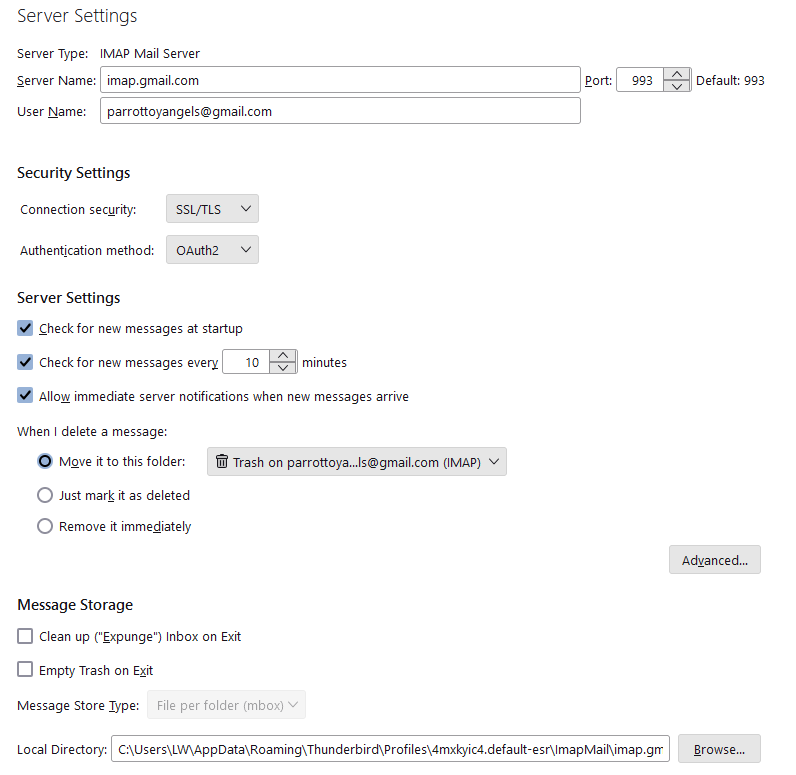
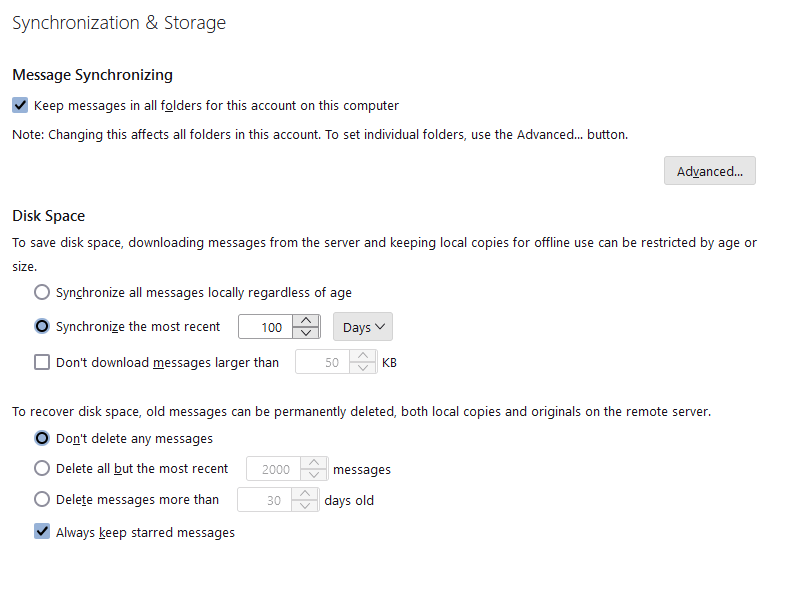
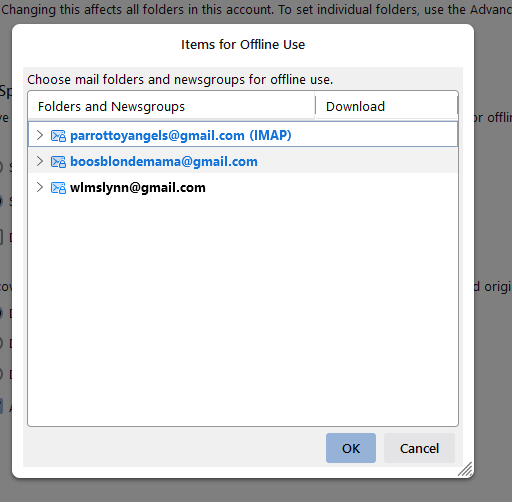
You clicked on 'Advanced'...The last image just showed the names of the various accounts, it did not show what folder names had been selected within the relevant gmail account.
Any folder name selected would be set up to download full copies of emails. Any folder not selected would only download headers.
re : 'synchronise the most recent 100 days' What does this mean....for any folder you selected in the 'Advanced' area, it will download full copies for the last 100 days, all other emails in same folder will only download headers. Full copies of downloaded emails are stored in an mbox text file one after the other. So Inbox mbox file had many emails written to same file one after the other. If you only have headers downloaded, they are not stored in the mbox file.
This is an option usually used by people who have a limited storage space. As each day passes new mail is fully downloaded to mbox files and older previously fully downloaded mail get 'marked as deleted' ready to be removed from mbox file, so only headers are kept. It requires maintenance to maintain that 100 days of fully downloaded copies. You would need to compact folders at the end of each day in order to remove the 'marked as deleted' and clean up the mbox file.
If you are not concerned about limiting storage and want full copies of all emails, then in 'Advanced' you must select all the folders - although it's probably not worth selecting 'Spam' and 'All Mail' (I would advise not subscribing to see 'All Mail'). You also need to select 'Synchronise all messages locally regardless of age'
Any emails that only download headers can still be accessed but when selected the server needs to be contacted and the email then gets downloaded to a temp file to faciliate viewing.
re :I simply saved the parrottoyangels@gmail Inbox and moved it to the bottom. Do you mean it's a now a folder (not an account) within the 'Local Folders' account ? if yes, that's ok. Can you please post an image showing the Folder Pane, so I see where that Inbox is located.
re:"Yes, 99 in webmail and in TB, everything in both is the same. Been monitoring that the past few weeks. "
That means everything is correct.
re : Ever since setting up the IMAP folder I only get maybe 30 messages each morning. Never more. Which is no way right. But, you seem to think emails are missing off server, so obviously cannot be displayed in Imap. You expected more to get downloaded and are wondering why so few.
That's why I'm trying to work out if you have that old Pop account still live and it's connecting to server and downloading emails perhaps even deleting emails off server.
In Account Settings. In left pane, does the original pop account still exist?
Do you have any other computer or email client or phone that connects to that old pop gmail email address?
Wot Toad-Hall změnjeny
Toad-Hall said
You clicked on 'Advanced'...The last image just showed the names of the various accounts, it did not show what folder names had been selected within the relevant gmail account. Sorry. All the folders are checked. Pic attached below Any folder name selected would be set up to download full copies of emails. Any folder not selected would only download headers. re : 'synchronise the most recent 100 days' What does this mean....for any folder you selected in the 'Advanced' area, it will download full copies for the last 100 days, all other emails in same folder will only download headers. Full copies of downloaded emails are stored in an mbox text file one after the other. So Inbox mbox file had many emails written to same file one after the other. If you only have headers downloaded, they are not stored in the mbox file. This is an option usually used by people who have a limited storage space. As each day passes new mail is fully downloaded to mbox files and older previously fully downloaded mail get 'marked as deleted' ready to be removed from mbox file, so only headers are kept. It requires maintenance to maintain that 100 days of fully downloaded copies. You would need to compact folders at the end of each day in order to remove the 'marked as deleted' and clean up the mbox file. I found that googling :-( What should I set it to? Should it be sync regardless of age? (Never mind, see you answered that below) If you are not concerned about limiting storage and want full copies of all emails, then in 'Advanced' you must select all the folders - although it's probably not worth selecting 'Spam' and 'All Mail' (I would advise not subscribing to see 'All Mail'). You also need to select 'Synchronise all messages locally regardless of age' Just changed it Any emails that only download headers can still be accessed but when selected the server needs to be contacted and the email then gets downloaded to a temp file to faciliate viewing. Where is this temp file located? re :I simply saved the parrottoyangels@gmail Inbox and moved it to the bottom. Do you mean it's a now a folder (not an account) within the 'Local Folders' account ? if yes, that's ok. Can you please post an image showing the Folder Pane, so I see where that Inbox is located. Pic attached. It's POP and since setting up the IMAP no mail has come in to it re:"Yes, 99 in webmail and in TB, everything in both is the same. Been monitoring that the past few weeks. " That means everything is correct. re : Ever since setting up the IMAP folder I only get maybe 30 messages each morning. Never more. Which is no way right. But, you seem to think emails are missing off server, so obviously cannot be displayed in Imap. You expected more to get downloaded and are wondering why so few. That's why I'm trying to work out if you have that old Pop account still live and it's connecting to server and downloading emails perhaps even deleting emails off server. In Account Settings. In left pane, does the original pop account still exist? Do you have any other computer or email client or phone that connects to that old pop gmail email address?
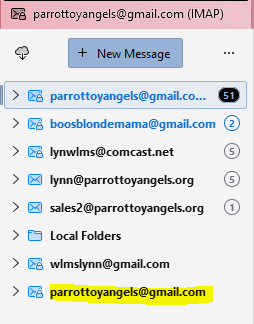
Sorry! I missed the last couple questions!! But, you seem to think emails are missing off server, so obviously cannot be displayed in Imap. You expected more to get downloaded and are wondering why so few.
Yes. Normally before IMAP I was getting 75 - 100 emails in the morning. For my first "email check". Now it's 30 or less.
That's why I'm trying to work out if you have that old Pop account still live and it's connecting to server and downloading emails perhaps even deleting emails off server.
Yes, that POP gmail account would be live I guess, but nothing comes into it since I switched the email address to IMAP. Last email that came into the POP account was 11/25. Nothing since (just checked to make sure).
In Account Settings. In left pane, does the original pop account still exist?
Yes it does. Pic attached
Do you have any other computer or email client or phone that connects to that old pop gmail email address? My phone does. I just checked. But, the message count there is the same as the IMAP acct. I need to go ahead and remove that from my phone anyway. I don't usually have my email come into my phone. The last 20 messages are exactly the same as what's come into IMAP this afternoon
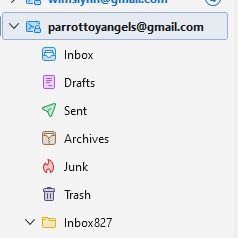
Look at the snips below. See on the POP server the port? Which should it be? I'm pretty sure 993? POP says default 995? If I recall correctly, when I was setting up the IMAP account I had to change the POP to imap.gmail to stop the mail from coming in. IMAP shows port 993. Also, I wonder if it could have something to do with the webmail for that address?


IMAP uses port 993, so that is correct.
Pop is not using correct settings. That would explain why it's not working. It looks like you or someone on your behalf originally tried to just alter the server settings of the Pop to use Imap. That's not going to work. You cannot swap settings there's a lot more to the set up behind the scenes.
You would need to alter the settling back to correct Pop server settings in order for the Pop account to work. Do you want the pop account to work ? If yes: Check you have the correct options set up in gmail webmail account. In gmail webmail account accessed via a browser
- click Settings
- select 'See all settings'.
- Click the 'Forwarding and POP/IMAP' tab.
In the "POP download" section, select the option that suits you best.
- Enable POP for all mail (even mail that’s already been downloaded)
- Enable POP for mail that arrives from now on
Under “When messages are accessed with POP,” select what happens to Gmail’s copy of the message: Please note - if you delete, archive etc then it will effect what you see in the Imap account as imap can only display whatever is on server.
- Keep Gmail’s copy in the Inbox
- Mark Gmail’s copy as read
- Archive Gmail’s copy
- Delete Gmail’s copy
At the bottom of the page, click 'Save Changes'.
Info here:
In Thunderbird You need to use these settings in the account set up 'Server Type' Pop Mail Server
- Incoming Server name: pop.gmail.com
- Port: 995
- Connection Security: SSL/TLS
- Authentication Method: OAuth2
- user name = full email address
- SMTP Server name: smtp.gmail.com
- Port: 465
- Connection Security: SSL/TLS
- Authentication Method: OAuth2
- user name = full email address
You also may need to check the 'Saved Passwords' because you do not want Thunderbird trying to access server using a normal pop password. Gmail does not accept them as it's expecting an oauth token.
- Server Settings > Privacy & Security
- Passwords section
- click on 'Saved Passwords'
- click on 'Show Passwords'
- If it asks for a Windows Security password - when you boot up computer and enter the User account password to log on to computer - that's the password it wants.
- Be careful - you need to look for the account that has the Pop server settings - so if you see a line starting with 'mailbox://accounts.google.com' then it's the pop account.
- Please select and remove that line because it might confuse the server as it's expecting an oauth password.
- click on Close
Exit Thunderbird. Wait a few moments and then restart Thunderbird. You may get a prompt by google to enter email and password - they are just checking you really are you and then you can allow thunderbird access to server. That sets up the oauth token which gets stored in the passwords area.
It was me that altered the POP settings for IMAP. When I was downloading everything and it wouldn't let me use POP for my gmail is when I did it. I changed the incoming to imap.gmail.com. Thus, the beginning of this mess apparently! lol. So I can actually use POP? I'm shocked because gmail wouldn't let me, but I will gladly go back! I'll follow your instructions to the letter. What do I need to do to the IMAP account? Anything? Keep your fingers crossed that this works well! Thanks!
Imap account can be removed via 'Account Settings'. Select name of account and on the right side there will be a delete button. As it is Imap you do not lose any emails because they are all stored on the server and it's just as easy to set up another imap account if required.
After removing the imap account, make sure all the data regarding the password is also removed before restarting Thunderbird.
Gmail - they need you to make sure POP is set in the gmail webmail account as per previous instructions. You would still be using 'Authentication Method: Oauth2' regardless of whether POP or IMAP.
One thing you do have to be aware of is this: Gmail store everything (incoming outgoing archived etc) in 'All Mail' folder. Gmail knows this is messy and not a user friendly method. So gmail invented 'labels' which work like tags. Any number of 'labels' can get applied to the one original copy in 'All Mail' thus allowing it to be seen in any 'Label' /folder the email has been assigned. If a 'label' is removed it only stops it from being seen in that particular folder. It does not necessarily delete the email from 'All Mail'. Only emails that get put into the server 'Trash' folder can be properly deleted from the 'All Mail' folder.
Gmail expect POP accounts users to be downloading full copies and saving them on their computer. Anything you delete via a POP account cannot be put into the Gmail Trash folder because POP can only access Inbox and download emails. That means even if a delete occurs from Inbox, it's likely that gmail will only 'delete' aka 'remove' the 'Inbox' label and email will still be stored in the 'All Mail' folder.
It means periodically, you would need to access gmail webmail account, look in the 'All Mail' folder and delete a load of old unwanted mail. If you do not do this and a lot of emails accumulate over a period of time, you may discover gmail starts to be awkward. They start to limit the downloads. Example: there may be 30 new mail but only 5 get downloaded. There is nothing written anywhere on this, but over the past few decades I've come across countless cases. Fix is simple, access gmail webmail account and delete a load of old mail from 'Inbox' if it's still got them or 'All Mail'.
As much as I loved the POP account, I think I'm going to stay with IMAP. There is a certain convenience there. Mainly having all the emails left on the server. It was so easy when I had to get my computer set back up after the crash. No moving messages from backup, etc. They just came flowing in. And I certainly do remember having to clear messages out of webmail. If I didn't stay on top of it there would be thousands and thousands. UGH! So, we've determined my IMAP settings are correct? Is there anything I should change or tweak? I thank you so much for all your help! I've def learned alot.
It might be more convenient for you to use the 'Local Folders' account to store old pop emails.
You do not want the old pop account trying to connect because it will fail and that might be the reason for the imap lost connection message.
In Local Folders: Create some folders to store old pop emails. It's a good time to organise emails into various folders if you have not done it much in the past. eg: Bills, Family, Friends, Clubs etc
In old pop account: Highlight batches of emails - right click on highlighted emails and select 'Copy to' and choose the relevant folder in 'Local Folders'. When you have copied all over to 'Local Folders' account, check you can read them - do random checks after each batch you copy by selecting some emails to check you can read them ok. When all are copied over you can then delete the old Pop account.