


Windows 10 reached EOS (end of support) on October 14, 2025. For more information, see this article.

Pomoc přepytać

Hladajće so wobšudstwa pomocy. Njenamołwimy was ženje, telefonowe čisło zawołać, SMS pósłać abo wosobinske informacije přeradźić. Prošu zdźělće podhladnu aktiwitu z pomocu nastajenja „Znjewužiwanje zdźělić“.

Dalše informacije

Closing a tab doesn't actually close the browser visit

  • 1 wotmołwa
  • 0 ma tutón problem
  • Poslednja wotmołwa wot dessertdish

dalše nastajenja

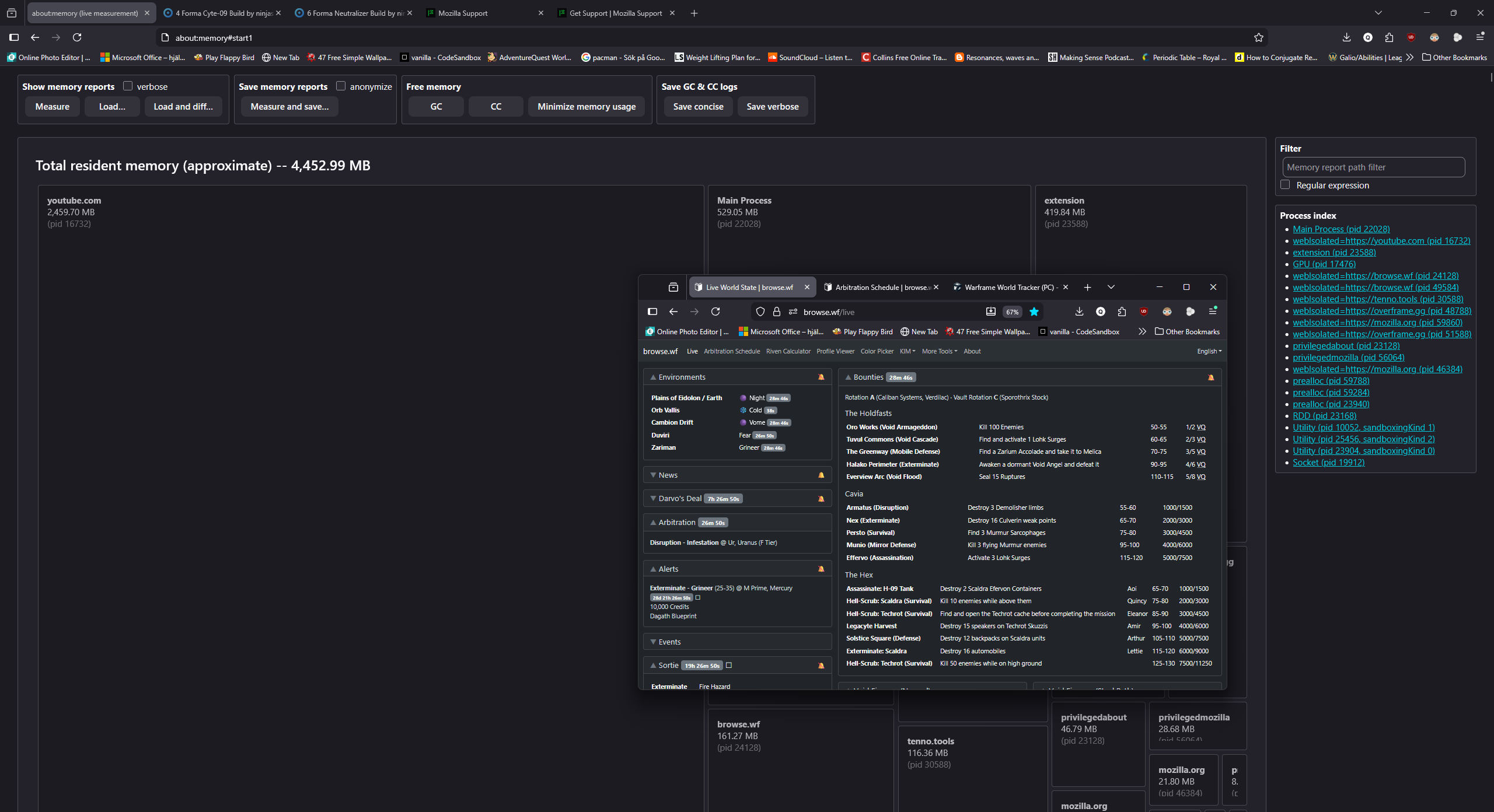
So, after using firefox in the background to browse websites or watch videos I checked my memory usage in firefox with about:memory -> Measure and saw that youtube was consuming a decent amount >2GB (checked the main url when clicking the youtube src, it was the video on that sole tab i was watching and nothing else playing youtube in the bg) so i closed that tab, waited a bit and re-measured but then see that the memory usage for youtube rose about 200MB... and the website for youtube is that same url for the tab that i just closed (when checking the src in the results for Measure). I've been revisiting the about:memory page, reloaded it and re-Measured and youtube is STILL THERE. Even now, 10 minutes later i still see youtube there, with none of my tabs running youtube.

If i close firefox entirely and re-open my tabs then it'll very likely fix it but this has to be a major issue no? I shouldn't have to close the entire browser program just to fix a website visit, which is youtube of all websites.

As of this moment, firefox, with 8 tabs open, is consuming 4,452.99MB (~4.5GB) where 2.5GB is youtube for that page i closed.

I don't know if sharing memory reports from the about:memory page give my cookies away or leave me open to a similar vulnerability so I won't share it unless a dev or similar asks for it but for now, I've included an image showing all the tabs i have open on firefox, 2 windows.
So, after using firefox in the background to browse websites or watch videos I checked my memory usage in firefox with about:memory -> Measure and saw that youtube was consuming a decent amount >2GB (checked the main url when clicking the youtube src, it was the video on that sole tab i was watching and nothing else playing youtube in the bg) so i closed that tab, waited a bit and re-measured but then see that the memory usage for youtube rose about 200MB... and the website for youtube is that same url for the tab that i just closed (when checking the src in the results for Measure). I've been revisiting the about:memory page, reloaded it and re-Measured and youtube is STILL THERE. Even now, 10 minutes later i still see youtube there, with none of my tabs running youtube. If i close firefox entirely and re-open my tabs then it'll very likely fix it but this has to be a major issue no? I shouldn't have to close the entire browser program just to fix a website visit, which is youtube of all websites. As of this moment, firefox, with 8 tabs open, is consuming 4,452.99MB (~4.5GB) where 2.5GB is youtube for that page i closed. I don't know if sharing memory reports from the about:memory page give my cookies away or leave me open to a similar vulnerability so I won't share it unless a dev or similar asks for it but for now, I've included an image showing all the tabs i have open on firefox, 2 windows.
Připowěsnjene fota wobrazowki

Wšě wotmołwy (1)

dalše nastajenja

Hello, This usually means the youtube tab has had a memory leak. Here are some common ways to fix this : 1. Kill the youtube task in Firefox task manager or windows task manger 2. Reduction in memory usage in about:config 3. Update firefox 4. Check extensions and disable problematic addons. 5. Disable hardware acceleration

Stajće prašenje

Dyrbiće so pola swojeho konta přizjewić, zo byšće na přinoški wotmołwił. Prošu stajće nowe prašenje, jeli hišće wužiwarske konto nimaće.