


Firefox Performance Issues When Using a Time Calculator Tool
Hi, I’ve been experiencing slow startup times in Firefox, especially when I have my Time calculator web app open. The browser takes longer to load and sometimes becomes unresponsive.
I’ve tried disabling extensions and changing my home page, but the issue persists. Are there any specific settings or troubleshooting steps in Firefox that can help improve performance when using online calculators like this?
Any guidance or tips would be greatly appreciated. Thanks!
Wšě wotmołwy (2)
Steps to replicate. What version of Firefox? Windows home or pro? Laptop, desktop, or DIY? If not DIY, what make and model computer? System information? Post a screenshot of the performance tab in task manager. Are you running security software besides MS Defender? Do you have the same issue with Firefox in Troubleshoot mode? https://support.mozilla.org/en-US/kb/diagnose-firefox-issues-using-troubleshoot-mode Also clear the browser cache and startup cache from the about:support page. see screenshot
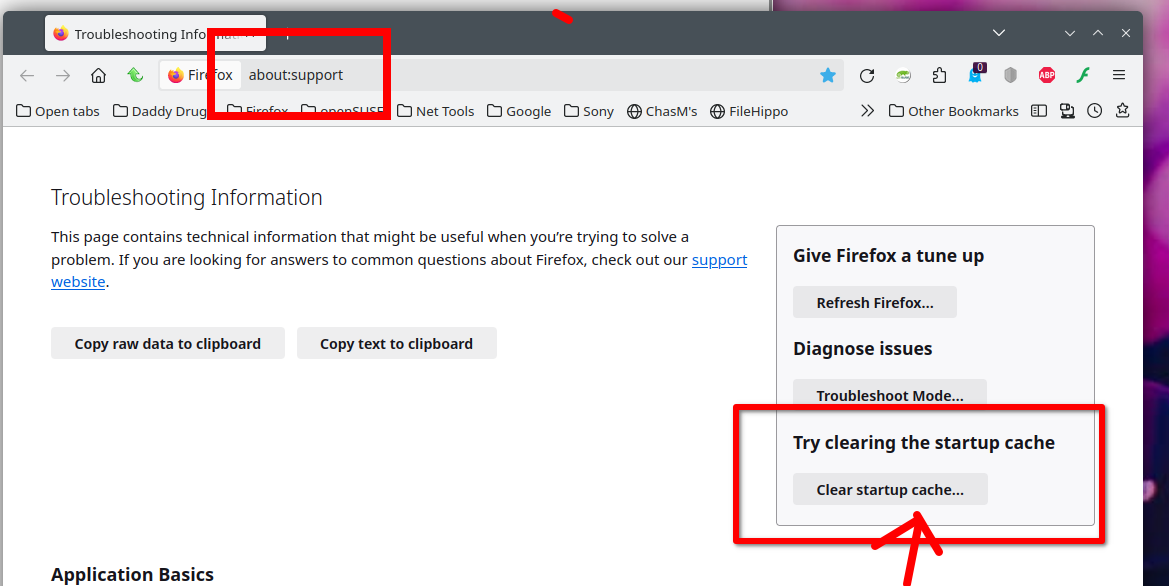
Wot jonzn4SUSE změnjeny

Here are a few Firefox-specific things you can try that usually help when performance drops while using web-based tools like time calculators:
First, check Firefox’s built-in performance monitor. Open Firefox → Settings → General → Performance. Uncheck “Use recommended performance settings” and manually set Content Process Limit to a lower value (like 4). This often reduces memory pressure and random freezing.
Second, clear site data and cache for heavy web apps. Some online calculators store temporary data that can slow startup over time. Go to Settings → Privacy & Security → Cookies and Site Data → Clear Data, then restart Firefox.
Third, test Hardware Acceleration. In some systems, hardware acceleration actually causes lag:
Settings → General → Performance
Disable “Use hardware acceleration when available”
Restart Firefox and check if responsiveness improves.
Another useful step is to open Firefox in Troubleshoot Mode (Help → Troubleshoot Mode). If performance improves there, it confirms the issue is related to browser settings or site scripts rather than Firefox itself.
From experience, performance also depends on how optimized the calculator tool is. Lightweight tools with minimal scripts usually run more smoothly. For example, a well-optimized Calculadora de horas loads quickly, doesn’t overload Firefox’s memory, and works smoothly even on slower systems. Using simpler, efficient calculators can noticeably reduce browser lag.
Lastly, ensure Firefox is fully up to date, as recent versions include significant performance and memory improvements, especially for JavaScript-heavy web applications.
Hope this helps! Let me know if the slowdown happens only on specific sites or across all calculator tools.