


Windows 10 will reach EOS (end of support) on October 14, 2025. For more information, see this article.

Pomoc přepytać

Hladajće so wobšudstwa pomocy. Njenamołwimy was ženje, telefonowe čisło zawołać, SMS pósłać abo wosobinske informacije přeradźić. Prošu zdźělće podhladnu aktiwitu z pomocu nastajenja „Znjewužiwanje zdźělić“.

Dalše informacije

Home Button goes away

  • 1 wotmołwa
  • 0 ma tutón problem
  • 30 napohladow
  • Poslednja wotmołwa wot bitdecay

more options

My toolbar is visible when I click on the 'Open a new tab' plus sign at the top. But if I go to a site, either from a search or from bookmarks, the toolbar disappears.

I just (yesterday) had to delete profile, delete bookmarks, delete Firefox, install Firefox, in order to get it where it would save bookmarks again. The toolbar, prior to that, did NOT disappear when I went to a new site.

Please help.

My toolbar is visible when I click on the 'Open a new tab' plus sign at the top. But if I go to a site, either from a search or from bookmarks, the toolbar disappears. I just (yesterday) had to delete profile, delete bookmarks, delete Firefox, install Firefox, in order to get it where it would save bookmarks again. The toolbar, prior to that, did NOT disappear when I went to a new site. Please help.

Wubrane rozrisanje

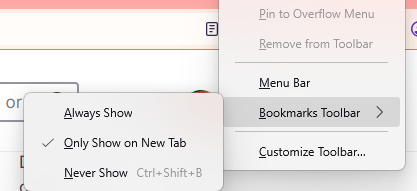
If you are referring to the bookmark toolbar, then it may have been customized to only appear on a new tab. In order to make it appear always at the top, right-click on an empty tab bar, go to "Bookmarks toolbar", then select "Always Show".
Tutu wotmołwu w konteksće čitać 👍 1

Wšě wotmołwy (1)

more options

Wubrane rozrisanje

If you are referring to the bookmark toolbar, then it may have been customized to only appear on a new tab. In order to make it appear always at the top, right-click on an empty tab bar, go to "Bookmarks toolbar", then select "Always Show".

Wužitny?

Stajće prašenje

Dyrbiće so pola swojeho konta přizjewić, zo byšće na přinoški wotmołwił. Prošu stajće nowe prašenje, jeli hišće wužiwarske konto nimaće.