


Bookmarks toolbar

For the first time, I have got a message 'For quick access, place your bookmarks here on the bookmarks toolbar.' I have always used the bookmarks toolbar. This message just takes up space, so I would like to get rid of it.
Wšě wotmołwy (4)
Do you have bookmarks in the Bookmarks Toolbar folder?
"Ctrl+B" is the keyboard shortcut to toggle the Bookmarks Sidebar. "Ctrl+Shift+B" is the keyboard shortcut to toggle the Bookmarks Toolbar. "Ctrl+Shift+O" is the keyboard shortcut to Open the Library.
I am not sure what this is telling me. I have got 16 bookmarks on the bookmarks toolbars, including Bookmarks Menu. The result of having this message taking up so much space is that some of these bookmarks have now been pushed off to the right so that they are no longer immediately visible.
Hmm, you shouldn't see that message if the "Bookmarks Toolbar Items" control is on the toolbar. You might need to use Customize to move it back to the bar (Customize Firefox controls, buttons and toolbars), or potential move it further left or right if you have other buttons on the bar:
Note that the controls on the Customize tab can be in any order, so you have to scan through to find things.
You might need to launch a new window to test the change (Ctrl+N).
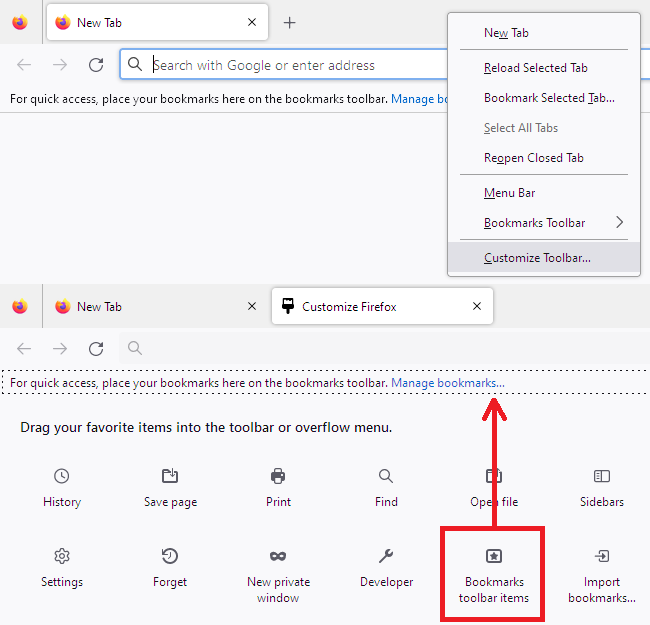
You can also try "Restore Default" on the customize page.