


How do I delete a saved login that is not displayed in lockwise?
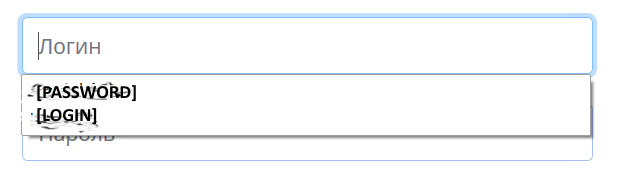
I accidentally entered a password in the login field. When asked by the browser about saving the password, he answered in the negative. I was surprised when the next time I entered the site, I saw two login options ([LOGIN]; and [PASSWORD]) in the dropdown menu. [LOGIN] matched my login. [PASSWORD] matched my password. Both logins are without a password. There is no stored data in lockwise for this site. If you save a random password for an unnecessary login ([PASSWORD]-[1111]), then it will be displayed in lockwise. Removing an account from lockwise removes the password, but does not affect the login. The only solution I found was to change the lockwise login. ([PASSWORD]-[1111] -> [1]-[111]), But after deleting this account, the login [PASSWORD] is returned to the drop-down menu.
Wubrane rozrisanje
Press the DOWN arrow key to highlight the [PASSWORD] option and press Delete. Repeat for any other logins/form entries that got saved by mistake.
Does this solve the issue?
Tutu wotmołwu w konteksće čitać 👍 0Wšě wotmołwy (4)

Wubrane rozrisanje
Press the DOWN arrow key to highlight the [PASSWORD] option and press Delete. Repeat for any other logins/form entries that got saved by mistake.
Does this solve the issue?
In current Firefox releases you need to use "Shift+Delete" to remove an entry in a drop-down list.
You can use these steps to remove saved items from an autocomplete drop-down list.
- click the (empty) input field on the web page to open the drop-down list
- highlight an entry in the drop-down list with cursor Down key
do not click the mouse or press the Enter key - press Shift+Delete (68+) or Delete to delete the highlighted entry
Note that hovering with the mouse doesn't work.
cor-el said
In current Firefox releases you need to use "Shift+Delete" to remove an entry in a drop-down list.
This is only applicable for suggestions in the address bar, not the logins/form entries.
@vaclavtrpisovsky Thanks for the clarification.