


'Show all Bookmarks' problem

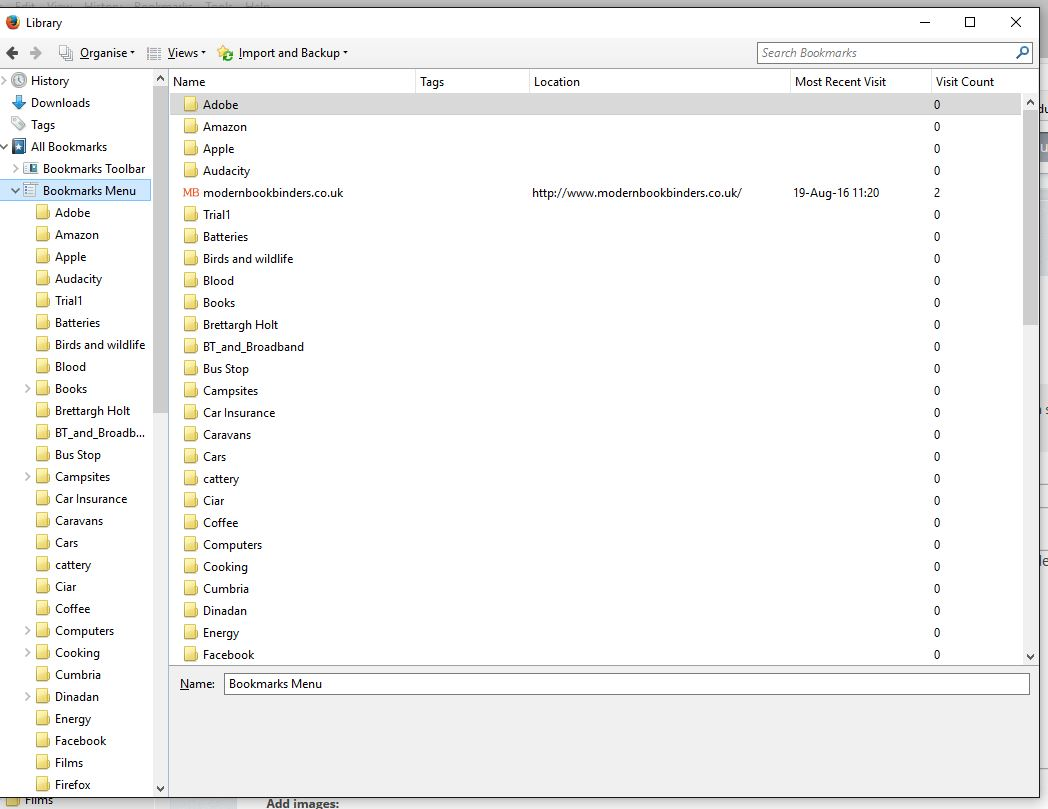
I'm sure that 'Show all bookmarks' used to do just that: show all my bookmarks individually in a list. Now it shows various other things (e.g. 'Bookmarks Menu') but always in folders except for bookmarks not in folders themselves. I have to open the folders individually: see screenshot. Any idea what I've done and how I can change it back?
Wubrane rozrisanje
Thanks Scribe. Perhaps I am imagining it, but I could have sworn that when I clicked Bookmarks in the Menu Bar I used to get a full list of actual bookmarks, not a list of folders to be opened as shown in my screenshot.
Also, from what I can see, in the Bookmarks Menu Ctrl+Shift+B should also open all bookmarks--for me it doesn't do anything.
Oh well...I must have dreamt it.
Tutu wotmołwu w konteksće čitać 👍 0Wšě wotmołwy (3)

Hi, that is normal behaviour! To see bookmarks in a different way, you can click the bookmarks button, or to see them in the sidebar press Ctrl + B.
- Bookmarks in Firefox. Note, the article hasn't yet been updated to reflect changes in FF48: When you click on the star, the bookmark, by default, will go into Other Bookmarks (prior to v48 known as Unsorted Bookmarks); however if you wish it to go to a different destination, keep your mouse pointer over the dialog box to prevent it from disappearing, then use the upper, downward pointing arrow on the far right, to select a destination > Done.
If your question is resolved by this or another answer, please take a minute to let us know. Thank you!
Wubrane rozrisanje
Thanks Scribe. Perhaps I am imagining it, but I could have sworn that when I clicked Bookmarks in the Menu Bar I used to get a full list of actual bookmarks, not a list of folders to be opened as shown in my screenshot.
Also, from what I can see, in the Bookmarks Menu Ctrl+Shift+B should also open all bookmarks--for me it doesn't do anything.
Oh well...I must have dreamt it.
Scribe: I think I've just realised that I was confusing 'Show all Bookmarks' with 'Show all history'. D'oh!