


Firefox 19 won't display my pdf links and images

I have a pdf uploaded to the site, when opening in Firefox 19, my buttons with hyperlinks don't show up, some images are showing either.
I use simple buttons with rollover stage and a hyperlink, the buttons were made with text and background color, they show fine in pdf when using other browsers and older versions of Firefox.
Here is the url with the pdf for reference:
http://teen.idrivesafely.com/how-to-get-your-learners-permit.pdf
Does anyone know how to fix this issue?
Thanks
Svi odgovori (2)
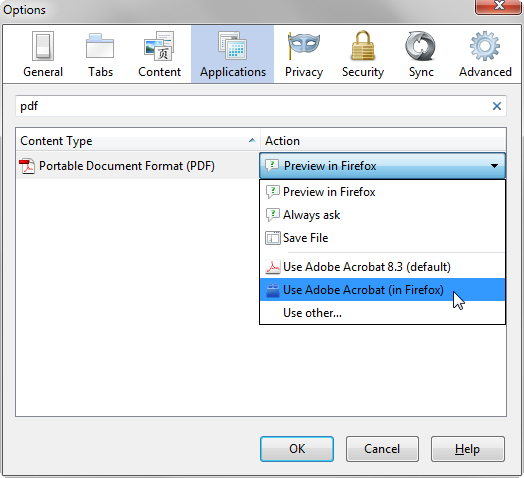
hello, firefox 19 has introduced its own integrated pdf viewer - if you want to switch back to the plugin you've used before to view pdfs just go to firefox options > applications & scroll down and define the default action for the portable document format (pdf).
Thanks for your response, the thing is I don't want the end user to have to go through these steps in order to be able to see my pdf file as it renders in older versions of Firefox.
What I've noticed is the use of buttons and interactivity is not been rendered, so it doesn't even show up in the page. The drop shadows applied within InDesign are also not been properly render by the browser, making the background of the image surrounded by dark background.
I have temporarily fixed the problem by getting rid of my drop shadows and using regular hyperlinks on text instead of interactive buttons.
Hope this issue gets fixed, since interactive pdfs is widely used today.
Thanks