


FF5 does not have mailto application (under tools/options/applications)

I cannot set it to gmail or anything else. Under Tools/Options/Applications, there is no mailto in the list of applications. How do I set one up?
Thanks.
FF5.0, Windows7/64
Izabrano rješenje
Try "Reset Download Actions";
- http://kb.mozillazine.org/File_types_and_download_actions
- https://support.mozilla.com/kb/Managing+file+types
Svi odgovori (16)
Please do the following.
- Open Microsoft Internet Explorer and then click Tools and go to Internet Options.
- Click the Programs tab and where you see "Email", choose your email client.
- Remove the checkmark from where it says "Tell me if Internet Explorer is not the default browser" in the same menu.
- Click Apply/OK and close Internet Explorer.
- Next, start Firefox and click the orange Firefox button, go to Options | Options | Advanced.
- In the General tab, System Defaults at the bottom, checkmark the option: "Always check to see if Firefox is the default browser on startup" and then click the "Check Now" button.
- Click OK, close Firefox and then restart it again.
You should now have a mailto: option in the Applications panel.
Izmjenjeno od Xircal
Odabrano rješenje
Try "Reset Download Actions";
Your links end up here: https://support.mozilla.com/en-US/kb/Changing%20the%20e-mail%20program%20used%20by%20Firefox#w_setting-firefoxs-mail-client, which has the same instructions I reference in my original (i.e., no 'mailto" program listed the applications pane).
I do not see "email" as an option for your step 2 above (see image). If I instead click "set programs", it just takes me to the OS's settings, which is not for webmail. for #3, it was already unchecked.
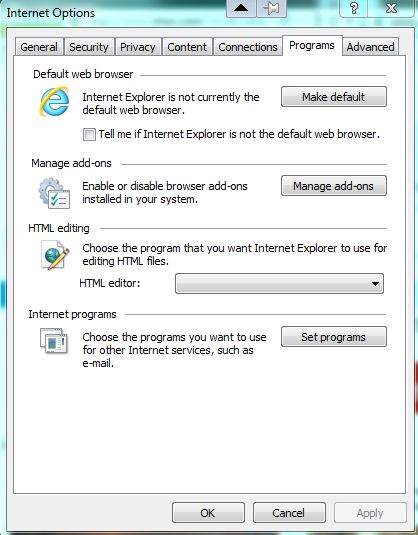
EDIT. Is it not a a dropdown menu?
Izmjenjeno od Xircal
>EDIT. Is it not a a dropdown menu?
Sorry, not sure what you mean. Where would I be looking for an EDIT option?
The word "Edit" was just to illustrate that I'd modified what I'd written before.
By "dropdown menu", I mean that there is an option to choose something other than the one displayed. For example, in the screenshot you can see that I can choose either Outlook Express or Hotmail as my default mail client.
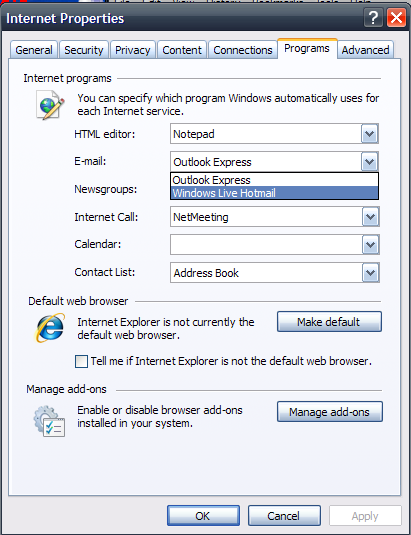
Xircal,
Thanks for being patient.
I do not have the same screen as you do on my IE 9, just the image I posted above. Are you running a different version?
Izmjenjeno od jmdumais
Yes, I have Windows XP with IE8. Microsoft doesn't make IE9 available for any version of Windows other than Windows 7.
cor-el -- thanks, I did go through and finally fixed it. My FF did not have any of those lines in about:config, so all I ended up doing is renaming mimeTypes.rdf and then I got the mailto application showing up. Weird.
btw, what is mimeTypes.rdf used for and will I miss it?
thanks again!
Izmjenjeno od jmdumais
Thanks, Xircal, I appreciate your time....
You're welcome.
Firefox will create a new (and hopefully better working) file mimeTypes.rdf if you delete the current file in case of problems.
so not having this file should create no problem in the meantime?
No.
Didn't Firefox create a new file yet?
You may need to open the Tools > Options > Applications window or download a file to force creating a new file.
Oh, I see (total newb). Yes, it did create a new one. Thanks.
You're welcome