


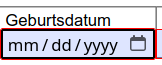
It seems like field entry in PDFs for dates cannot be changed?

When filling forms using the nightly build `148.0a1` on ubuntu 24.04, all date fields seem to default to `mm/dd/yyyy` when I want to use `dd.mm.yyyy`. I cannot seem to find anywhere in firefox settings to change this default, and this makes it impossible to fill some forms correctly (as in the case of e.g. government forms in Germany, only one date format is accepted)
Svi odgovori (1)

This may not actually be a Firefox setting. PDF date fields can have their own format defined by the PDF itself, so a form can require dd.mm.yyyy even though Firefox is displaying a different format. Firefox’s PDF viewer has been updated to use a date input based on the user’s locale, while formatting the saved value according to the PDF’s specified format.
Since you’re on Ubuntu, I’d first check Firefox’s regional settings. In about:support, look under Internationalization & Localization and see what Firefox has for its regional preferences. Firefox has historically used its regional locale for date formatting.
If the PDF still shows mm/dd/yyyy while your Firefox locale is German, I’d test the same PDF in Adobe Acrobat Reader. If Acrobat handles the field correctly, that gives you a good Firefox PDF-viewer bug to report, especially since you’re using Nightly.