


Some settings aren't available in one profile

Hello. 😊 I have a question about my copy of Firefox for Windows v152.0.6 x64. (For the record, I have nasty feeling that I'm using the wrong forum; but the address bar says I'm in the right one.)
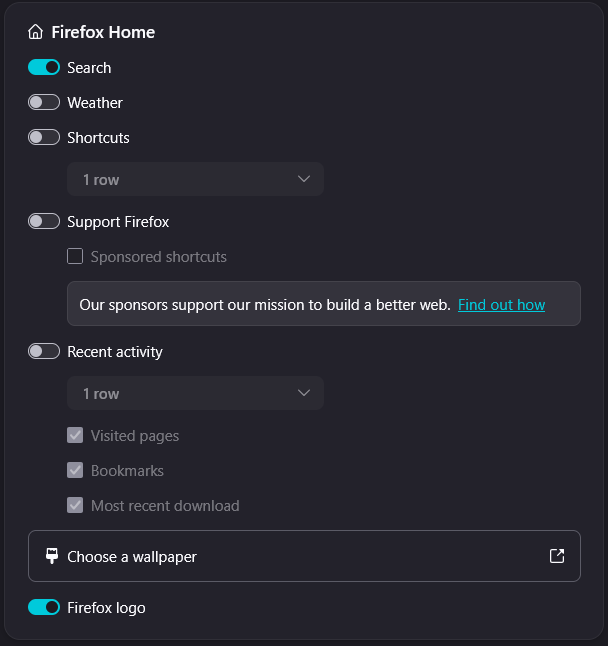
In my main profile, the one that I have been using for years, the "Home and Startup" part of my settings page shows the following:
- Firefox Home
 - Search
 - **Weather**
 - Shortcut
 - Support Firefox
 - Recent Activity
   - Visited pages
   - Bookmarks
   - Most recent download
   - [Choose a wallpaper]
 - Firefox logo
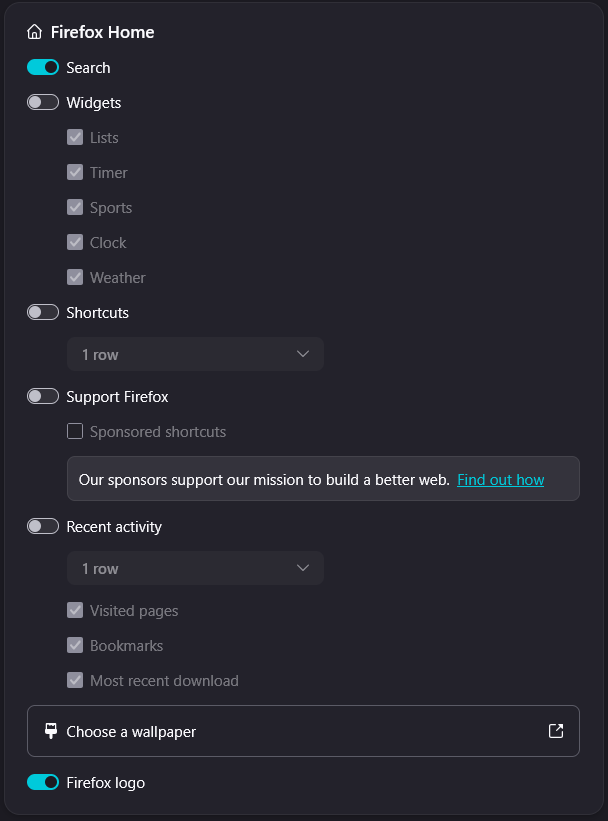
Today, I went to about:profiles and created a new profile. This new profile offers different settings:
- Firefox Home
 - Search
 - **Widgets**
   - **Lists**
   - **Timer**
   - **Sports**
   - **Clock**
   - **Weather**
 - Shortcuts
 - Support Firefox
 - Recent Activity
   - Visited pages
   - Bookmarks
   - Most recent download
   - [Choose a wallpaper]
 - Firefox logo
That's strange, isn't it? Why the difference? And how can get all the goodies of the new profile under my old profile?
Svi odgovori (8)
Hello
Some settings aren't available in one profile
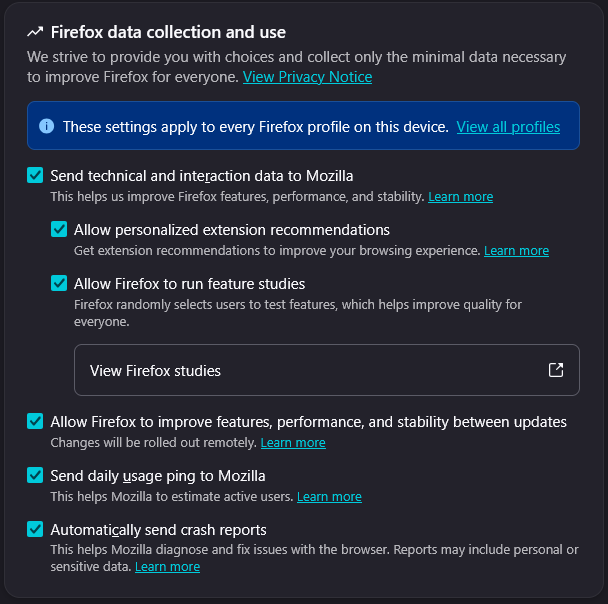
Please, check, Manage remote improvements settings in Firefox https://support.mozilla.org/en-US/kb/remote-improvements
If the Allow Firefox to improve features, performance, and stability between updates setting is turned off, please, turn on
Restart Firefox several times if necessary
Restart Firefox several times if necessary A illustration https://support.mozilla.org/en-US/questions/1593182#answer-1832485
Allow Firefox to improve features, performance, and stability between updates A verification performed https://www.youtube.com/watch?v=OybGmMa5GBM
I tried the remote improvements setting. It was on. Turning it off and then on again had a visible impact, but the missing settings are still missing.
Hi
Some features in Firefox are released early to a small number of users to make sure all is well before a broader roll out.
As a result, what you may be seeing is one of your devices is included in this and one will get the new features soon why they are ready to be more widely adopted.
Paul said
what you may be seeing is one of your devices is included in this and one will get the new features soon why they are ready to be more widely adopted.
With respect, you're not paying attention. The difference I'm observing is on the same device, same copy of Firefox, same Mozilla account, different profiles.
Profiles are isolated and do not know anything about themselves.
What you're seeing is two different experiences:
- your "old" profile gets "existing user" treatment
- your "new" profile is applying things as it was a new user
These two paths do things differently, in terms of onboarding, upgrades, applying remote settings (which drives home/new tab features heavily).
Usually existing users' features are not replaced right away, whereas new installations are driven from new code as early as possible (to not have to tackle any legacy migrations later on).
So this is expected.
Now to the question itself:
- (Why do you think this is not the right forum, BTW?)
- What's the end goal you're trying to achieve? Being on the remote improvements et al. cohort will help ship these updates earlier to you in the future. For the current ones, is this just about the widgets, and you're looking to enable them? There would be preferences to set manually if you're so inclined…
jbr said
What's the end goal you're trying to achieve?
Since the beginning of FIFA World Cup, Firefox consistently reminded me that I have access to a widget for tracking the competition. It even showed me a tutorial on how to customize it. But I never had. The widget was never there. Then, I create a new profile and, lo and behold, there is the widget!
It's clear that I am supposed to have the widget, even though I don't. And believe it or not, where I live, FIFA World Cup is a big deal.