


Windows 10 reached EOS (end of support) on October 14, 2025. If you are on Windows 10, see this article.

Pretraži podršku

Izbjegni prevare podrške. Nikad te nećemo tražiti da nas nazoveš, da nam pošalješ telefonski broj ili da podijeliš osobne podatke. Prijavi sumnjive radnje pomoću opcije „Prijavi zlouporabu”.

Saznaj više
Open

(Revisted) Thunderbird is being managed by your organisation CAUSE: Bitdefender

Ed replied
flexible

This is a continuation of the thread - [is being managed by your organisation CAUSE: Bitdefender]

The solution of deleting the Registry Key does not work. It simply comes back after reboot. I have engaged with BitDefender support and they suggested the same thing - they also added to uninstall TB which I am not going to do.

The issue is that the BitDefender extension is not installed in a normal way, and cannot be removed. The settings in BitDefender do not make any difference, I cannot change settings in a Thunderbird account eg change a folder location, it looks like it works, but it actually does not.

I did find in the about:config extensions.webextensions.uuids key has the bdThunderbird@bitdefender.com entry but there is no indication as to what other strings belong to the entry and I do not to mess things up.

I do realize this is a BitDefender issue, and i did follow up with their support but I am wondering if anyone has solved this annoying issue.

Thanks
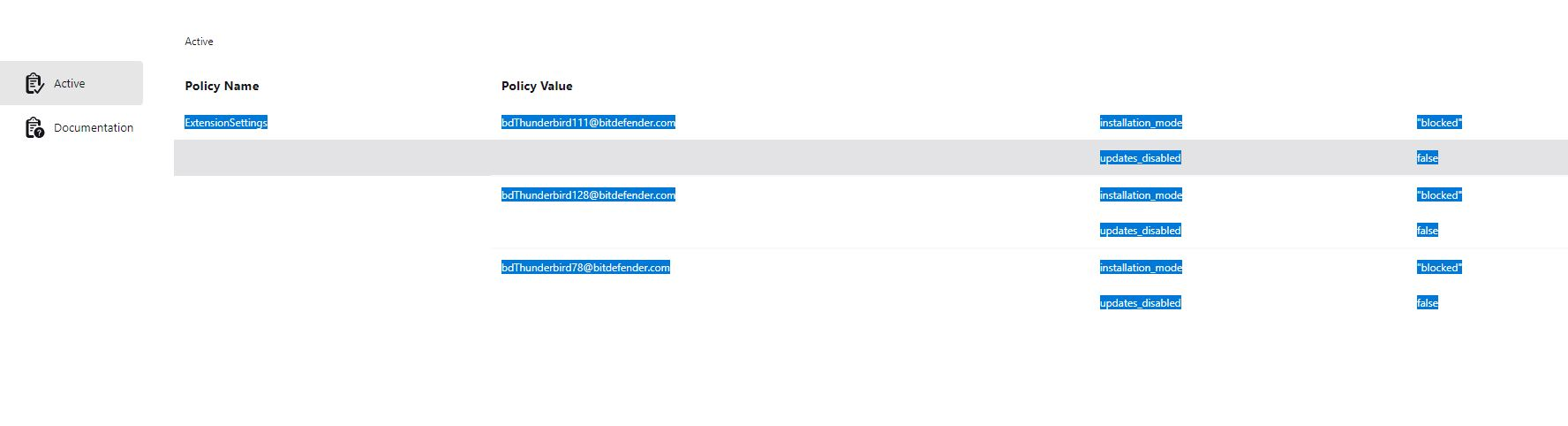
This is a continuation of the thread - [[https://support.mozilla.org/bm/questions/1533447|Thunderbird is being managed by your organisation CAUSE: Bitdefender]] The solution of deleting the Registry Key does not work. It simply comes back after reboot. I have engaged with BitDefender support and they suggested the same thing - they also added to uninstall TB which I am not going to do. The issue is that the BitDefender extension is not installed in a normal way, and cannot be removed. The settings in BitDefender do not make any difference, I cannot change settings in a Thunderbird account eg change a folder location, it looks like it works, but it actually does not. I did find in the about:config '''extensions.webextensions.uuids''' key has the bdThunderbird@bitdefender.com entry but there is no indication as to what other strings belong to the entry and I do not to mess things up. I do realize this is a BitDefender issue, and i did follow up with their support but I am wondering if anyone has solved this annoying issue. Thanks
Priložene slike ekrana

Svi odgovori (1)

The link to the other post is https://support.mozilla.org/bm/questions/1533447.

Honestly, if the reg hacks don't work any more and BD says dump TB, I'd dump BD in a New York minute. Windows Defender is all you need.

Postavi pitanje

Za odgovaranje na poruke moraš se prijaviti na tvoj račun. Postavi novo pitanje, ako još nemaš račun.