


Undeletable "ghost" folders in Trash
Under Inbox | Trash in my TBird account is a structure
2019
  subfoldername
     sub-subfoldername
in italics, in gray letters. When I try to delete it, I see "The server replied [Nonexistent]" and the structure disappears; until I close and reopen TBird, and there it is again. When I select "Empty trash" I get no error message and the structure disappears; but it reappears on reopening TBird. How can I make it gone gone gone?
Odabrano rješenje
With all due respect, since the problem has gone away I did not see a need to investigate it further. But to answer your question (if I understand it correctly), I see
Keep message archives in: "Archives" Folder on: [my email address]
However, as I stated above, > I have moved older ones to local folders on my NAS drive. And I moved some yesterday
Thanks again for your help, and I will drop the matter until / unless it reappears.
Svi odgovori (4)
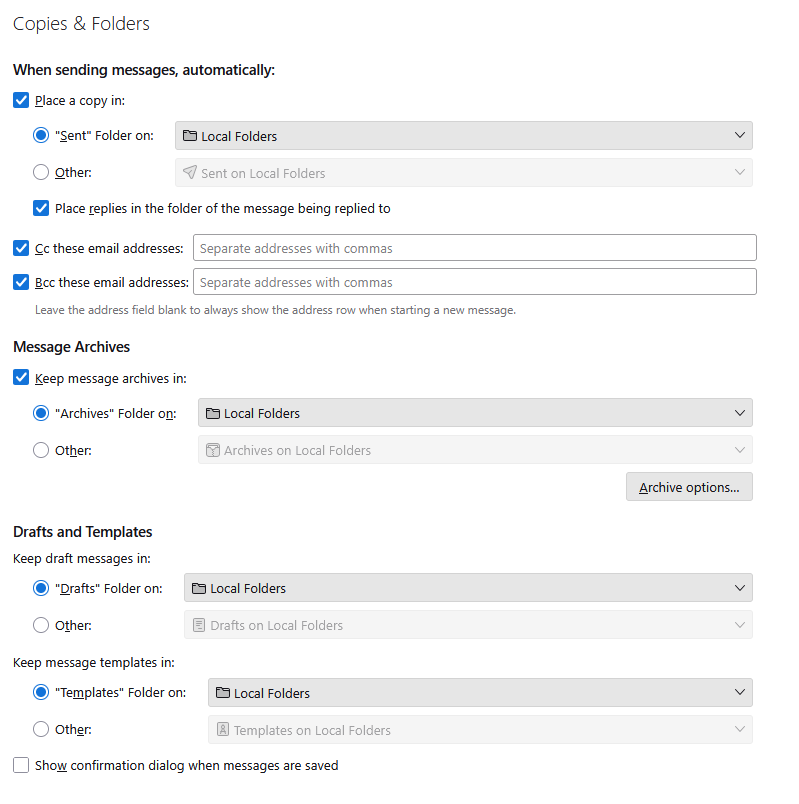
where does the archive setting in account settings point. Sounds like the folder is being recreated for a purpose and given it's name I am guessing archives is the most likely outcome.
Thanks for your reply. > where does the archive setting in account settings point
Well, that's a little complicated. Recent years' archives are stored on my ISP's server; but I have moved older ones to local folders on my NAS drive. And I moved some yesterday; have previously done this with no problem.
But; for no reason I can name, after several closing of TBird and restarts, the ghost folder is gone now. Can close this question; if it comes back will open a new one.
I asked a question and you provided lot of information. None of it actually answering the question.
What shows in your account settings like in the image below. (that is a POP mail account that uses a deferred inbox, everything in that account uses local folders.
Odabrano rješenje
With all due respect, since the problem has gone away I did not see a need to investigate it further. But to answer your question (if I understand it correctly), I see
Keep message archives in: "Archives" Folder on: [my email address]
However, as I stated above, > I have moved older ones to local folders on my NAS drive. And I moved some yesterday
Thanks again for your help, and I will drop the matter until / unless it reappears.