


Change colors of bookmark sub folders

Hello:
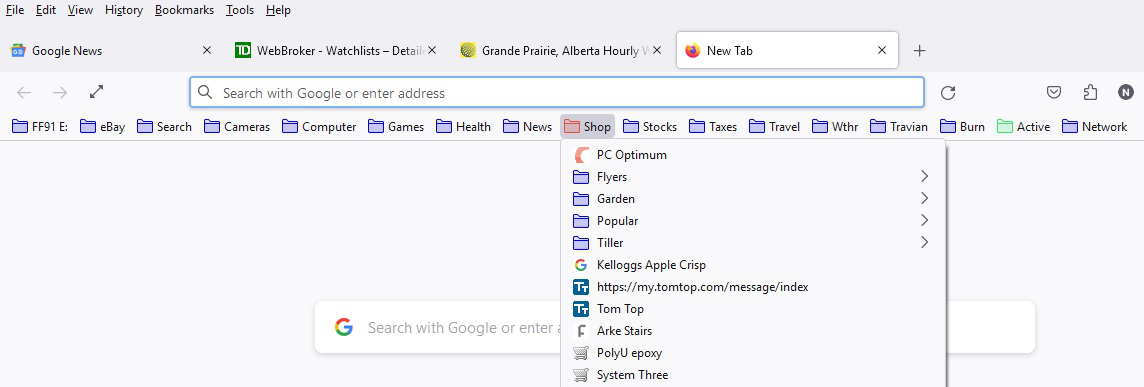
I can change the color of Bookmarks, but would like to change the color of sub folders.
Here is the CSS code and the results
/* One line fix This colours all bookmarks */
.bookmark-item[container], treechildren::-moz-tree-image(container) { fill: Blue !important; }
/* Make Shop folder Red */ toolbarbutton.bookmark-item[label="Shop"] > .toolbarbutton-icon { fill: #e74c3c !important; }
/* Make Flyers folder Red !NOT WORKING! */ toolbarbutton.bookmark-item[label*="Flyers"] > .toolbarbutton-icon { fill: #e74c3c !important; }
thanks Norbert
Izabrano rješenje
Doesn't this rule work ?
.bookmark-item[container][label*="Flyers"] { fill: #e74c3c !important; }
You may need to toggle svg.context-properties.content.enabled => true on about:config if you use a custom SVG file.
You can't combine/nest labels, you need a separate selector for each label.
.bookmark-item[container][label*="Flyers"],
.bookmark-item[container][label*="Shop"] {
  fill: #e74c3c !important;
}
Pročitaj ovaj odgovor u kontekstu
👍 1
Svi odgovori (4)
toolbarbutton.bookmark-item only works for toolbarbutton items on the Bookmarks Toolbar. For items in a drop down list you need to use menu.bookmark-item (folder) or menuitem.bookmark-item or use only .bookmark-item to make it apply to all cases.
menu.bookmark-item[label*="Flyers"] > .toolbarbutton-icon { fill: #e74c3c !important; }.bookmark-item[container][label*="Flyers"] > .toolbarbutton-icon { fill: #e74c3c !important; }Izmjenjeno od cor-el
Hello Cor-el
Thanks for the suggestions. None worked.
I tried
menu.bookmark-item[Label=" AND [label*=" menuitem.bookmark-item[Label=" AND [label*=" .bookmark-item[Label=" AND [label*="
Can I be more specific about the label? [Label="Shop;Flyers"]
thanks Norbert
Odabrano rješenje
Doesn't this rule work ?
.bookmark-item[container][label*="Flyers"] { fill: #e74c3c !important; }
You may need to toggle svg.context-properties.content.enabled => true on about:config if you use a custom SVG file.
You can't combine/nest labels, you need a separate selector for each label.
.bookmark-item[container][label*="Flyers"],
.bookmark-item[container][label*="Shop"] {
  fill: #e74c3c !important;
}
Thanks Cor-el
I was using .bookmark-item[container][label*="Flyers"] > .toolbarbutton-icon { fill: #e74c3c !important; }
This works!!
.bookmark-item[container][label*="Flyers"] { fill: #e74c3c !important; }
Norbert