


Join us to show up for other Firefox users 🦊. Earn fun badges and Mozilla swag vouchers! Find out more: https://mzl.la/askafox150

Windows 10 reached EOS (end of support) on October 14, 2025. If you are on Windows 10, see this article.

Pretraži podršku

Izbjegni prevare podrške. Nikad te nećemo tražiti da nas nazoveš, da nam pošalješ telefonski broj ili da podijeliš osobne podatke. Prijavi sumnjive radnje pomoću opcije „Prijavi zlouporabu”.

Saznaj više

Bug: Troubleshooting Information page blank. Also . . .

  • 3 odgovora
  • 1 ima ovaj problem
  • 208 prikaza
  • Posljednji odgovor od Rodney
  • Arhivirano

The Troubleshooting Information page is blank.

Also, when I wrote this post, I got this;

Troubleshooting Information (optional):

We can't automatically get your browser's troubleshooting data, please . . . .

The Troubleshooting Information page is blank. Also, when I wrote this post, I got this; Troubleshooting Information (optional): We can't automatically get your browser's troubleshooting data, please . . . .
Priložene slike ekrana

Svi odgovori (3)

Note: When using Troubleshoot (Safe) Mode, the page displays properly.
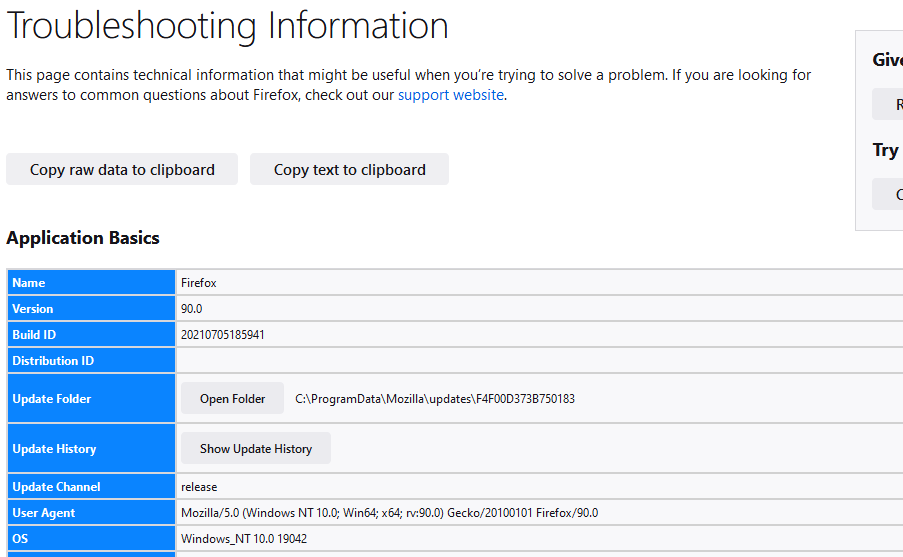
I closed the browser and let it alone for a while. Now the page displays properly.

But Distribution ID is still blank.

FredMcD said

But Distribution ID is still blank.

Same here ....

As you and I are both on Windows;   my guess is that   "Distribution ID"  only
applies to Linux users.