


Firefox one-click bookmarks

Hi Just recently my Firefox Browser has decided to Bookmark a page with just "one click" on "bookmark this page. I need to restore the old behaviour, where I could edit what the bookmark said & in what sub-folder to place it. I do not like the new behaviour & I did not choose it. Please how can I get the original & better behaviour restored??? Thanks
Hi
Just recently my Firefox Browser has decided to Bookmark a page with just "one click" on "bookmark this page.
I need to restore the old behaviour, where I could edit what the bookmark said & in what sub-folder to place it.
I do not like the new behaviour & I did not choose it. Please how can I get the original & better behaviour restored???
Thanks
Izabrano rješenje
about:config --> browser.bookmarks.editDialog.showForNewBookmarks --> true
or click on the star and enable the checkbox
Pročitaj ovaj odgovor u kontekstu 👍 1Svi odgovori (2)

Odabrano rješenje
about:config --> browser.bookmarks.editDialog.showForNewBookmarks --> true
or click on the star and enable the checkbox
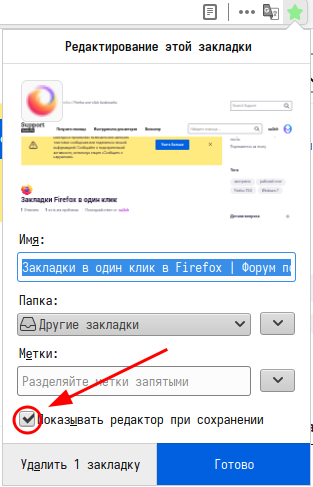
Izmjenjeno od Vedun
Note that with Firefox 79.0 you are behind on updates, current is Firefox 83.0.
- https://support.mozilla.org/en-US/kb/update-firefox-latest-version
- Help -> About Firefox