


Windows 10 reached EOS (end of support) on October 14, 2025. If you are on Windows 10, see this article.

Pretraži podršku

Izbjegni prevare podrške. Nikad te nećemo tražiti da nas nazoveš, da nam pošalješ telefonski broj ili da podijeliš osobne podatke. Prijavi sumnjive radnje pomoću opcije „Prijavi zlouporabu”.

Saznaj više
Arhivirano

How to stop Firefox printing blocks of colour around text in High Contrast mode

cor-el replied
CZ535

Please can someone tell me how to prevent Firefox from printing blocks of background colour around text when printing while in High Contrast mode (ie with the 'Override the colours specified by the page with your selections above' option set to 'Always' or 'Only with High Contrast themes'). It is wasting a lot of ink and makes it difficult to read the printed page. I just want it to print the text, not the background colour from my display settings. The 'Print background (colour and images)' option is off.
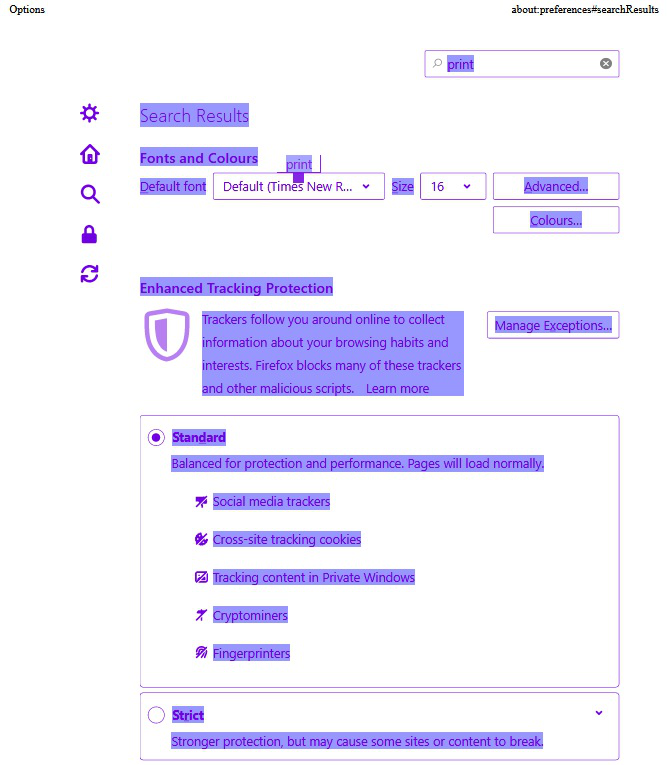
Please can someone tell me how to prevent Firefox from printing blocks of background colour around text when printing while in High Contrast mode (ie with the 'Override the colours specified by the page with your selections above' option set to 'Always' or 'Only with High Contrast themes'). It is wasting a lot of ink and makes it difficult to read the printed page. I just want it to print the text, not the background colour from my display settings. The 'Print background (colour and images)' option is off.
Priložene slike ekrana

Svi odgovori (1)

You can try to set browser.display.permit_backplate = false on the about:config page.

You can open the about:config page via the location/address bar. You can click the button to "Accept the Risk and Continue".

See also this comment of this pref: