


Thunderbird 78.2.1 not connecting to server
Thank you for building Firefox and Thunderbird. My computer crashed two weeks ago and when I received my new computer I immediately tried to install Thunderbird. But I keep getting an error message "Unable to log into server. Probably wrong configuration, username, or password." I have double checked everything and I believe it is correct. My incoming settings are:
POP3 inbound.att.net 995 SSL/TLS Normal Password Michaelspence@att.net
My outgoing settings are:
SMTP outbound.att.net 465 SSL/TLS Normal Password Michaelspence@att.net
I have tried to uninstall and reinstall several times, but with no help.
I am able to access my email at att.net, but I really need Thunderbird so I can save important messages that I receive.
Thank you for any help you can give me.
Michael Spence
Izabrano rješenje
How can I get a previous version of Thunderbird? Since I updated to the 78.2.1 version I have not been able to get any emails. I have to go online to get emails from Gmail and MS Outlook.
I would like to install an older version that works.
Pročitaj ovaj odgovor u kontekstu 👍 0Svi odgovori (4)
Are you using a secure mail key in place of the account password?

Odabrano rješenje
How can I get a previous version of Thunderbird? Since I updated to the 78.2.1 version I have not been able to get any emails. I have to go online to get emails from Gmail and MS Outlook.
I would like to install an older version that works.
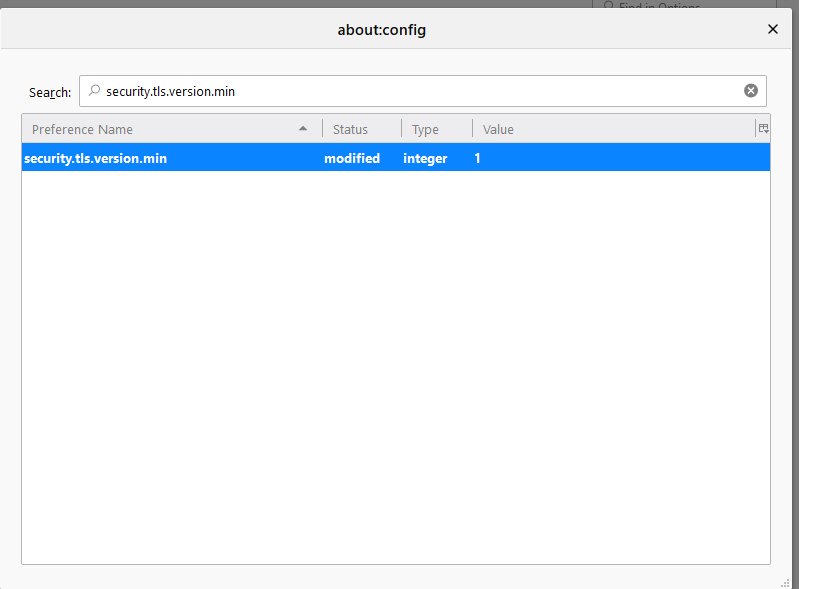
We had similar issue. Resolved by lowering the TLS Security Version to 1 using Config Editor
In Thunderbird via "Tools -> Options -> Advanced -> General -> Config Editor". Serch for security.tls.version.min variable. Right click to Modify value. Change the security.tls.version.min value to 1 from default 3.
I'm not seeing any "options" under "tools," so can't try this solution. Thunderbird has updated to 78.7. What could be wrong?