


issues with latest update

I have downloaded and installed the latest version of firefox, when I load firefox all I get is a black window
Svi odgovori (3)
Odabrano rješenje
hello kidsarocker, other users with this problem all had an embedded intel hd3000 graphics card with an old driver present. in case this also applies to you, here would be a link to update the driver, which in turn should also address the black firefox problem: https://downloadcenter.intel.com/Detail_Desc.aspx?DwnldID=23764 (for win7 64 bit)
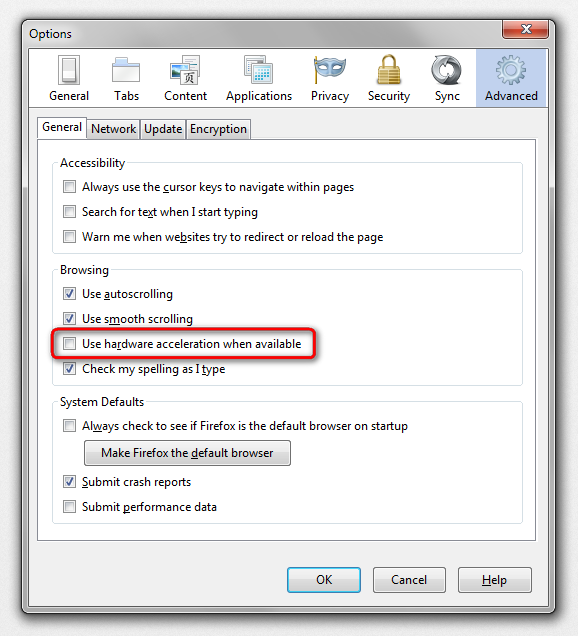
in case this doesn't solve the issue or does not apply to your system, start firefox into safemode by pressing the shift key while the application is launching & disable hardware acceleration in the firefox menu ≡ > options > advanced > general (that setting will take a restart of the browser to take effect).
Troubleshoot extensions, themes and hardware acceleration issues to solve common Firefox problems
I have attached a screenshot of what I mean
Thanks Philipp, it worked :)