


Firefox consumes 2 TB of RAM

firefox is very slow, crash several times. i need to close and reopen.
it comes on average 2TB of Ram with 4-5 tabs open. version: 99.01 64 bit
- slow when using youtube
כל התגובות (2)

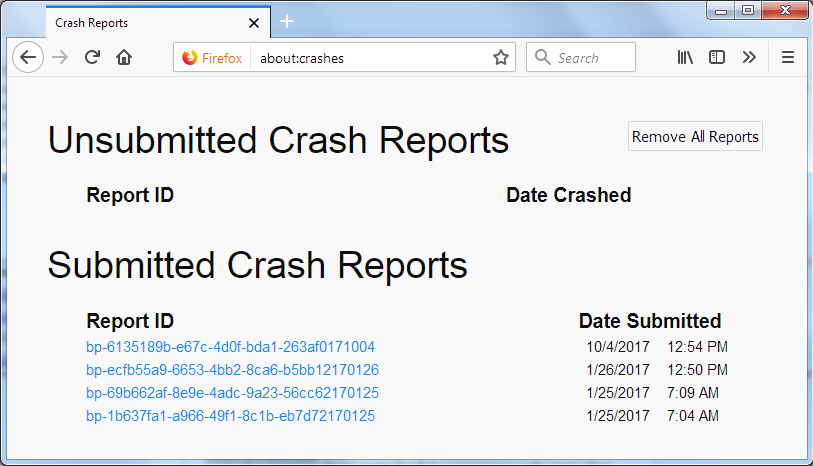
In the address box, type about:crashes<enter>. Note: If any reports do not have BP- in front of the numbers/letters, click it to submit them.
The crash report is several pages of data. We need the report numbers to see the whole report.
Using your mouse, mark the most recent 7 - 10 Submitted crash reports, and copy them. Now go to the reply box and paste them in.
Please, Do not post a screenshot ! !
For more help on crash reports, see; https://support.mozilla.org/en-US/kb/firefox-crashes-asking-support
Many site issues can be caused by corrupt cookies or cache.
Warning ! ! This will log you out of sites you're logged in to. You may also lose any settings for that website.
- How to clear the Firefox cache {web link}
If there is still a problem,
Start Firefox using Troubleshoot(Safe) Mode {web link}
A small dialog should appear. Click Start In Troubleshoot(Safe) Mode (not Refresh). Is the problem still there?
While you are in Troubleshoot(Safe) mode;
Try disabling graphics hardware acceleration in Firefox. Since this feature was added to Firefox it has gradually improved but there are still a few glitches.
How to disable Hardware Acceleration {web link}
https://support.mozilla.org/en-US/kb/firefox-slow-how-make-it-faster
https://support.mozilla.org/en-US/kb/firefox-uses-too-many-cpu-resources-how-fix
https://support.mozilla.org/en-US/kb/firefox-uses-too-much-memory-ram
https://support.mozilla.org/en-US/kb/firefox-hangs-or-not-responding
https://support.mozilla.org/en-US/kb/firefox-takes-long-time-start-up
https://support.mozilla.org/en-US/kb/quick-fixes-if-your-firefox-slows-down
https://support.mozilla.org/en-US/kb/firefox-uses-too-much-memory-or-cpu-resources
MemTest
Could you please run a tool from http://memtest.org/
in order to check the integrity of your RAM?
You will need a thumb or disk drive to install it on.
Do you let Windows handle the page file or did you set a fixed size ?
Control Panel -> System -> Advanced -> Performance -> Settings
If you use a fixed size for the page file then try the former and let Windows handle the page file. How to determine the appropriate page file size for 64-bit versions of Windows {web link}
This question has been locked because the original author has deleted their account. While you can no longer post new replies, the existing content remains available for reference.