Google Search is slow to load in Firefox but loads almost instantly in Chrome
When using Google (.com or .co.uk) as my search engine it takes a long time to load and display results. Chrome searches and displays results almost instantly. What is causing this slow down? Let me know if you need any more details.
כל התגובות (7)

Are you using the webpage directly, or the search engine in the browser?
Many site issues can be caused by corrupt cookies or cache.
- Clear the Cache and
- Remove Cookies
Warning ! ! This will log you out of sites you're logged in to. You may also lose any settings for that website.
- Cookies; Delete cookies to remove the information websites have stored on your computer {web link}
- Cache; How to clear the Firefox cache {web link}
If there is still a problem, Start Firefox in Safe Mode {web link} by holding down the <Shift> (Mac=Options) key, and then starting Firefox.
A small dialog should appear. Click Start In Safe Mode (not Refresh). Did this help?
While you are in safe mode;
Try disabling graphics hardware acceleration in Firefox. Since this feature was added to Firefox it has gradually improved but there are still a few glitches.
How to disable Hardware Acceleration {web link}
FredMcD said
Are you using the webpage directly, or the search engine in the browser? Many site issues can be caused by corrupt cookies or cache.Warning ! ! This will log you out of sites you're logged in to. You may also lose any settings for that website.
- Clear the Cache and
- Remove Cookies
- Cookies; Delete cookies to remove the information websites have stored on your computer {web link}
If there is still a problem, Start Firefox in Safe Mode {web link} by holding down the <Shift> (Mac=Options) key, and then starting Firefox. A small dialog should appear. Click Start In Safe Mode (not Refresh). Did this help? While you are in safe mode; Try disabling graphics hardware acceleration in Firefox. Since this feature was added to Firefox it has gradually improved but there are still a few glitches. How to disable Hardware Acceleration {web link}
- Cache; How to clear the Firefox cache {web link}
I have tried both the webpage directly and search engine in the browser.
I tried all of the things you suggested and none made any difference
Remove History For One Site
Open the History Manager <Control><Shift> H. In the search bar, enter the name of the site. Right-click on one of the listings and select Forget About This Site. This should remove all information, including any passwords / settings.
FredMcD said
https://support.mozilla.org/kb/Clear+Recent+History#w_how-do-i-remove-a-single-website-from-my-history Remove History For One Site Open the History Manager <Control><Shift> H. In the search bar, enter the name of the site. Right-click on one of the listings and select Forget About This Site. This should remove all information, including any passwords / settings.
No data is stored as I use private browsing! Thanks for all the suggestions so far though

Also check for active VPN, proxy or DNS if you using them. The most of time using anonymization tools can cause to the same problem you have, or if you are trying to reach Google from different server (for example, you are visiting Asian Google from Europe). This is also like one of reason why it could happen.
It is possible that your firewall or other security software blocks or restricts Firefox without informing you, possibly after detecting changes (update) to the Firefox application. Remove all rules for Firefox from the permissions list in the firewall and let your firewall ask again for permission to get full, unrestricted, access for Firefox and the plugin-container process and the updater process.
See:
- https://support.mozilla.org/en-US/kb/server-not-found-connection-problem
- https://support.mozilla.org/en-US/kb/Firewalls
- https://support.mozilla.org/en-US/kb/fix-problems-connecting-websites-after-updating
Maybe also do a malware check.
It seems suspicious that Google search runs slowly. It's normally very fast.
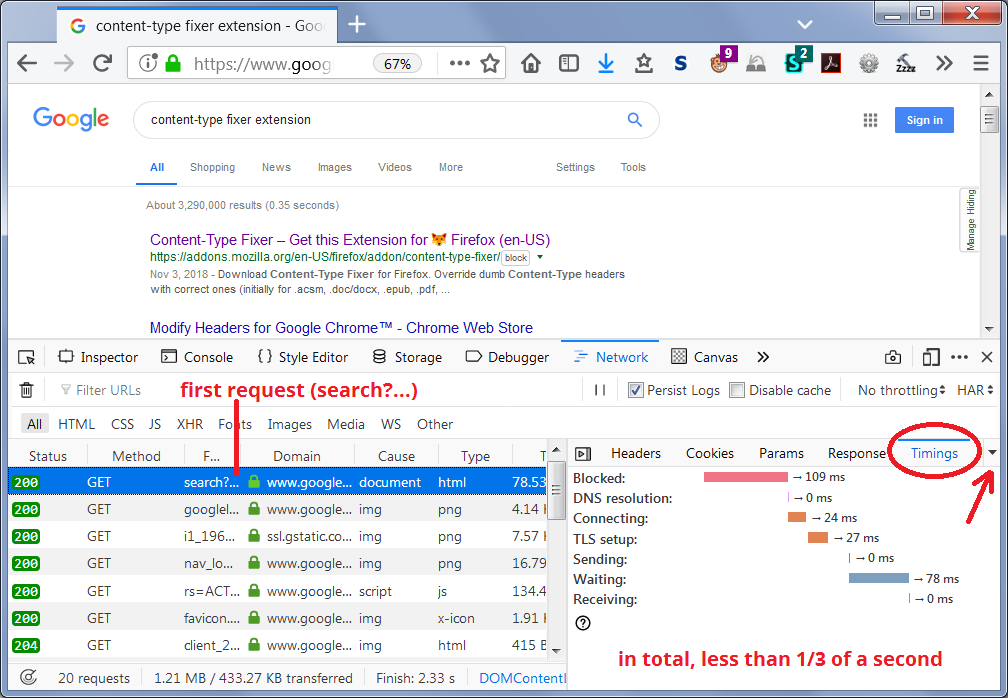
Firefox has a developer tool called the Network Monitor. One of its features is a breakdown of the time involved in obtaining a response. I'm attaching what I see for a Google search that was initiated from the address bar.
To give that a try, open the Network Monitor in the lower part of a tab. Either:
- "3-bar" menu button > Web Developer > Network
- (menu bar) Tools > Web Developer > Network
- (Windows) Ctrl+Shift+e
Then submit a search through the address bar on the same tab. The results page should load in the top part, and Firefox should list a bunch of requests in the Network Monitor. Scroll back up to the top of the list and click the first item (the search?q=blah request). On the right side, click Timings (you might need to click the triangle if it isn't visible, see the arrow in the screenshot).
Any particularly slow area? This article has the definitions of what the different phases are: https://developer.mozilla.org/docs/Tools/Network_Monitor/request_details#Timings