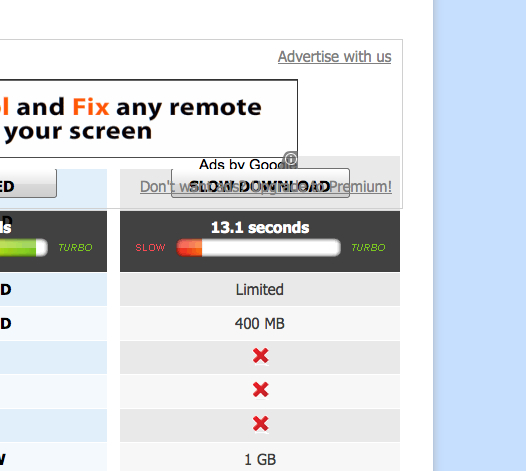
clicking on "slow download" in Filesonic( http://www.filesonic.nl/file/2050182804 ) doesn't work only in in Firefox 6.0.2.

Underneath "slow download" partly the text "Don't waste etc..." is visible. Clicking on "slow download" results in a (wrong) directed to pay-options of the site. Problem only occurs in Firefox, not in other browsers. What I did: reinstalled Firefox 6.0.2 screenshot: http://tinypic.com/r/6eq52w/7
Underneath "slow download" partly the text "Don't waste etc..." is visible. Clicking on "slow download" results in a (wrong) directed to pay-options of the site. Problem only occurs in Firefox, not in other browsers. What I did: reinstalled Firefox 6.0.2
screenshot:
http://tinypic.com/r/6eq52w/7
Modified by vossenjacht
All Replies (1)
SOLVED!! Menubar/Firefox/Preferences/Content/Fonts and Colors/Advanced/Minimal font-size: "none"