


Avoid support scams. We will never ask you to call or text a phone number or share personal information. Please report suspicious activity using the “Report Abuse” option.

Learn More
Open

How can I get three-state vertical tabs back?

tess

Context: In the customize sidebar section, if the "Vertical tabs" checkbox is checked, the vertical tabs can be switched between showing names and favicons, or just favicons. If, additionally, "Hide tabs and sidebar" is checked, then vertical tabs instead can be switched between showing names and favicons, or being completely hidden. (These settings are in the photo I uploaded)

The recent update seemed to add a feature I had been really wanting from vertical tabs. I could switch between all three states: favicons and names, just favicons, or completely hidden. I could do this by dragging the vertical tab pane smaller or bigger. A few days later, though, it stopped working, but I didn't change any settings (as far as I remember).

Is there any way to get the three-state vertical tabs back? They were really nice!
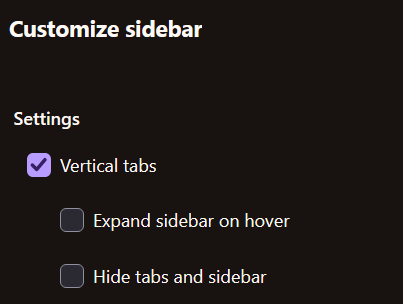
Context: In the customize sidebar section, if the "Vertical tabs" checkbox is checked, the vertical tabs can be switched between showing names and favicons, or just favicons. If, additionally, "Hide tabs and sidebar" is checked, then vertical tabs instead can be switched between showing names and favicons, or being completely hidden. (These settings are in the photo I uploaded) The recent update seemed to add a feature I had been really wanting from vertical tabs. I could switch between all three states: favicons and names, just favicons, or completely hidden. I could do this by dragging the vertical tab pane smaller or bigger. A few days later, though, it stopped working, but I didn't change any settings (as far as I remember). Is there any way to get the three-state vertical tabs back? They were really nice!
Attached screenshots

You must log in to your account to reply to posts. Please start a new question, if you do not have an account yet.