


Can no longer download any extensions/add-on on firefox

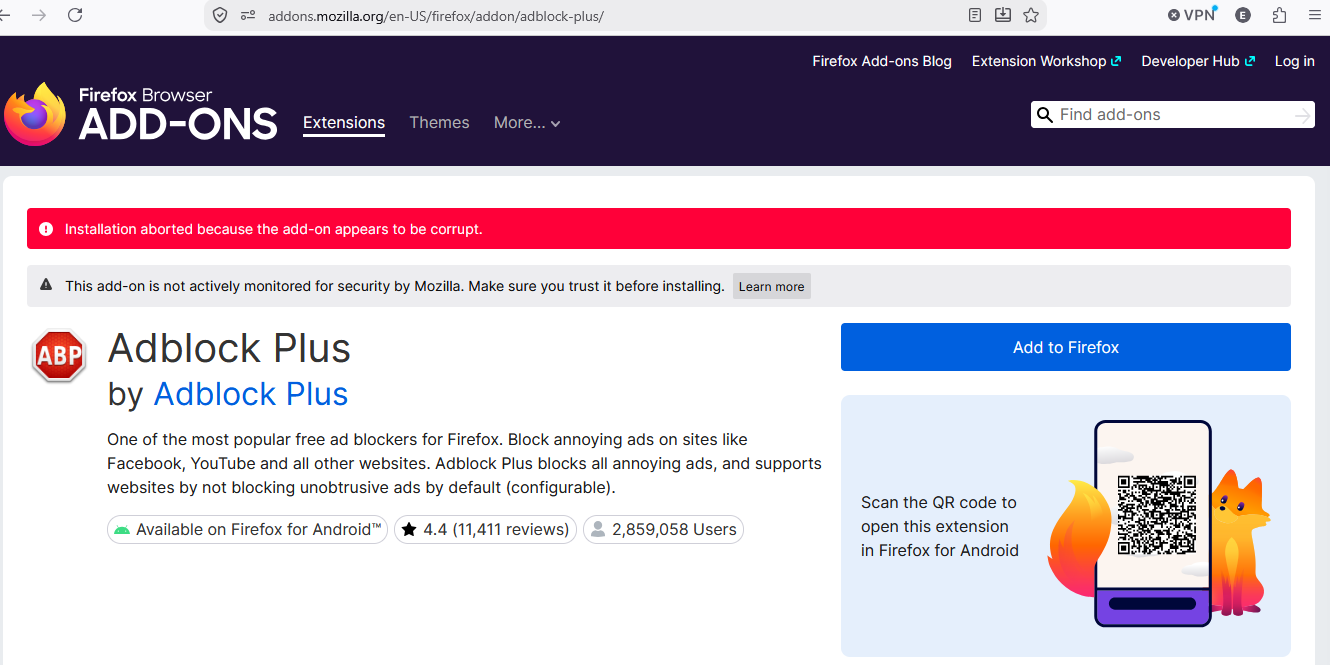
Hello, I am trying to add extensions from addon.mozilla.org, and any one that I click "Add to Firefox" shows this error code:
"Installation aborted because the add-on appears to be corrupt."
A few months ago, I was able to run extensions no problem (For the ad blocker) until my Firefox application updated automatically and it no longer works. My Firefox continues to update automatically since then and I am not able to use any extensions unfortunately.
Any help would be greatly appreciated. I've been having to use Edge in the meantime, but I would prefer to use Firefox.
Thanks, Ethan
All Replies (3)
Hi Ethan, I assume your system clock and time zone is correct (otherwise you'd have other certificate issues as well elsewhere), can you just quickly try doing the same from a new clean Profile to test if that works in general, and is only localized to your current preexisting profile perhaps? Thanks!
Hi Jbr, thank you for the reply! My system and time zone should be set to automatic and be correct yeah. If i understand correctly, I should sign out of my current profile, create a new one, and try downloading the extensions from there?
When doing so I understood that Firefox doesnt have permission to create a new profile. So I've gone to the Firefox folder in File Explorer and viewed the preferences for the folder and it was labelled as "read-only" for some reason. I've unticked it (To hopefully allow Firefox to create a profile, and therefore also install extensions) and once it finished, I opened the preferences again and it showed read-only being active again. I assume now the issue has to do with windows folder permissions. Found this page (https://helpdeskgeek.com/how-to-fix-a-folder-that-keeps-reverting-to-read-only-on-windows/) and did everything there except for reverting updates and restoring the system, and the problem still persists.
Here is the Error Code when trying to create a new profile:
Profile couldn’t be created. Probably the chosen folder isn’t writable. [Exception... "Component returned failure code: 0x80520015 (NS_ERROR_FILE_ACCESS_DENIED) [nsIToolkitProfileService.createProfile]" nsresult: "0x80520015 (NS_ERROR_FILE_ACCESS_DENIED)" location: "JS frame :: chrome://mozapps/content/profile/createProfileWizard.js :: onFinish :: line 251" data: no]
Thank you so much for your help! - Ethan
Modified by Ethan Cundall
You basically don't need to sign out or anything in the current profile, you just quickly create a sacrificial empty profile on the side to delete when done verifying. Or, when in doubt, download a completely separate nightly.mozilla.org just to test, which can be removed later when not needed any longer.
This sounds like a broader permission issue — wondering how other things work for you, like keeping history, bookmarks and such, if the location is not writable:(