


Multiple Trash folders

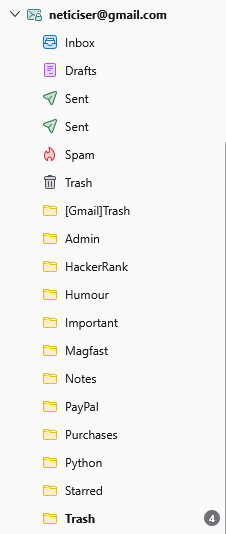
While importing a Gmail account, I ended with three Trash folders, only one of which I could delete. Trash goes automatically into the top folder, but bottom one says it's a system folder and can't be deleted. How do I consolidate into the one that Trash automatically goes into, which should be the top one, please?
All Replies (1)
Got to love developers that think they are making things easier for us.
Lets first try and work out which is which.
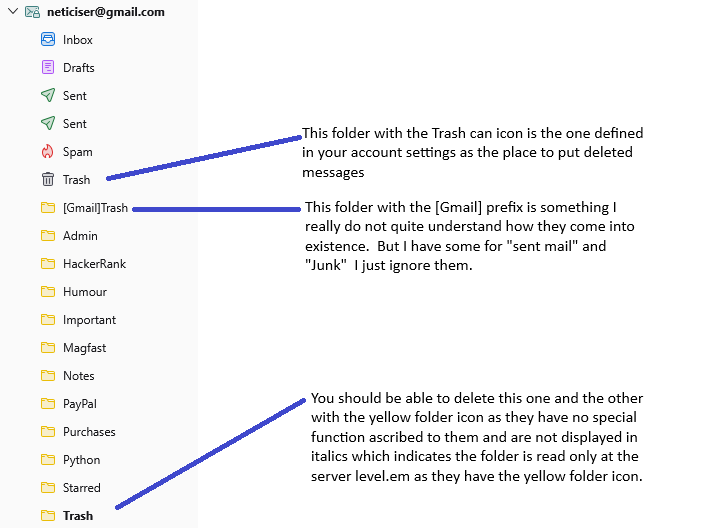
So lets check a couple of things are correct before deleting anything. Right click your account name and select subscribe. Are all three folders shown (I expect they will be.) Open account settings. From that same right click menu select settings Under the "Server Settings" pane check the folder that is named as the correct one for trash. Change it is necessary. While we are cleaning up. Your image shows two sent folders. So under copies and folders, check the folder name actually used for sent mail by selecting other and setting it manually to "sent mail" on the account name (that is what Google use). I think what is happening is Thunderbird is using sent and Google is using sent mail and both are being displayed as "sent".
So after the change you should still have two sent folders, but one will no longer have the green icon and should be deleted.
Note that you can right click on a folder name and select properties from the menu. This will show the "real" name of the folder not what Thunderbird is using to display to you. It is this substitution that evoked my initial comment.