


Why is Thunderbird suddenly not receiving messages (I already checked my password settings)?

I've been using Thunderbird for years but suddenly as of yesterday it's stopped receiving messages. First it told me my password was incorrect. Ever since then when I try to click "Get Messages," it simply has no response at all. Nothing happens. I went into my Thunderbird password settings, and upon seeing that the incoming-message password had for some reason reverted to an old, obsolete password, I corrected it and saved the correct one. I've checked several times and the passwords are correctly saved now. But this did not fix the problem. When I click "Get Messages," nothing happens. My Thunderbird is connected to my Earthlink account, which is working fine. When I go into Earthlink, I am able to send and receive messages as normal. So the problem is not with Earthlink but with Thunderbird.
All Replies (18)
re :When I go into Earthlink, I am able to send and receive messages as normal. So the problem is not with Earthlink but with Thunderbird.
You are logged on to the webmail account. That proves your password is correct which is useful to know. Webmail account is directly logged onto the server. It is not using the IMAP/POP/SMTP protocols. There is no comparison.
It's weird that suddenly an old password has been restored as that's not possible. Not unless you have suddenly swapped over to an old profile ?! In Thunderbird
- Help > TRoubleshooting Information'
- Under 'Application Basics' section near the bottom locate: Profiles and click on 'about:profiles'
- It opens in a new tab.
- Upload image(s) so we can see what you see -
- How many 'profiles' do you see?
Also, post info on what server settings you are using:
- Help > TRoubleshooting Information'
- Scroll down to 'Mail and News Accounts' section
- Copy all the data and paste it into this forum question - or upload an image.
After altering the password for both the incoming and outgoing. Did you exit Thunderbird - wait a while and then restart Thunderbird to ensure it was now using the newly saved password ?
Please check computer for the following: Firewall - it might be controlled by OS and default on computer OR if you installed an Anti-Virus product then it might be controlling the firewall. Access Firewall Thunderbird must be set up as an allowed program otherwise it might get blocked.
- Confirm Thunderbird is set up as an allowed program.
VPN. Most servers do not like VPN as it hides your IP address, so server will just block you as it thinks you might be a hacker. Many Anti-Virus now offer a VPN and in some cases people have discovered it was auto enabled. So please check computer for a VPN and switch it off.
- Confirm no VPN enabled.
Also check the following: In Thunderbird
- Account Settings > Server Settings,
- setting "Check for new messages every X minutes"
- whatever you currently have set up please increase it to minimum of 15 minutes or more.
- Temporarilly uncheck "Check for new messages at startup"
Do the above as a test to see if it helps to avoid hitting Earthlink’s timeout or rate limits that might be triggering a problem.
I need to see the 'Mail and News Accounts' info because the server settings depend upon the type of protocol you are using eg: IMAP or POP
There are several reasons why a password would not work. Right password but wrong server settings. No access to server would not help. That could be because of something on your computer blocking Thunderbirds access or the server blocking access.
IF you get any errors pop up please get an image of the error and upload the image.
Also, after trying to 'Get Messages', please do this: Ctrl+Shift+J to open the Error Console Make window a bit larger to show as much as possibe and upload an image.
Thank you so much for all your ideas.
"It's weird that suddenly an old password has been restored as that's not possible. Not unless you have suddenly swapped over to an old profile ?!" No, I haven't. I don't understand either. To clarify what I mean, when I first stopped receiving messages, I checked the password settings in Thunderbird and saw that the password for incoming messages was different from the password for outgoing -- and I read online that this is NOT supposed to be the case, they are supposed to be the same. The password listed for incoming messages was a password I use for many things, but not for my Earthlink email, so I'm not sure how it got there. I assumed it was a password I used to use for Earthlink a long time ago, but I'm not really sure. I don't think I'd ever looked at these settings before. Anyway, I simply changed it to my current Earthlink password. I hope that was the right thing to do. But the problem didn't go away.
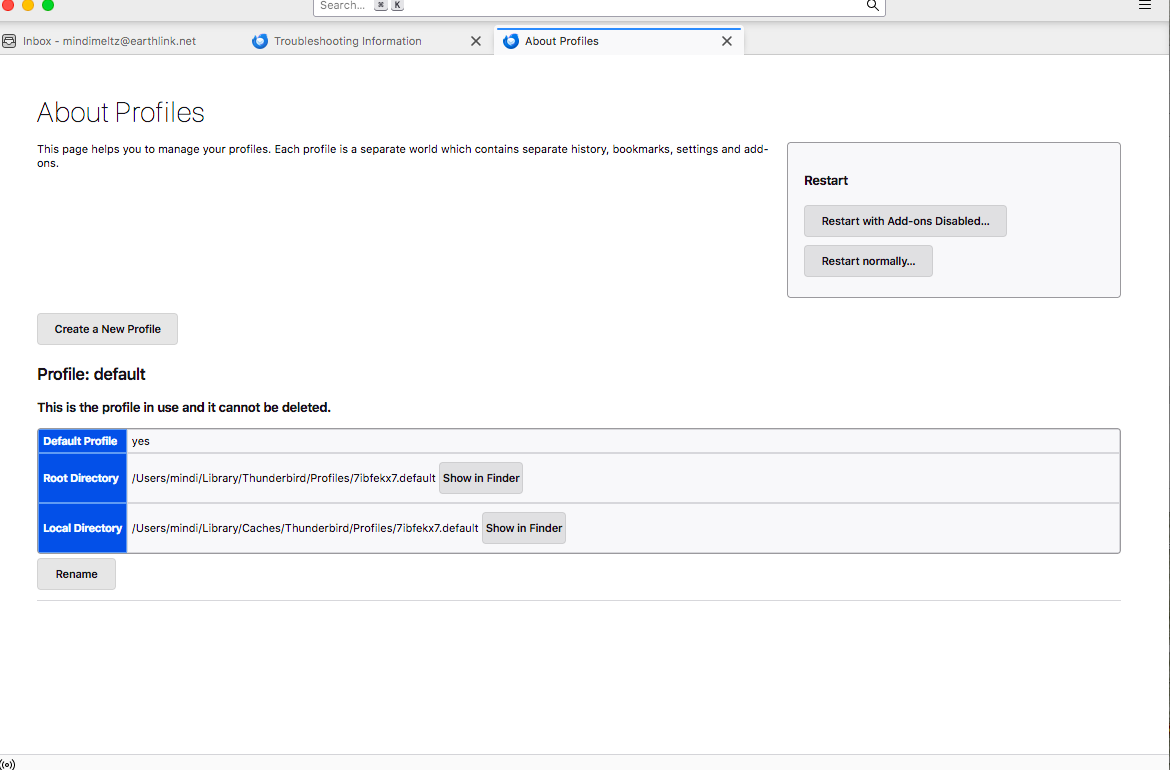
You asked me to upload an image of Profiles-- these are attached.
You asked me to upload an image of Mail and News Accounts -- this is also attached.
"After altering the password for both the incoming and outgoing. Did you exit Thunderbird - wait a while and then restart Thunderbird to ensure it was now using the newly saved password ?" Yes, I did. I have reopened it many times now.
Regarding Firewall and VPN, I do not have any new anti-virus programs installed. For many years I have run certain anti-virus checks periodically, but I haven't run any recently. I don't know how to look at Firewall or VPN. I don't know how to check these things. But nothing has changed that I know of. I have not added any VPN or anything.
I made the changes you suggested regarding "check for new messages." That didn't change anything.
I have not gotten any error messages or popups since the first time this happened -- at that time a message came up regarding incorrect passwords, but unfortunately I did not take an image of it. Since then, when I click "Get Messages," nothing happens at all. It's as if I'm not doing anything. No error message appears. I tried Cntl-Shift-J but nothing happened. No Error Console opened.
Is it possible the problem is simply that my operating system is getting too old for Thunderbird to function properly? I've noticed some other issues with online things like gmail, etc., but I have been avoiding updating because of the other changes that would cause that I don't want. But could that be the problem? I have MacOS Sierra 10.12.6.

After changing the server settings to use a more up to date and secure method - please exit Thunderbird, wait a few moments for background processes to complete and then restart. This ensure its using the updated data.
re :Is it possible the problem is simply that my operating system is getting too old for Thunderbird to function properly? .... I have MacOS Sierra 10.12.6.
That depends upon what version of Thunderbird you are currently using. You could not use the most up to date versions.
System Requirements As of Version 128.0esr - macOS 10.15 or later Version 115.18.0 macOS 10.12 or later
You use MacOS Sierra 10.12.6 OS that means the last version of Thunderbird you could use is Version 115.18.0 esr
What version are you running ?
re: earthlink data You are using an insecure set up which is not advisable - are you aware that you can use a more secure set up? Please check your 'Account Settings' > 'Server Settings' and update the Port and Connection Security settings. Also update the SMTP Connection Security setting. I've posted the info you need to be using below.
EarthLink POP3 Settings Incoming POP3 settings are unique to each EarthLink domain. The format is pop.(domain name). The outgoing server is the same regardless of domain.
- Pop Incoming Server: pop.earthlink.net (pop.mindspring.com, pop.peoplepc.com, etc)
- Port : 995
- Connection Security: SSL/TLS
- Authentication Method: Normal Password
- Password: Same password as you would use to access webmail account.
Outgoing SMTP
- Outgoing Server: smtpauth.earthlink.net
- Port : 587
- Connection Security: STARTTLS
- Authentication Method: Normal Password
- Password: Same password as you would use to access webmail account.
re: Error console - Ctrl+Shit+J
As most people use Widows OS, by default we always supply info as per a Windows OS.
It's important to mention the OS you are using and the version of Thunderbird when posting any question as it does effect instructions etc.
On Windows and Linux, the shortcut modifier key is usually the Ctrl key. On macOS, the shortcut modifier key is usually the Command key.
So for MAC it's Command + Shift + J If you see the Menu Bar toolbar - the one with File, Edit, View, Go... Tools > Developer Tools > Error Console
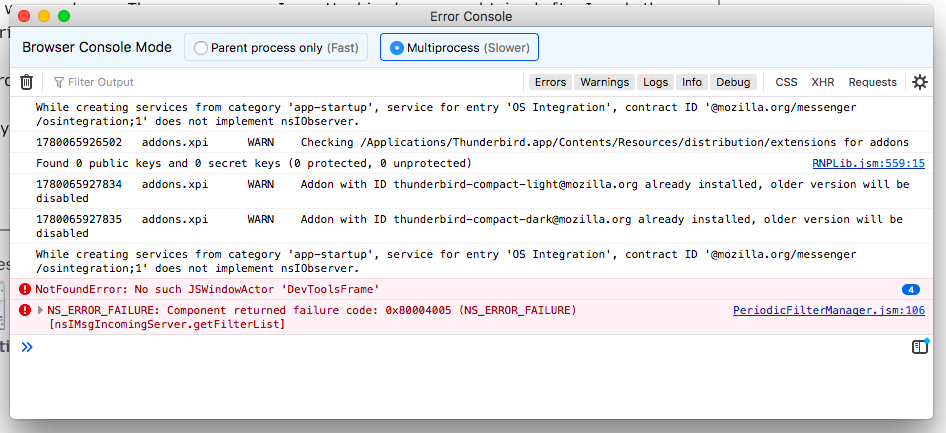
Thank you. I was able to open the error message box using Cntrl-Shift-J. I have attached it here.
I did update the server settings as you described, then closed Thunderbird and waited, and then opened it again. There was no change. The error message I am attaching here was obtained after I made those changes and tried "Get Messages" again.
My Thunderbird version is 115.18.0 esr.
Thank you for your continued help. Let me know if you figure anything out from the error box.
Modified by mindimindy
Please try this:
In Thunderbird Help > Troubleshooting Information Under 'Application Basics' - about Half way locate 'Profile Folder' and click on 'Open Finder'
A new window opens showing the contents of profile name folder.
Exit Thunderbird now.
I'm trying to remember what was used in the old version. Do you see a 'panacea.dat' file ? If yes: rename it to 'panacea.dat.bak' Then restart Thunderbird.
Please tell me if you found that panacea.dat file.
I did find the panacea.dat file, and I changed it as you said, after quitting Thunderbird. But when I reopened Thunderbird, I still couldn't get messages. There was also a file called panacea.dat.msf. Do you want me to change that too?
I really appreciate all the time you've taken to try to help me!! I am happy to continue trying things if you have more ideas and are willing to keep replying to me. But if you get tired of trying to figure this out, I am also open to other ideas you may have, if there's a way to just start over. For example, maybe there is a way to save my old messages (perhaps by renaming that folder?) but somehow open a new Thunderbird account linked with Earthlink, and see if it sets up properly if I try again? Or if there is a way to delete and recreate my Earthlink connection, without losing my old folders/messages? I don't know how it works. Just an idea.
Thanks again.
re :There was also a file called panacea.dat.msf.
That should not exist. Files with a .msf extension are index files and only created in the mail account name folder. It implies something is not set up correctly in order for that to occur.
Can you please check the following first:
- In 'Account Settings'
- Select 'Server Settings'
- Bottom right locate 'Local directory:'
- Make window wide enough so it shows all the content in the 'Local directory:'
- Post an image showing what it says.
Also post image showing all the contents in the profile name folder.
In Thunderbird
- Help > Troubleshooting Information
- Under 'Application Basics' - about Half way locate 'Profile Folder' and click on 'Open Finder'
- A new window opens showing the contents of profile name folder.
- Exit Thunderbird now.
You may need to create more than one image to do the following. You can upload jpg image files. I need images that show all the contents of the 'profile name' folder. Make sure to include the directory in the image, so I can be sure everything is where I expect it to be. eg: ~/Library/Thunderbird/Profiles/<Profile name>/ The tilde character (~) refers to the current user's Home folder, so ~/Library is the /Macintosh HD/Users/<username>/Library folder.
I am attaching the image of the "Local directory" name.
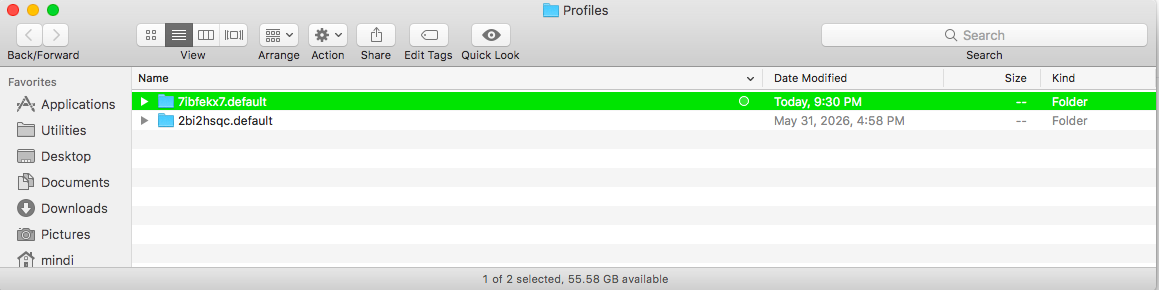
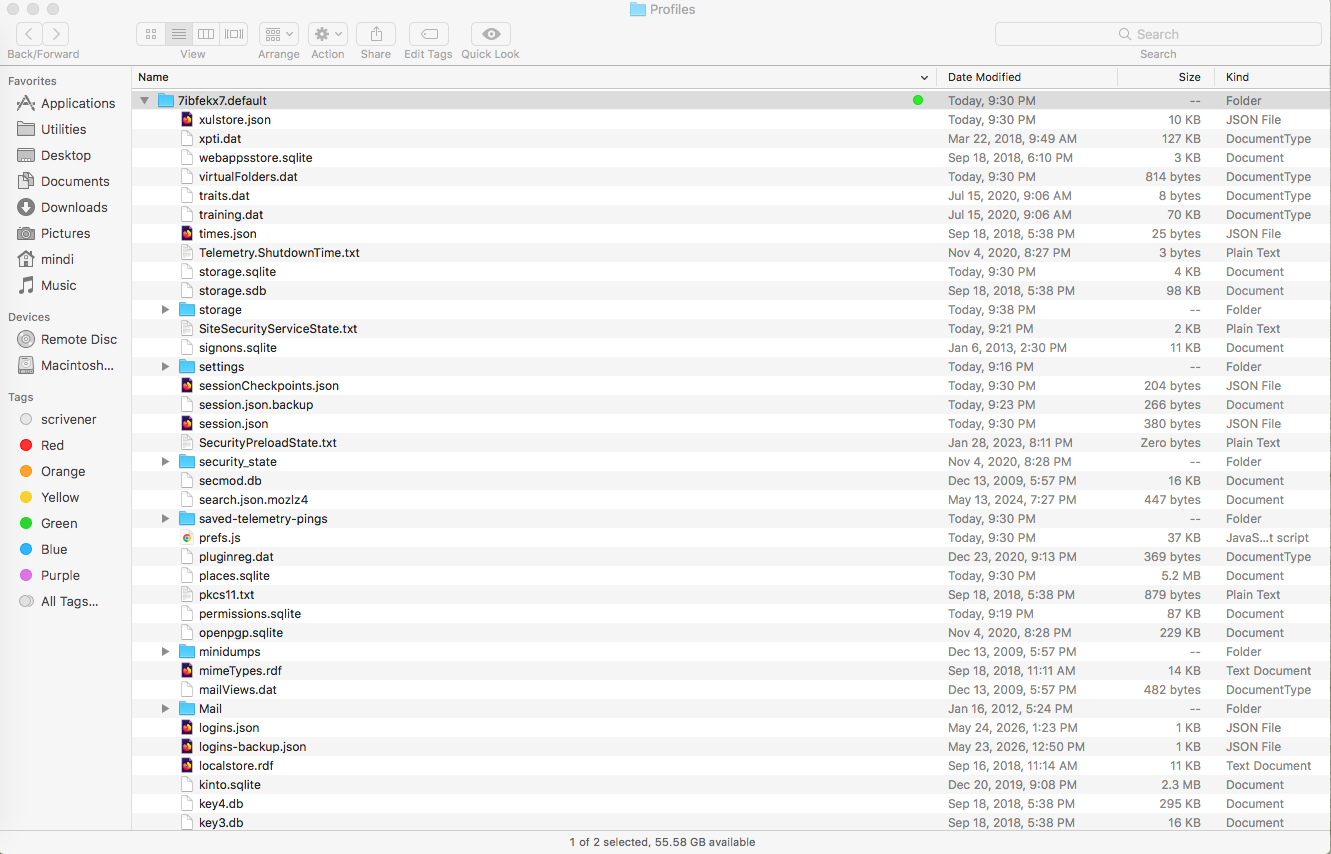
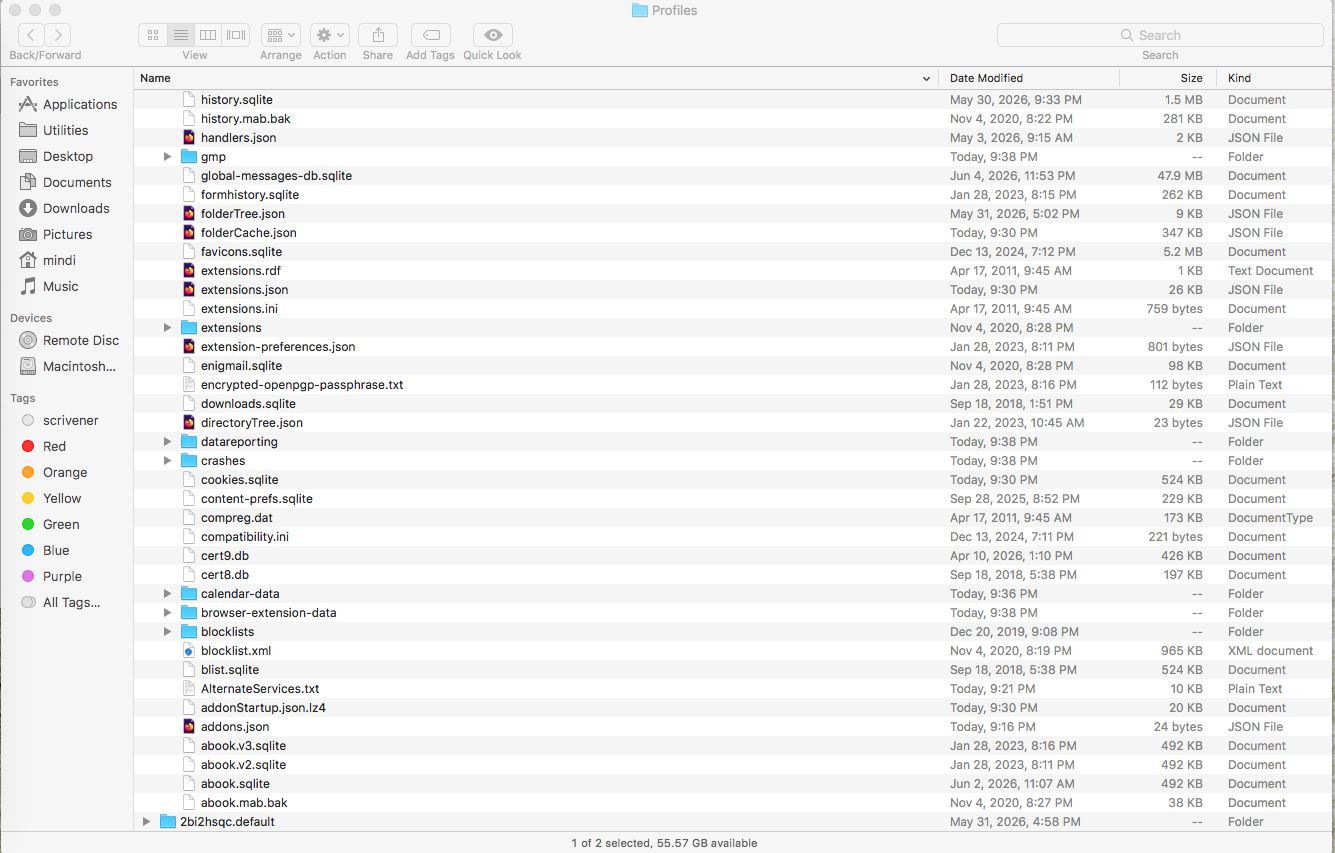
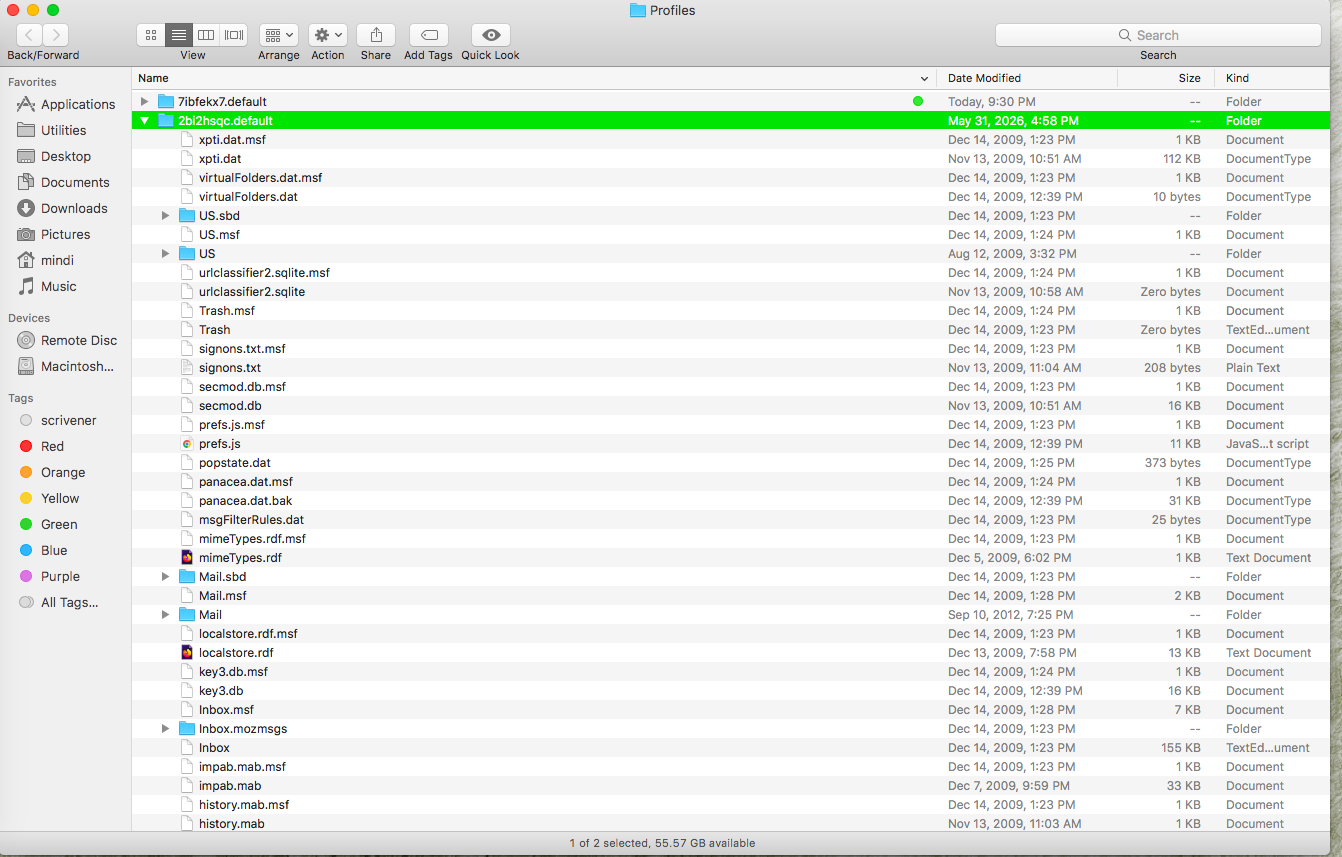
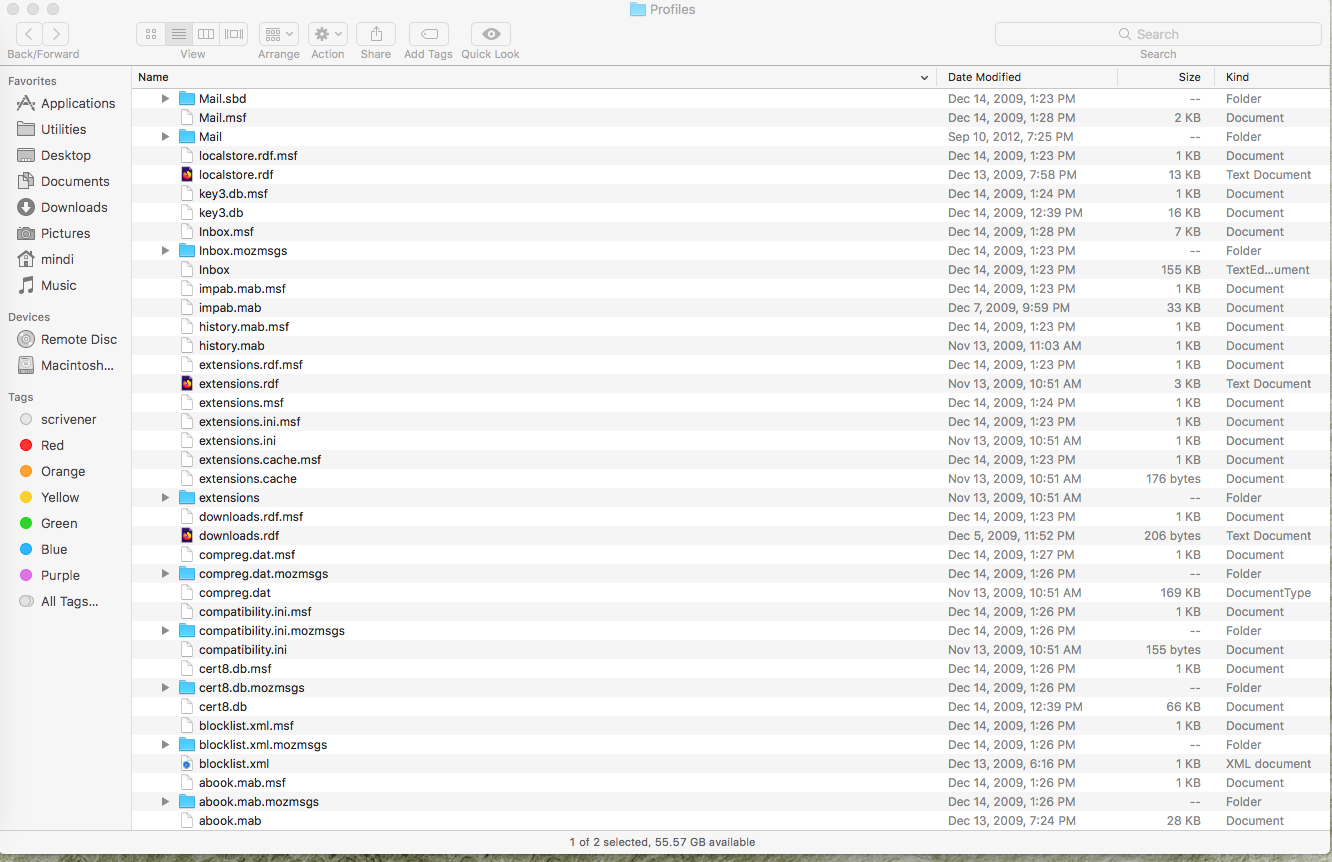
I am attaching an image of what opens when I open "Profiles" (from "Profile Folder" under "Application Basics"). There are TWO folders in there. Is that weird? In my first image, I am just showing you the two folders.
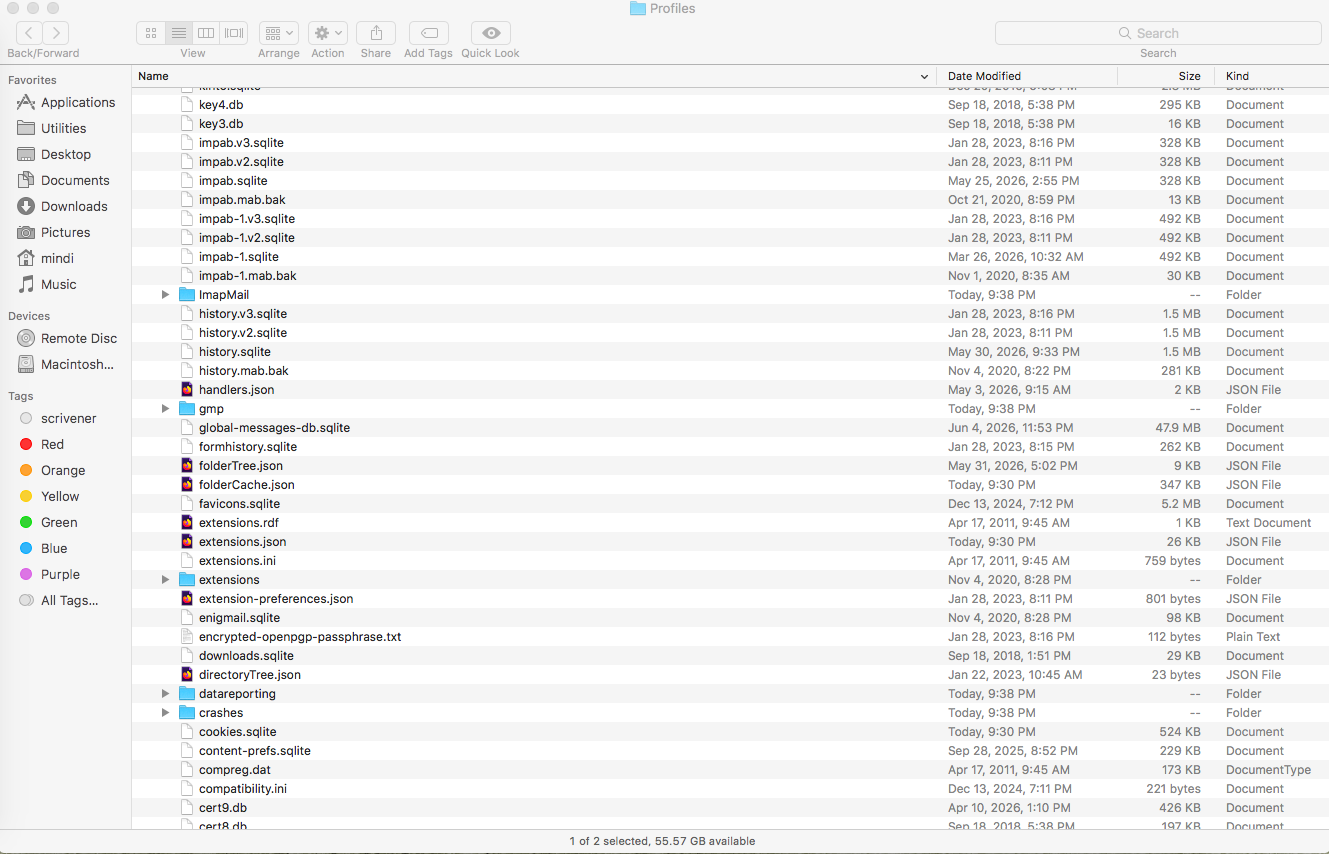
Then I am opening each folder and showing you what's in there. The first folder is shown in 3 images (labeled). The second folder is shown in 2 images (labeled).
Then I am attaching an image of the directory separately, which I obtained from opening "file info," because it is not appearing otherwise. The directory appears the same for either folder.

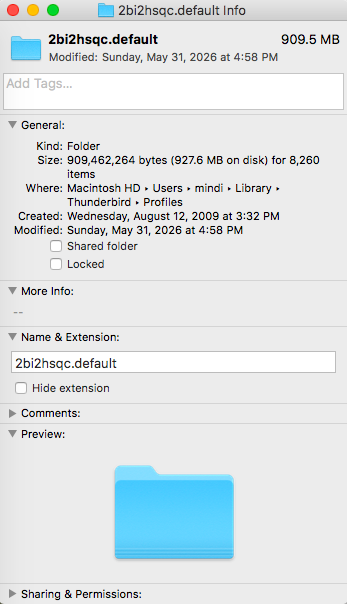
RE: Profiles.
Much earlier in previous comment, you uploaded an image showing the 'about:profiles' tab. It stated the current default profile is '7ibfekx7.default'. This might be newly created profile. All the images regarding that profile name folder appear correct.
In '7ibfekx7.default' it has a 'Mail' folder.
- Post an image showing the contents of that 'Mail' folder and make sure the image clearly shows it's the 'Mail' folder in the 7ibfekx7.default' profile.
This will tell us whether that new profile knows about the pop account.
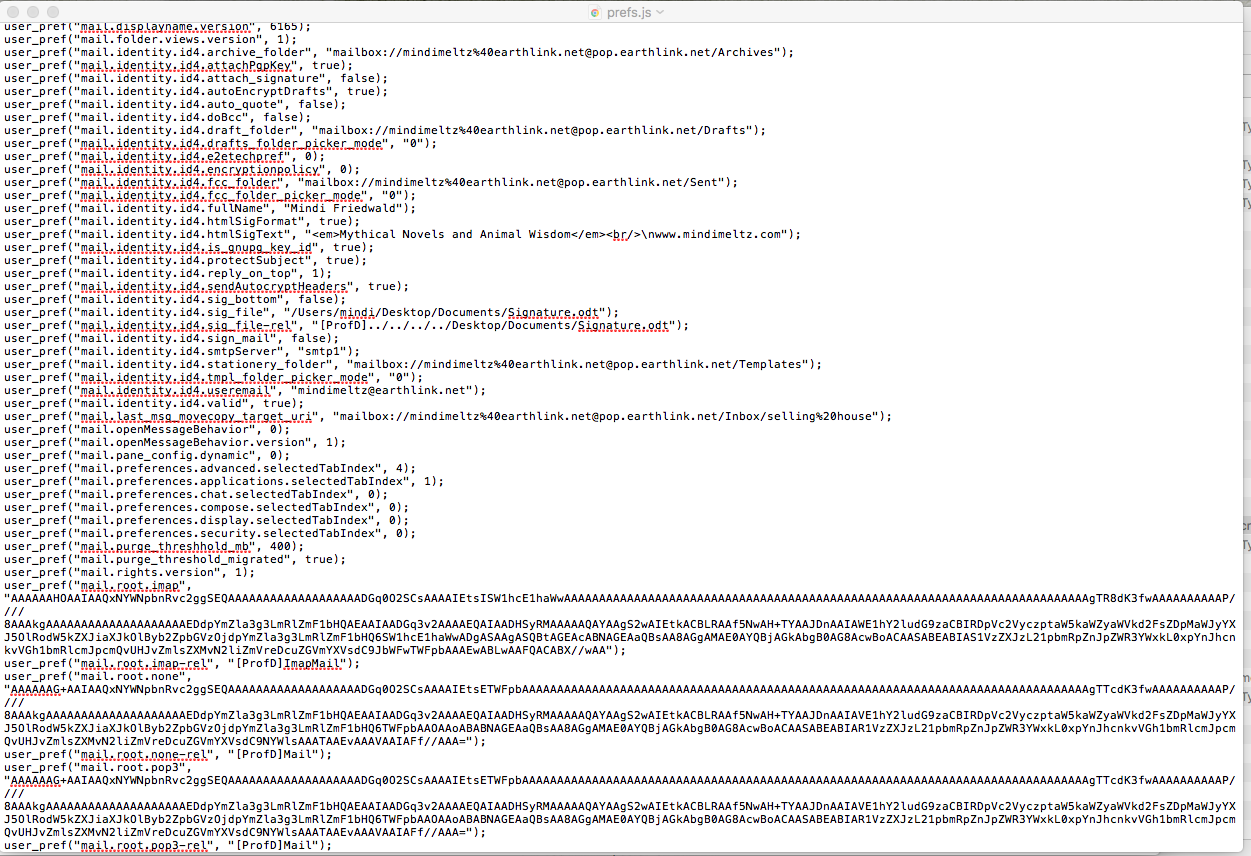
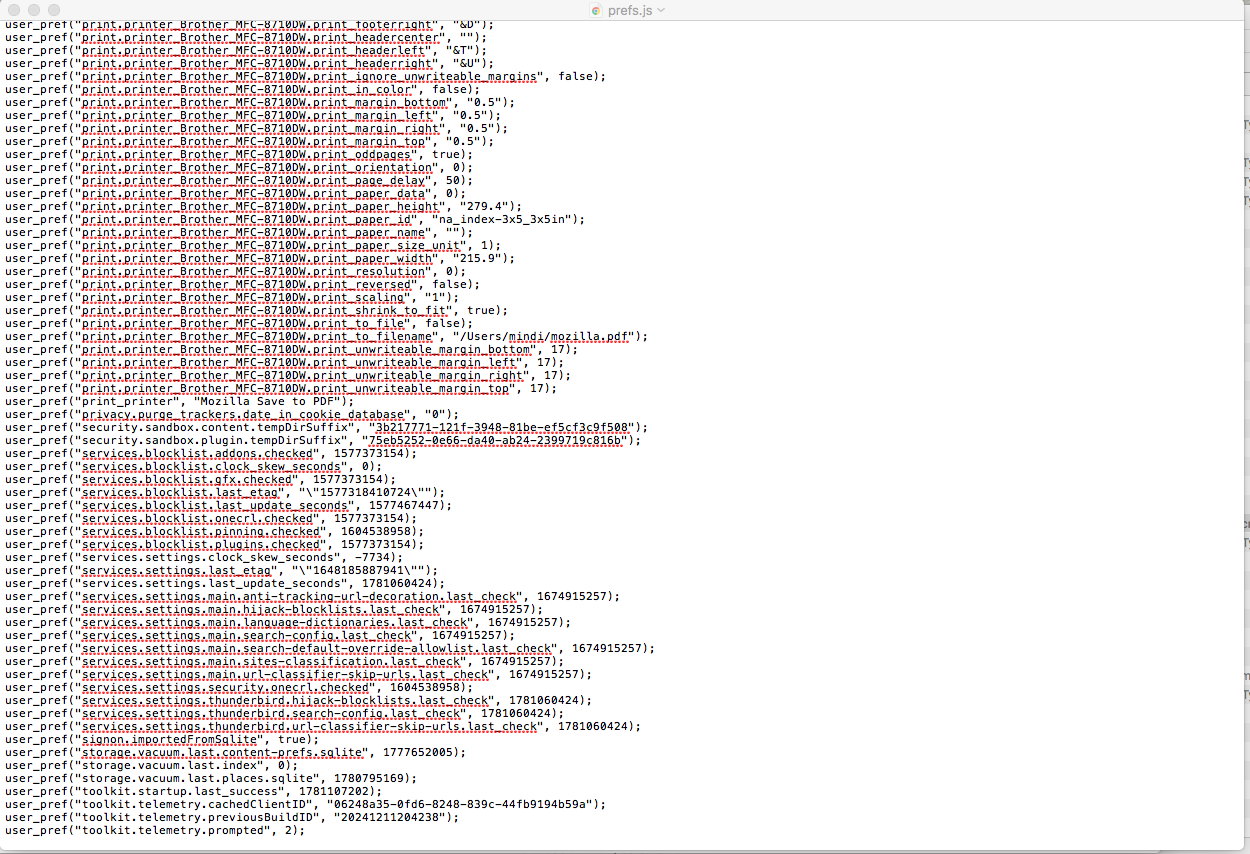
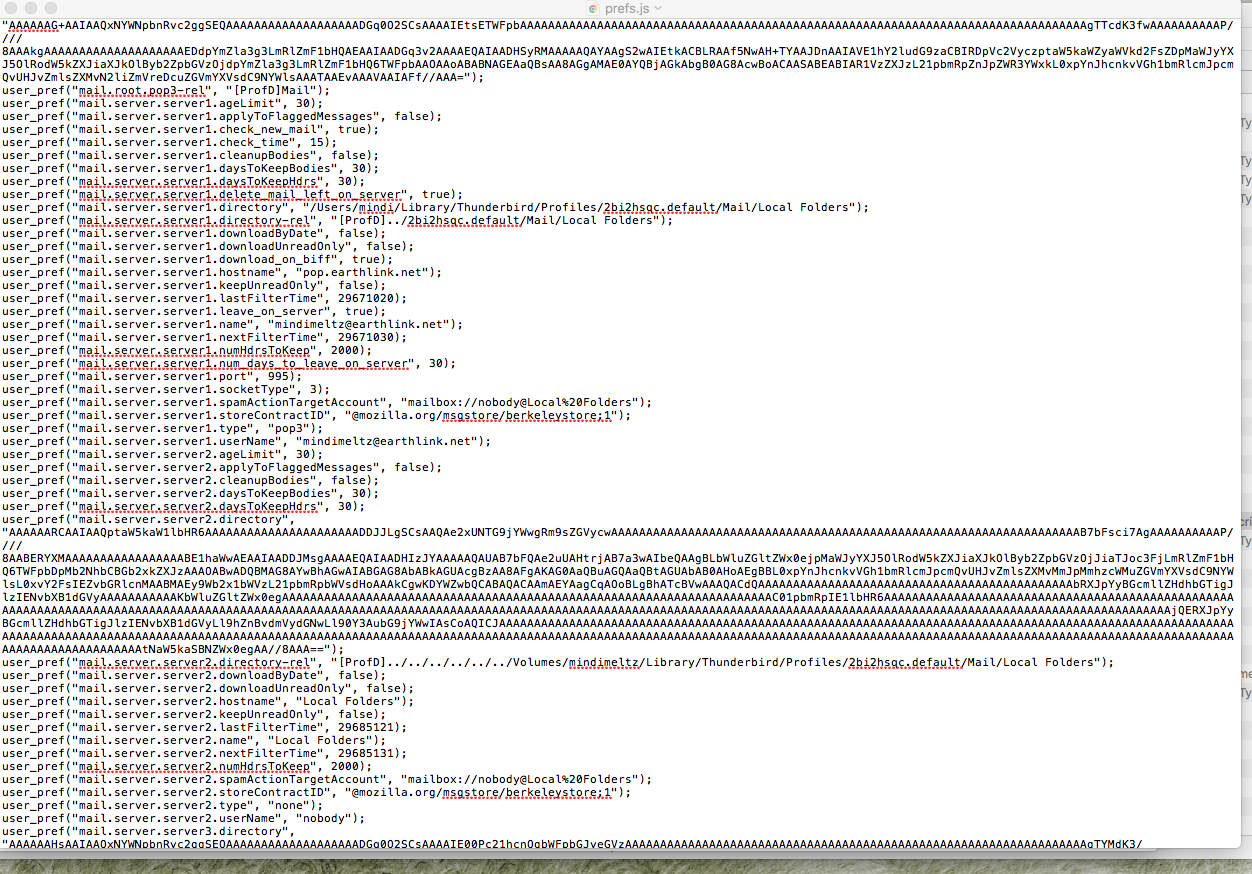
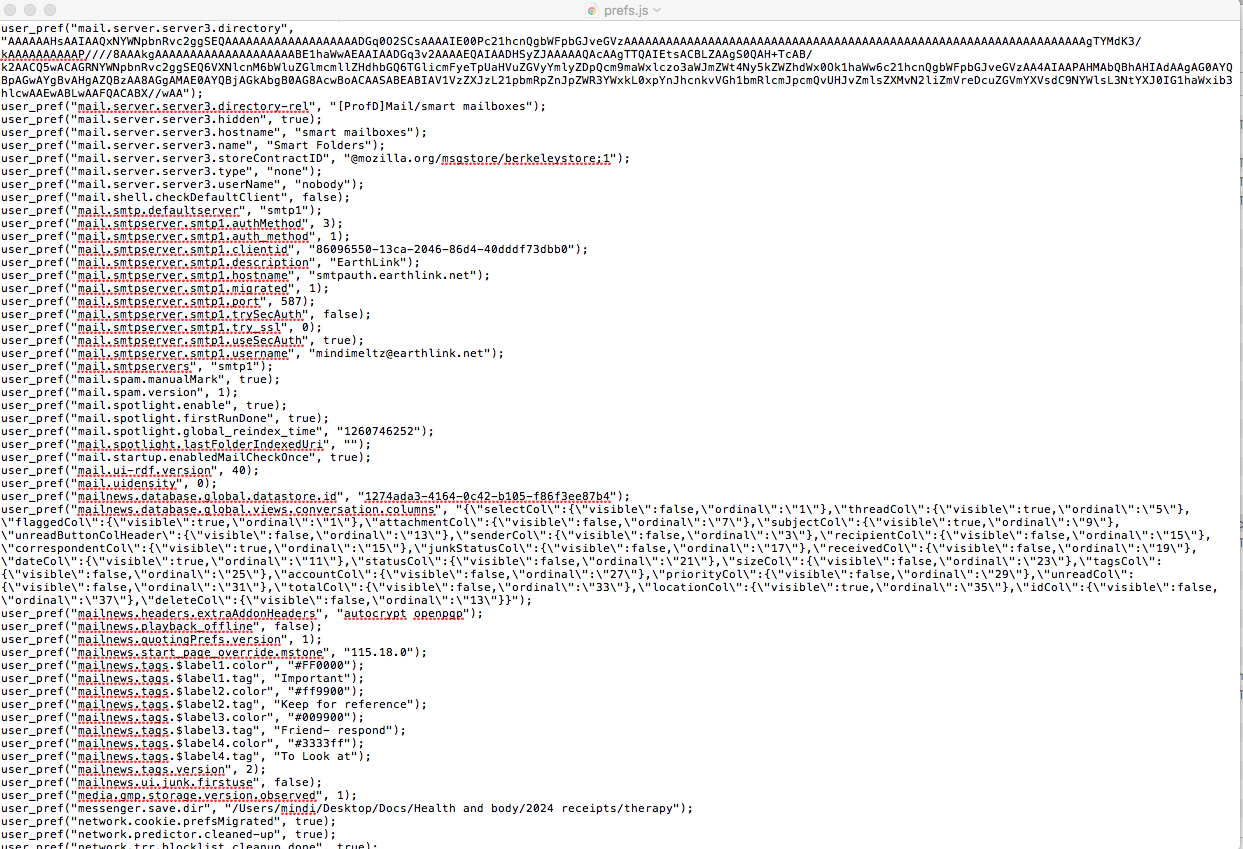
In '7ibfekx7.default' it has a 'prefs.js' file.
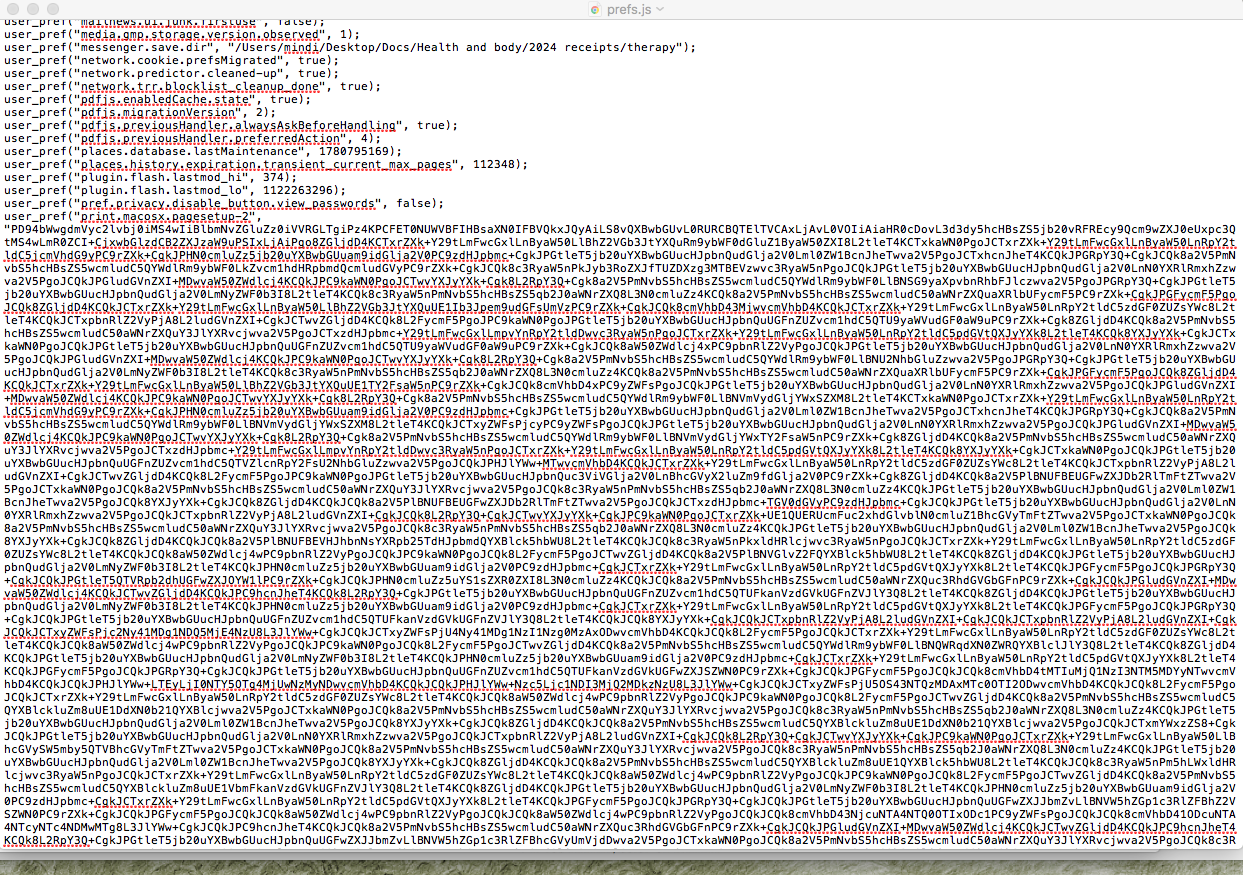
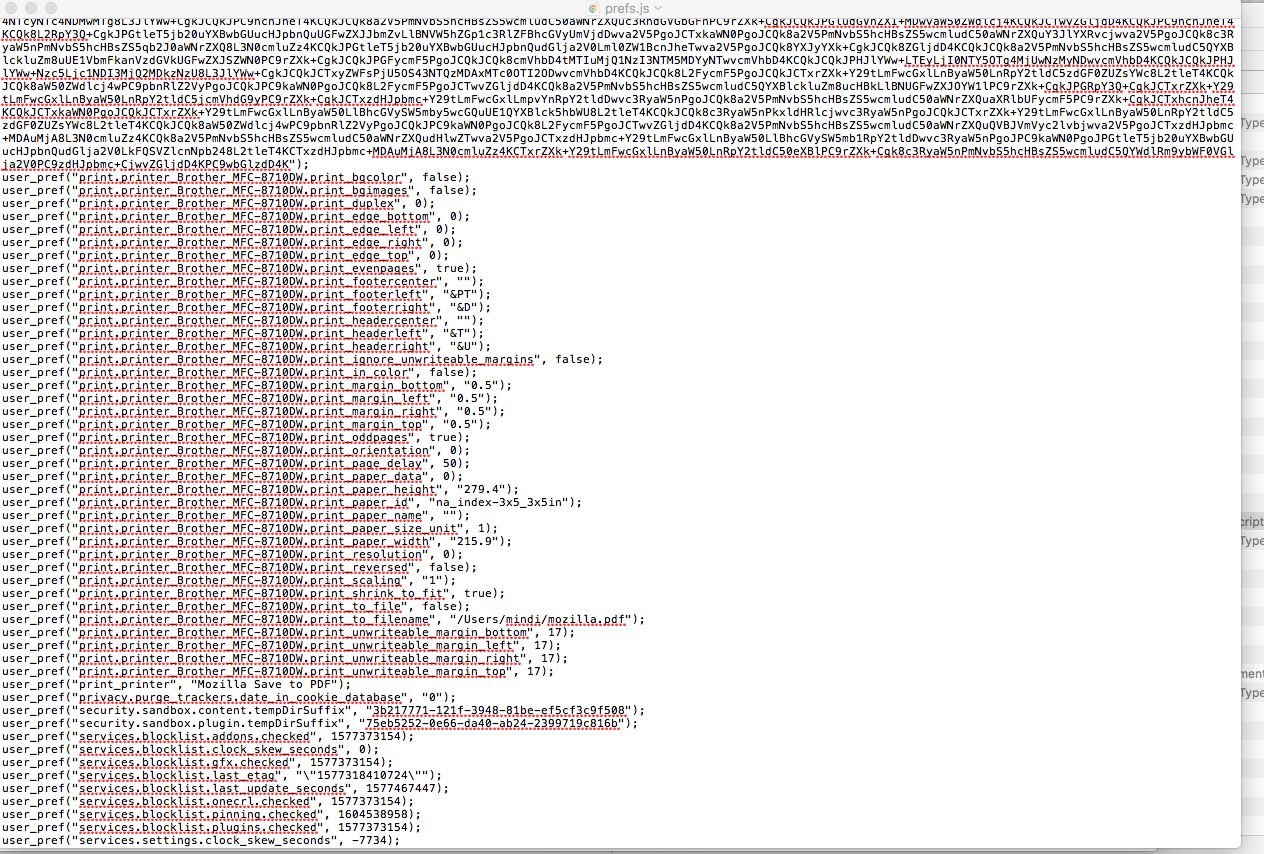
- Open that file using a simple text editor program and upload images showing contents.
That will tell me if that new profile has any knowledge of your mail accounts or not. That may be very useful.
Now lets focus on the older profile.
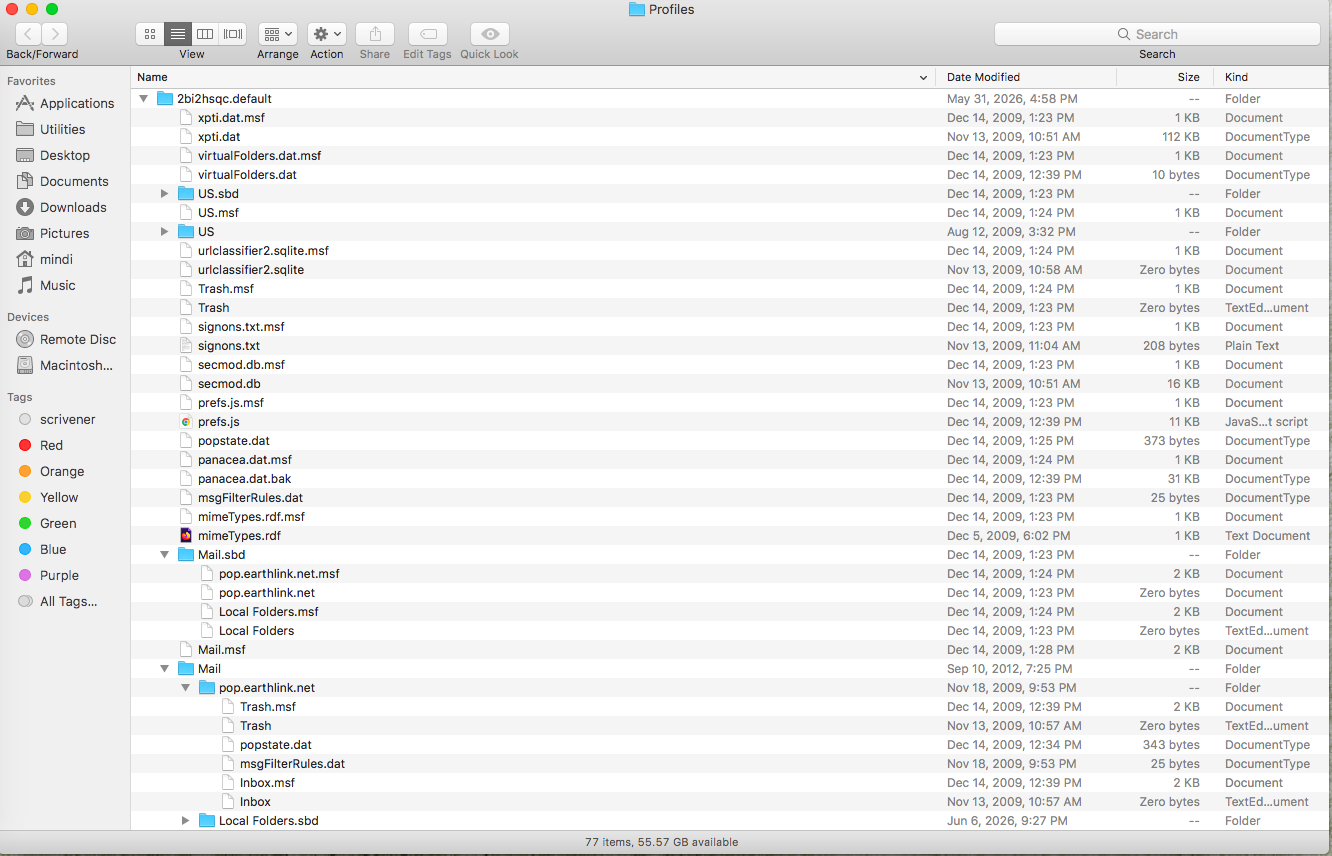
The other profile name '2bi2hsqc.default'. It's a much older profile. The images you supplied showing contents of '2bi2hsqc.default' profile show it's a mess. No idea how you managed to do it, but hey, it does explain why nothing works. You have a load of files in wrong places. Your mail account folder which should be in the 'Mail' folder would contain all the mbox files that store emails. It's also where all the index files for those email files should be located. For example - There should never be a Inbox mbox file in a profile folder. They should be in the mail account name folder located in the 'Mail' folder. There should never be a load of mozmsg in the profile name folder. There is a folder called US, now that is not a normal folder name in a profile, so I'm guessing this is a folder you created in a mail account, so it's also in the wrong place. Even the popstate.dat file is not in the mail account folder.
It explains why there are a load of .msf files in the profile name folder and they should not exist. It's messed up. It thinks your profile name folder is a mail account folder which it isn't. It can be sorted out but it's not exactly that simple. We have to understand what is where and then plan how to put things back into the correct location.
The 'Mail' folder should contain your POP mail account name folder and the 'Local Folders' folder. But does it ? Let's check this out first.
In '2bi2hsqc.default' profile, there is a 'Mail' folder which is good. There is also a Mail.sbd folder which should not exist, but we had better check what's in it.
- Post an image showing the contents of the 'Mail' folder
- Post an image showing contents of the 'Mail.sbd' folder - if it's empty just say it's empty you do not have to post image.
In the 'Mail' folder there should be a mail account name folder for earthlink. Let's hope it exists :)
- Open that pop.earthlink.net folder and post an image showing contents and make sure we can all data, files etc including modified date and size etc.
re: image of 'Local directory' Thank you for posting the 'Local directory:' data which is pointing to 'Local Folders' in the old profile. I expected this to be pointing at the new profile.
That image should have been the 'Local Folders' account, but unfortunately, you have cropped a load of data, so I do not know if I'm looking at the 'Local Folders' account OR whether I'm looking at the earthlink account 'Local directory' ? I do need to see the earthlink account local directory.
- In 'Account Settings'
- Select 'Server Settings' for the earthlink account
- Bottom right locate 'Local directory:'
- Make window wide enough so it shows all the content in the 'Local directory:'
- Post an image showing what it says - but make sure more data is also shown so I can see which account is using that local directory.
Modified by Toad-Hall
Hi Toad-Hall,
Toad-Hall said
RE: Profiles. Much earlier in previous comment, you uploaded an image showing the 'about:profiles' tab. It stated the current default profile is '7ibfekx7.default'. This might be newly created profile. All the images regarding that profile name folder appear correct.
The '7ibfekx7.default' profile is no new profile but the profile actually used by mindimindy. This profile already existed in 2011 as some modification dates suggest. And it is still in use today as shown by the modification date of the 37 kB prefs.js from Today, 9:30 PM
Toad-Hall said
Now lets focus on the older profile.
The other profile name '2bi2hsqc.default'. It's a much older profile.
Yes, this is an old profile which has no longer been used since 2009. It is not mentioned in the "About Profiles" screen shot shown above You are right, it's a mess but an old mess. No need to keep it in the "Profiles" folder. Is it possible that the OP accidentally started Thunderbird in his old profile recently? One of the screen shots show that the profile 2bi2hsqc.default has been modified on May 31, 2026.... Another screen shot shows a path to the local directory of Local Folders which leads to .... the old 2bi2hsqc.default profile! Just my 2 cents....
Toad-Hall and Mapenzi, Thanks for all your attempts to help me. I am not computer savvy and this is all a mystery to me. To my knowledge I have been using Thunderbird as normal, have not done anything different, and have not created any new profiles. One day Thunderbird told me there was a password problem when I tried to "Get Messages." I can't remember exactly what it said or how I clicked out of it (maybe I just clicked "okay" or "try again" -- not sure), but ever since then, when I click "Check Messages" absolutely nothing happens. This all happened BEFORE May 31, when Mapenzi is saying the old profile may have been suddenly reactivated. I don't understand that, because I haven't even used Thunderbird since then, other than to follow Toad-Hall's instructions for supplying information.
(To be clear, I use Thunderbird with my earthlink email account. NOT the yahoo account which I have attached to this support email request.)
Toad-Hall, I will supply all the information you have asked for in this most recent post. I have appreciated all the time and thought and effort you have put into this, so I have wanted to follow it through. However at this point, I'm not sure how far I want to continue down this rabbit hole. Please let me know if you see a light at the end of the tunnel here. Your customer service has been wonderful, but at this point I am considering finding a new email client, or asking you again -- Is there some way I can just START OVER with Thunderbird, without losing my old messages?
Now for what you requested: I am attaching an image of the contents of the mail folder in 7ibfekx7.default. The image does not show that it's the 7ibfekx7.default folder because it's not possible to expand the screen wide enough to include that. But you can trust me it is definitely that folder.
I am attaching images of the prefs.js file in 7ibfekx7.default; I hope you can make sense of them, since it took 8 images to capture it all.
I am attaching the contents of the mail folder and the mail.sbd folder from the 2bi2hsqc.default folder.
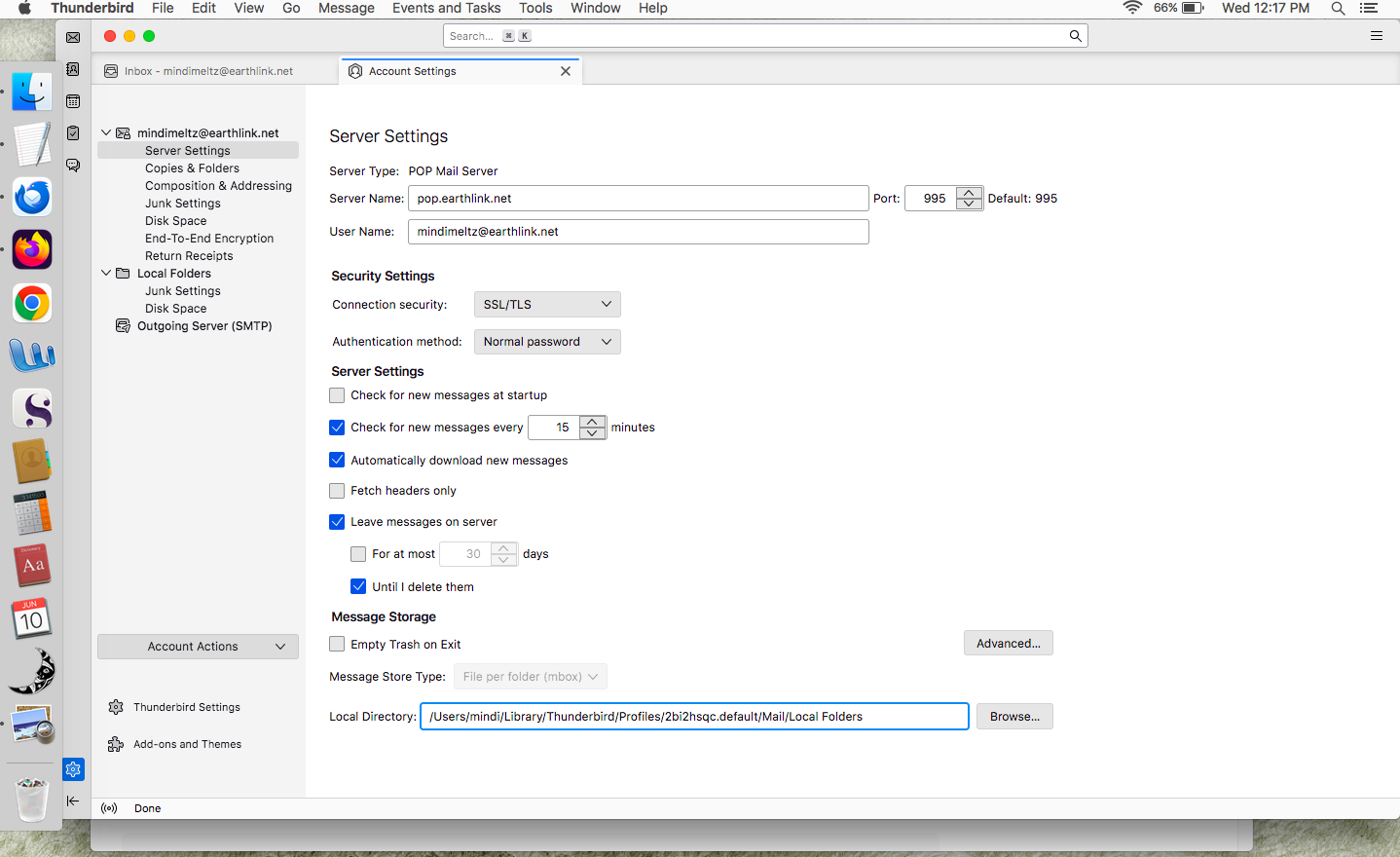
I am attaching the contents of the Local Directory. I wasn't really sure what you meant by showing the full contents. I have expanded the screen as far as it could go, and taken an image of my entire computer screen.
Again, if there is not a fairly quick solution based on this information, I would ask you if there is a way for me to simply begin over with Thunderbird. Thanks.
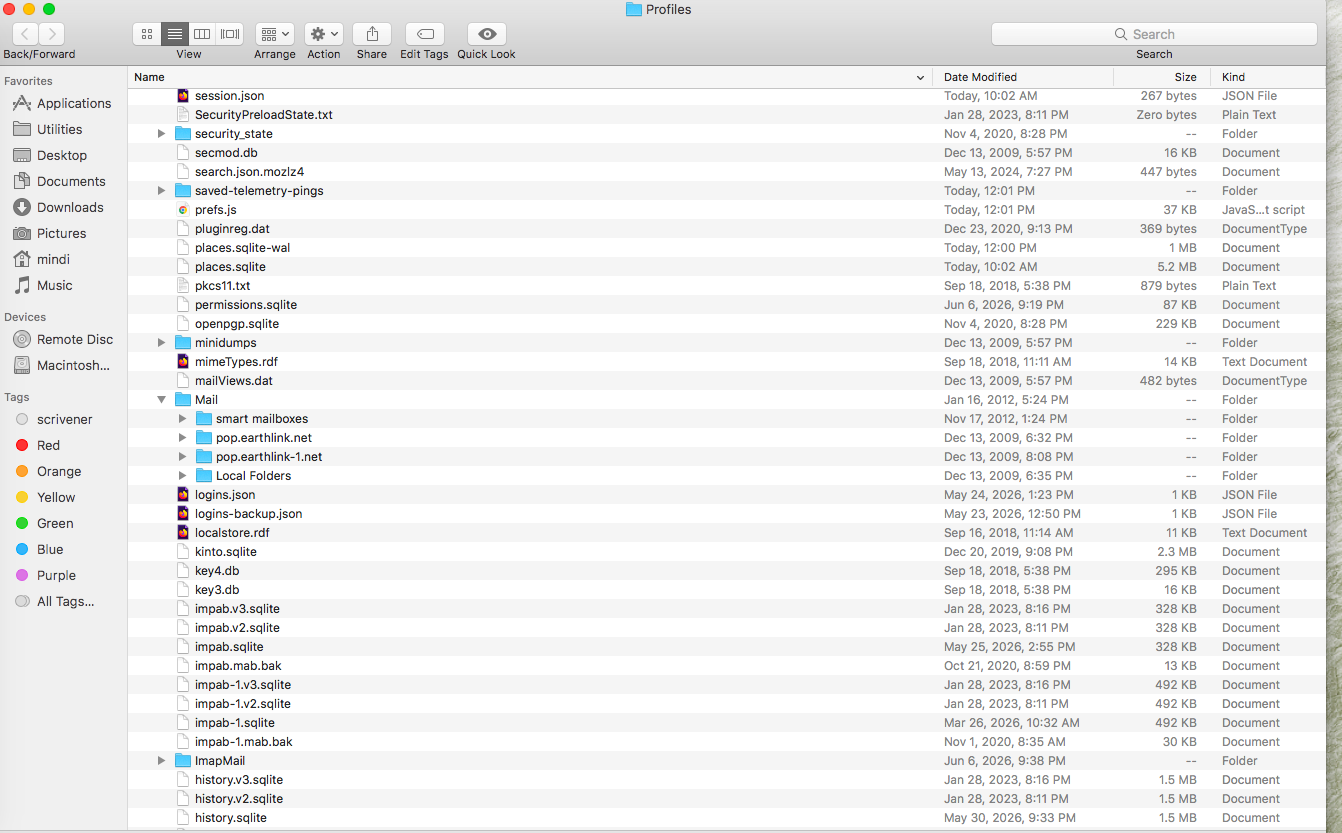
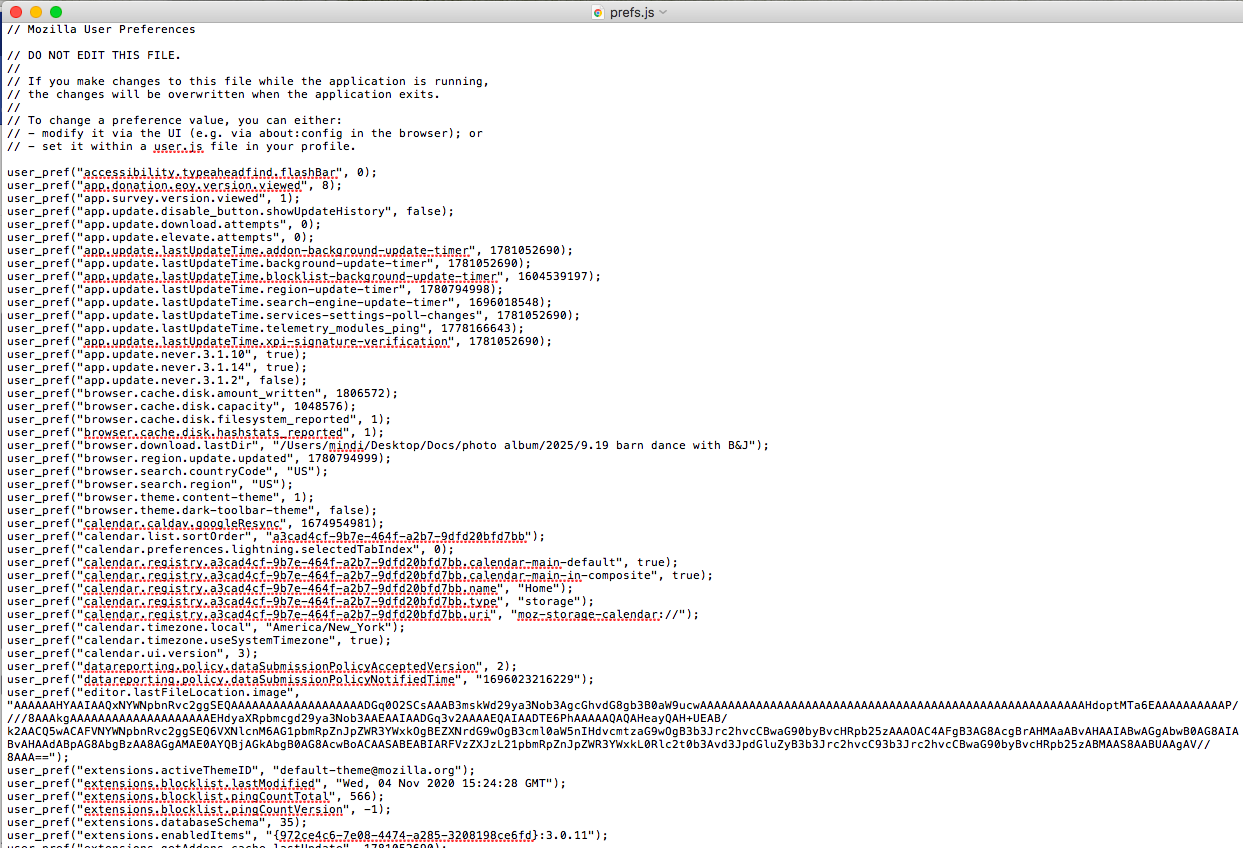
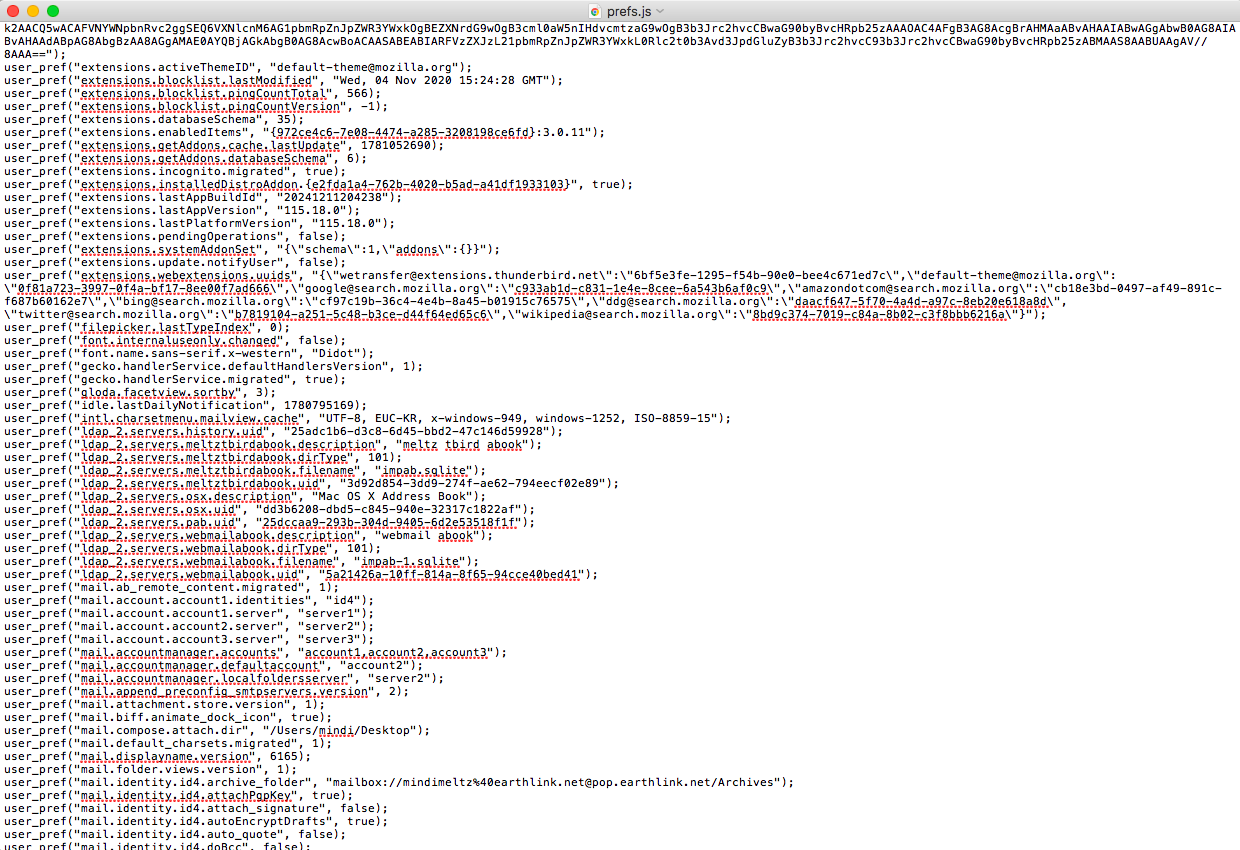
Hi mindimindy, Your screen shots indeed show anomalies which at this point I cannot easily interpret although I am not a newbie (Mac and Thunderbird - respectively Netscape and Mozilla Suite - user since the last century).
The screen shot with the contents of your old 2bi2hsqc.default profile shows a "Local Folders.sbd" folder in the "Mail" folder which has been modified on June 6, 2026, four days ago!
How is this possible? Maybe the answer is given in the last screen shot showing the Server Settings > Message Storage of your @earthlink.net POP account: here the path to the local directory of your pop account messages leads to the Local Folders in your old profile 2bi2hsqc.default, a situation I have never seen in many years in Thunderbird forums.
One interpretation could be that when you created your actual 7ibfekx7.default profile and set up your @earthlink.net POP account, for an unknown reason you (or another person did it for you) subsequently modified the path to the local directory of the message storage in the old 2bi2hsqc.default.... But why link the local directory of the new account with Local Folders in the old profile and not with a "pop.earthlink.net" account folder in "Mail"?
You may provide further information with some more screen shots: • contents of the folder "Mail" in the 7ibfekx7.default profile folder • contents of the "Local Folders.sbd" in the "Mail" folder in the 2bi2hsqc.default • contents of the profiles.ini file (to open with Text-Edit.app) you'll find in the "Thunderbird" folder or your user Library (see image) • contents of the ImapMail folder in the 7ibfekx7.default profile folder
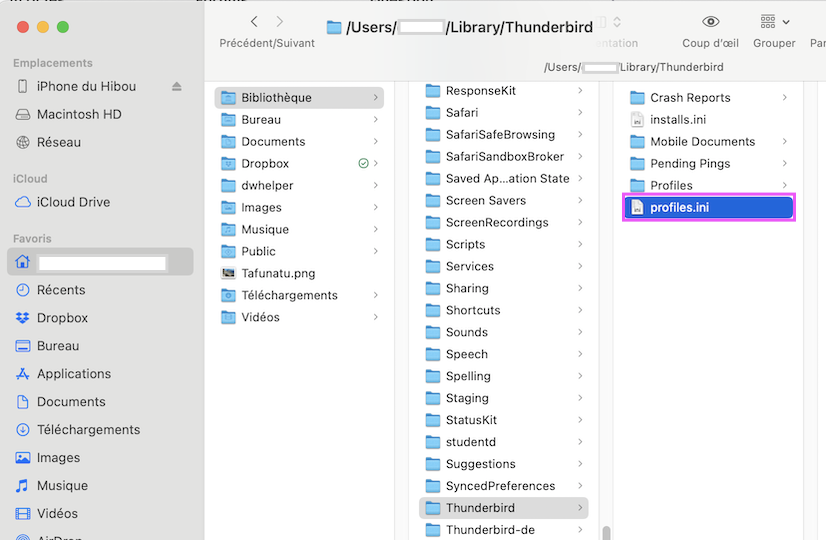
Well, it's interesting to know that I have a problem even the experts have never seen before! To clarify, it's not entirely true that I've done nothing in Thunderbird for a while... Every so often I go in there and click "Get Messages" again (nothing happens), either just for the hell of it or because Toad-Hall has asked me to try something and then try again (you can see what he has suggested in our past exchanges). And every so often I also send a message from Thunderbird, because it still allows me to send messages -- just not receive them. So it's possible that four days ago I did one of these things.
Again, thanks for your time on this, both of you, but it's been weeks now and I've spent a number of hours taking images of information and sending them and waiting for replies and further requests for information... I think at this point, there is no clear end in sight, so unless Toad-Hall has some idea for a fix, I think I'm going to move on and try to find a new email client. I'm sorry because I did really love Thunderbird.
And I will ask you both one more time, as neither of you have answered this question: IS THERE A WAY FOR ME TO START OVER WITH THUNDERBIRD, without losing my old folders and messages? Can I just ditch this account and start over somehow?
"And I will ask you both one more time, as neither of you have answered this question: IS THERE A WAY FOR ME TO START OVER WITH THUNDERBIRD, without losing my old folders and messages? Can I just ditch this account and start over somehow?" My answer is YES, this could be done. But since you have a POP account it would require still more screen shots and then put many pieces of the puzzle together to get a new working account for your @earthlink.net email address. And this certainly won't be done in one day ... since you even didn't show the screen shots I asked you in my previous answer. In a case like yours there is no miraculous solution without screen shots ! It would be much easier if you knew a person familiar with Thunderbird profiles who would do this while sitting before your screen.
Modified by Mapenzi
OK. Thanks for images. The profile you should be using is 7ibfekx7.default as it's not corrupted and is the profile set up as default in 'about:profiles'. The Prefs file confirms that profile knows about your mail accounts, so that's good. But at this moment Thunderbird cannot see them because your Account Settings are looking a the other profile which is not helpful. They are also looking at the Local Folders account and not the pop mail account. The prefs also implies Local Folders is set up as default account, so we could do with checking a that as well.
Please do the following and then report back on the results. Do not worry about anything. This is not deleting or doing anything weird with any of your data. You are just going to reset your Account Settings to look in a specific location.
- In 'Account Settings'
- In left pane - Select the name of the earthlink account
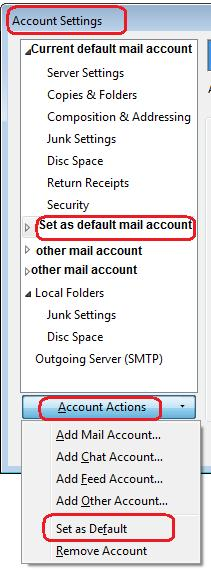
- click on 'Account Actions' to see drop down and select 'Set as default' if it's not greyed out.
See image below as guide
Then...
- Select 'Server Settings' for the earthlink.net account
- Click on the 'Advanced' button
- Select 'Inbox for this servers account' (if already selected that's ok, but tell me if you had to select it)
- click on 'OK'
In same location - Server Settings
- Bottom right - 'Local directory'
- click on 'Browse'
A new window opens and it will be looking at : /Profiles/2bi2hsqc.default/Mail/Local Folders
- You need to select the following location: Profiles/7ibfekx7.default/'Mail' folder
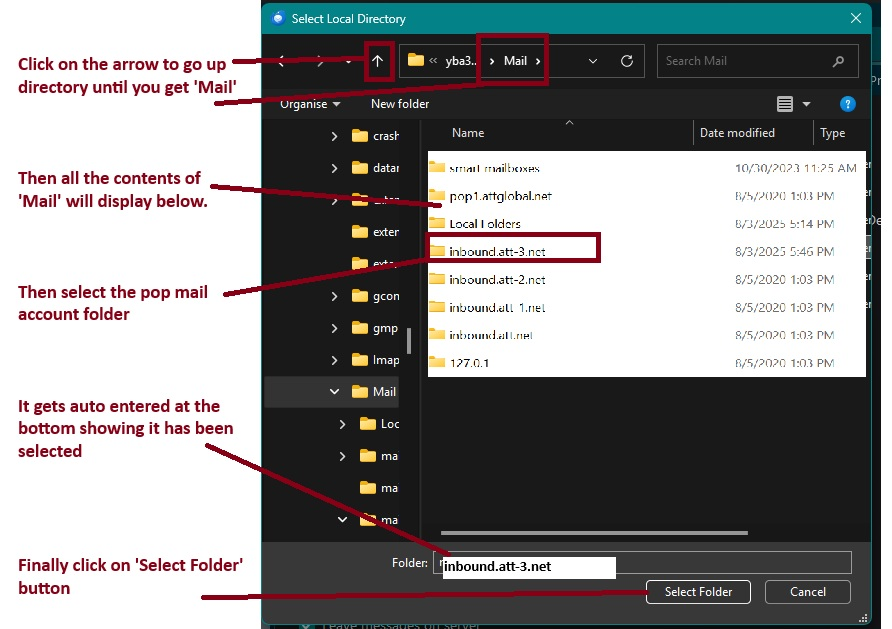
First you need to go back up to the 'Profiles' folder, then select the correct profile 7ibfekx7.default, then select the Mail folder - so you can see the list of pop accounts and Local Folders.
- Select the pop mail account folder - pop.earthlink.net - to highlight it - that folder now displays below where it says 'Folder:'
- Then click on the 'Select Folder' button
I've added an image below which is just a guide, but may help.
Then the 'Local directory:' should say this:
- C://Users/mindi/Library/Thunderbird/Profiles/7ibfekx7.default/Mail/pop.earthlink.net
Now check the 'Local Folders'
- In Account Settings
- In left pane select' Local Folders'
- Bottom right - 'Local directory'
If it says this then all is good:
- C://Users/mindi/Library/Thunderbird/Profiles/7ibfekx7.default/Mail/Local Folders
If it does not say that:
- click on 'Browse' to open a window so you can locate the correct folder.
go back up to the 'Profiles' folder, then select the correct profile '7ibfekx7.default', then select the 'Mail' folder - so you can see the list of pop accounts and 'Local Folders'.
- This time Select the 'Local Folders' folder - to highlight it - that folder now displays below where it says 'Folder:'
- Then click on the 'Select Folder' button
It should now say
- C://Users/mindi/Library/Thunderbird/Profiles/7ibfekx7.default/Mail/Local Folders
Now I need you to check the individual folders are correctly selected. Still In 'Account Settings'
- Select 'Copies and Folders' for the earthlink account
- Select checkbox 'Place a copy in'
- Select 'Sent folder on: and select the pop earthlink mail account name
- Select checkbox 'Keep message archives in:'
- Select 'Archives' folder on: and select the pop earthlink mail account name
Drafts and Templates
- Select 'Drafts' folder on: and select the pop earthlink mail account name
- Select Templates' folder on: and select the pop earthlink mail account name
In left pane
- select 'Junk Settings' for the earthlink account
- Select checkbox 'Enable adaptive junk mail controls for this account'
- Select your address books - they act as a whitelist of good email addresses.
Under Destination and Retention
- Select checkbox 'Move new junk messages to'
- Select 'Junk folder on: and select the pop earthlink mail account name
Not sure but if your version still has the 'OK' button then click on it.
Exit Thunderbird - make sure program has been exited/quit and not just closed the window. Wait a few moments whilst all background processes complete.
Start Thunderbird.
Please report on what you now see.
Modified by Toad-Hall