


Thunderbird Mailprogramm, Alle Ordner der Konten verschunden

Sehr geehrte Damen und Herren, plötzlich sind von allen Konten die Unterordner mit allen Mails verschwunden. ES gibt auch kein Junk Ordner mehr. Wie kann ich es wieder herstellen? Mit freundlichen Grüßen, Matthias Brockmann
All Replies (8)
Hier noch ein Screenshot, wo zu sehen ist, dass alle Unterordner der Konten fehlen.

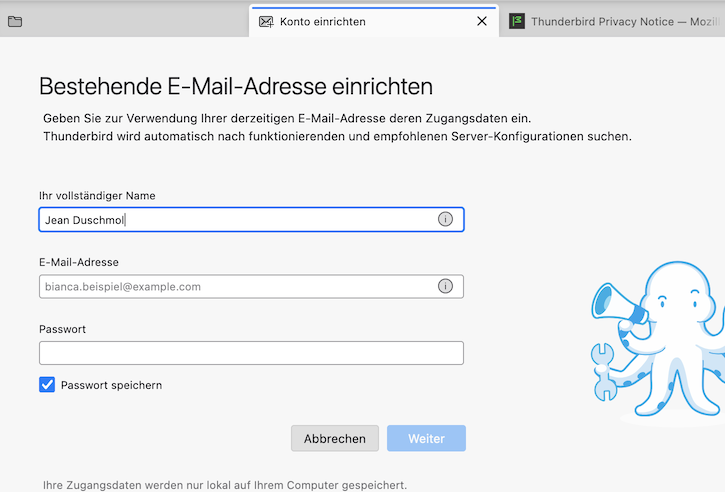
Hallo Matthias, bitte in der nächsten Antwort den Screen shot einfügen. Sieht dein Thunderbird-Hauptfenster beim Start etwa so aus wie in meinem Bild, mit einer Aufforderung eine bestehende E-Mail-Adresse einzurichten?
matthias_brockmann said
Dear Sir or Madam, Suddenly, all subfolders containing all emails have disappeared from all accounts. There is also no longer a junk folder. How can I restore it? Kind regards, Matthias Brockmann
Right-click the account in the Folder Pane, Subscribe..., Refresh. Can you see the list of missing folders and subscribe them (check the boxes)?
Dear Sir or Madam, no, there is no "Subscribe…" and then "Update" option when right-clicking on any of the accounts.
This option is not available for any of my accounts. It's not available in the settings either, nor within the individual account settings. The only options are "New Folder," "Reset Folder Order," and "Mark All Folders as Read." Even though I have the latest version of Thunderbird.
matthias_brockmann said
Dear Sir or Madam, no, there is no "Subscribe…" and then "Update" option when right-clicking on any of the accounts.
This means that you have created POP email accounts. The "Subscribe" option only exists for IMAP accounts
In order to progress in our diagnostic search please show the screen shot which you announced or reply to my question "Sieht dein Thunderbird-Hauptfenster beim Start etwa so aus wie in meinem Bild, mit einer Aufforderung eine bestehende E-Mail-Adresse einzurichten?"
I didn't want to publicly display all my accounts here. No, my initial setup looks like this: all accounts are present. All accounts also have trash and junk folders after I reactivated them. But all my old emails are missing, even though I specified the storage space on my D: drive. That is, I deleted the profiles contents from the new folder and copied my profiles files from the D: drive into it. I've done this many times before, and it always worked. I just tried to send an email. Specifically, I wanted to reply to two recipients. Just text, no attachments, and it's not working. It says there's not enough storage space. I've deleted all emails from the junk, spam, and trash folders. My C: and D: drives also have plenty of free space. I've never had this problem before. What's going on? Sincerely, Matthias Brockmann
matthias_brockmann said
I didn't want to publicly display all my accounts here.
Nobody asked you to do that, but your description doesn't give much info. Screen shots are often needed in this forum for diagnostic purpose, not to spy on people. In my first reply I asked whether you Thunderbird main window looked like in my screen shot when all your folders disappeared but you didn't matter.
matthias_brockmann said
That is, I deleted the profiles contents from the new folder and copied my profiles files from the D: drive into it. I've done this many times before, and it always worked.
From which new folder? Did you create a new Thunderbird profile? Or where did this "new folder" come from? Do you have a recent backup copy of your Thunderbird profile?
It happens sometimes (PC crash, Thunderbird crash, power failure, ...) that the most important central file prefs.js gets damaged. In such a case TB renames the corrupt prefs.js file in prefs-x.js (or sometimes in invalidprefs.js) and creates a new virgin prefs.js file of 6 to 7 kB size which doesn't contain any account settings. So TB on startup asks you "to set up your existing email address", as if it were a first start after installation
With your description it is impossible to know what really happened. My usual suspect is a corrupt prefs.js file, or maybe you created a new profile for un unknown reason. Go to Help < Troubleshooting information > Profile Folder > Open Folder.... then quit Thunderbird. Now in the profil folder search for a prefs-1 or prefs-xx.js file with an actual creation date
Thank you very much. I've now reinstalled Thunderbird because another error occurred. I will back up the data from the Profiles folder regularly.