


Email folders not transferred when Thunderbird account set up

I set up a Thunderbird account to transfer all my past emails from my ISP. I get current email in Thunderbird but no folders with saved emails transferred
All Replies (16)

yes no message to myself received in Thunderbird, in fact there has been no message received since 1150 this afternoon.
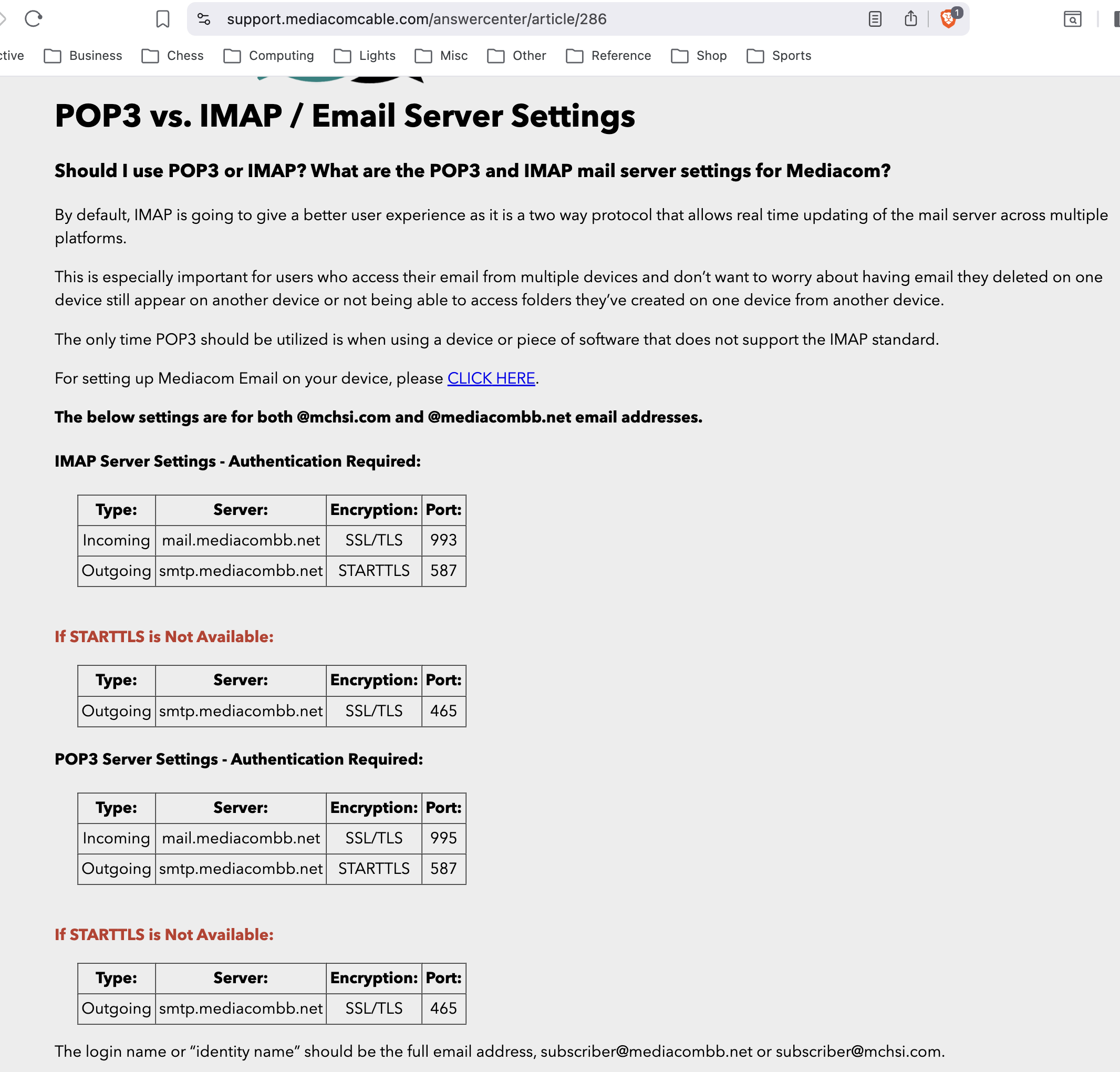
I'm hoping that changes after you correct the incoming server name to be mail.mediacombb.net.
I did not use the encrypted password since I have never used something like that so I used the password I have had for the last few months and I can remember it.
The encrypted password is not a different password. It is a way of transmitting your password. I am more optimistic about using "normal password" instead. Let's stick with that.
I have a virus program called Total Defense that mediacom uses they recommended I use that as I have problems logging onto their email server periodically.
I don't know how anti-virus software would help someone use a website.
Ant-virus software can create many problems in Thunderbird. The common recommendations are to use only Windows built-in anti-virus software. If someone insists on using another one (and maybe in addition to the one in Windows?!), they should make an exception in its rules for Thunderbird. If your mail does not start arriving after you change the name of the incoming server, we should try running Thunderbird without Total Defense active.
All of the folders I created are still there under the Local Folders heading, all empty though.
They will be empty until you put messages in them. We are not ready to do that because we are not yet getting messages from the server to put into them.
One confusing thing is that under my inbox are folders that transferred from my mediacom account with content but only 3... Trash, Healey and Read Mail.
And you have many more folders that you created on the server, right? Again, I am hoping that they appear (or we can make them appear) after you change the name of the incoming server.
Hang in there.
tld6008 said
I changed it and the connection is refused everytime I try to get mail
What does the error message say?
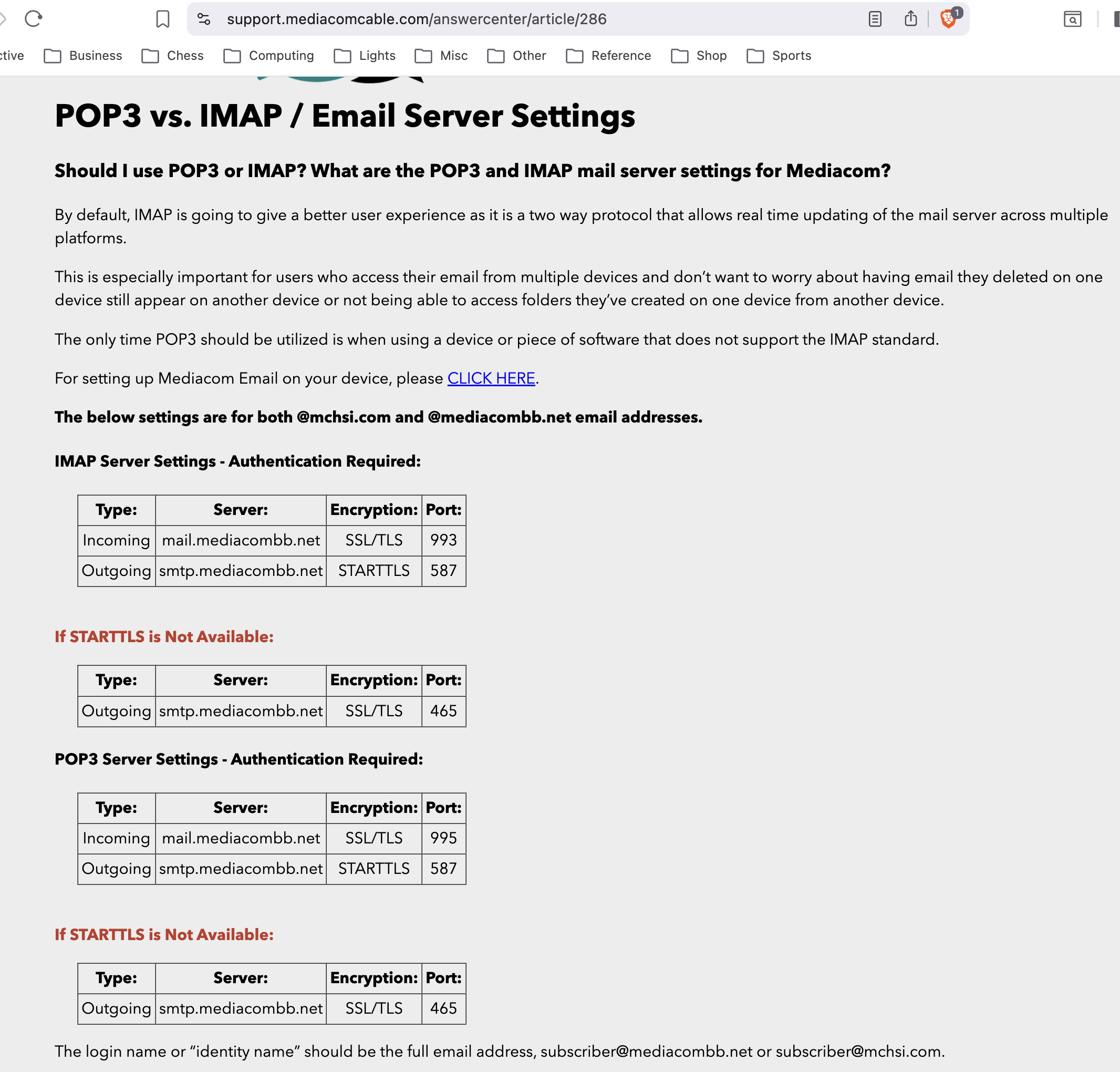
The attached image shows the settings that you should be using and that I believe you are using. The only other thing that I can think to check is your password. Try this:
- Three-line button > Settings > Privacy & Security (on the left) > Passwords (on the right) > Saved passwords > Show password
- Expand the window to see passwords.
- Is your password in the row for your IMAP connection correct? If not, correct it and try to send yourself a test message now. Is it sent and received?
If your password was/is correct and you are still not receiving messages, try this:
- Start Windows 10 in safe mode with networking enabled.
https://support.microsoft.com/help/12376/windows-10-start-your-pc-in-safe-mode
- Still in Windows safe mode, start Thunderbird in troubleshooting mode.
https://support.mozilla.org/kb/safe-mode
- If you send yourself a test message, is it sent and received?
Windows safe mode disables anti-virus software. This is a troubleshooting step, not a solution.
This has been much work. You must be frustrated and worn out and tired of it. I wish that I knew why you are not able to receive messages.
Plan B: When you sign in to webmail, look around, do you see an option for exporting your mail?
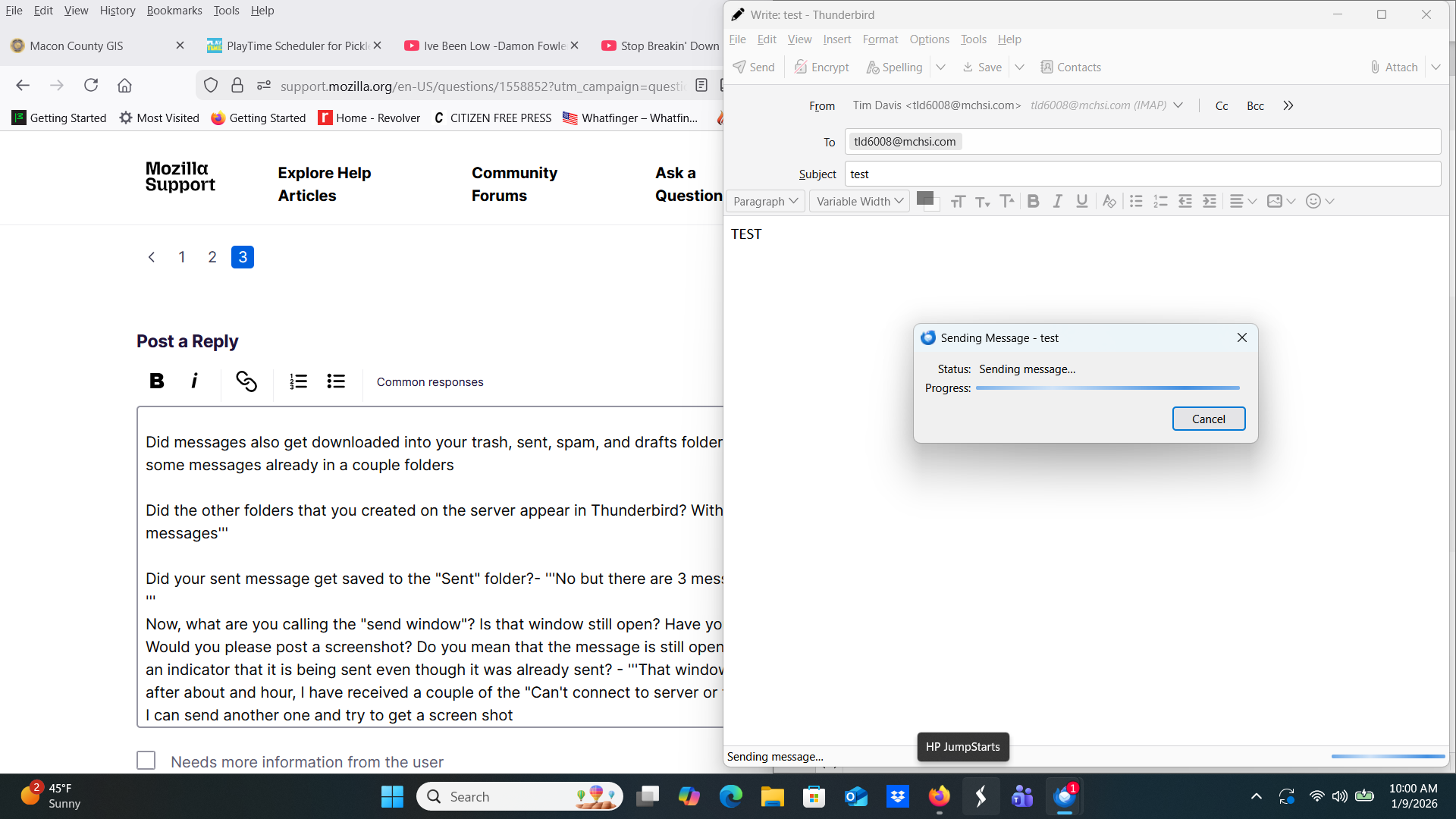
I disabled Total Defense for Thunderbird and sent an email to myself and it went through immediately also other messages were received into the inbox...but the Thunderbird send window is still showing the message is being sent after 5 minutes
tld6008 said
I disabled Total Defense for Thunderbird and sent an email to myself and it went through immediately also other messages were received into the inbox...but the Thunderbird send window is still showing the message is being sent after 5 minutes
Yay! Progress. I lay in bed for a while this morning, trying to figure out what was wrong.
Let's make sure we understand the current situation. You can send messages from Thunderbird. You can receive messages in Thunderbird. Right? Good.
Did all the messages from the inbox on the server get downloaded into your inbox in Thunderbird?
Did messages also get downloaded into your trash, sent, spam, and drafts folders?
Did the other folders that you created on the server appear in Thunderbird? With their messages?
Did your sent message get saved to the "Sent" folder?
Now, what are you calling the "send window"? Is that window still open? Have you received an error message? Would you please post a screenshot? Do you mean that the message is still open in a "compose" window with an indicator that it is being sent even though it was already sent?
Let's make sure we understand the current situation. You can send messages from Thunderbird. You can receive messages in Thunderbird. Right? Good.
Did all the messages from the inbox on the server get downloaded into your inbox in Thunderbird? -YES
Did messages also get downloaded into your trash, sent, spam, and drafts folders?-NO although there were some messages already in a couple folders
Did the other folders that you created on the server appear in Thunderbird? With their messages?- No new messages
Did your sent message get saved to the "Sent" folder?- No but there are 3 messages from 2009 in there Now, what are you calling the "send window"? Is that window still open? Have you received an error message? Would you please post a screenshot? Do you mean that the message is still open in a "compose" window with an indicator that it is being sent even though it was already sent? - That window was frozen and I closed it after about and hour, I have received a couple of the "Can't connect to server or the Connection refused" I can send another one and the screenshot is attached the message went through immediately but the progress window just keeps running
Our priority is the messages in the folders that you created on the server. Would you please tell me about them? How many? Are they sub-folders of your inbox on the server or are they at the same level as the inbox?
Your answer to my question about them is not clear. Do any of those folders now appear in Thunderbird? Are they sub-folders of your inbox or are they at the same level as the inbox? Do they have any messages in them? If some folders do not appear, do you see them in the list of folders when you right click on the account name in the folder pane and select "Subscribe"?
Something is preventing your sent messages from being saved and maybe interfering with receipt of some messages too. I think that you should try Windows in safe mode with networking instead of just disabling Total Defense.
Are you using any add-ons in Thunderbird?
And please tell me more about your computer. Which version of Windows? Did you get Thunderbird from thunderbird.net or from the Microsoft Store? Which version of Thunderbird? To find out, select "About" from the "Thunderbird" menu in the application menu at the top of the window. If it is not visible, press <alt> to show it.
When will your account with Mediacomm end? Can you extend it if you need to?
I do not know why getting this IMAP account to work is this difficult. I will soon run out of ideas.
Our priority is the messages in the folders that you created on the server. Would you please tell me about them? How many? Are they sub-folders of your inbox on the server or are they at the same level as the inbox? I have 17 folders that I created and I would assume they are subfolders only because I created them, they are in line vertically with all the folders above them and can be hidden under the first folder which is INBOX
Your answer to my question about them is not clear. Do any of those folders now appear in Thunderbird? YES there are six that were moved by Thunderbird and have content as the Mediacom version of them, Also there are the 14 that I added under Local Folders none of them have content but three of them are duplicates of the ones that did transfer with all the content
Are they sub-folders of your inbox or are they at the same level as the inbox? All with content are sub folder to Inbox, all the others are ones I added and a subs to the Local Folder... see screenshot Do they have any messages in them? YES the subfolders of inbox If some folders do not appear, do you see them in the list of folders when you right click on the account name in the folder pane and select "Subscribe"? No folders show up using the subscribe feature, the connection is refused when trying to get the folders..I guess Something is preventing your sent messages from being saved and maybe interfering with receipt of some messages too. I think that you should try Windows in safe mode with networking instead of just disabling Total Defense.
Are you using any add-ons in Thunderbird? Nothing added by me intentionally
And please tell me more about your computer. Which version of Windows? Its 10 or 11 Did you get Thunderbird from thunderbird.net or from the Microsoft Store? Just searched for thunderbird on web. have never used MS store Which version of Thunderbird? 146.0.1 To find out, select "About" from the "Thunderbird" menu in the application menu at the top of the window. If it is not visible, press <alt> to show it.
When will your account with Mediacomm end? 2 more week Can you extend it if you need to? Yes but I don't want to as I am paying for 2 ISPs now I do not know why getting this IMAP account to work is this difficult. I will soon run out of ideas.
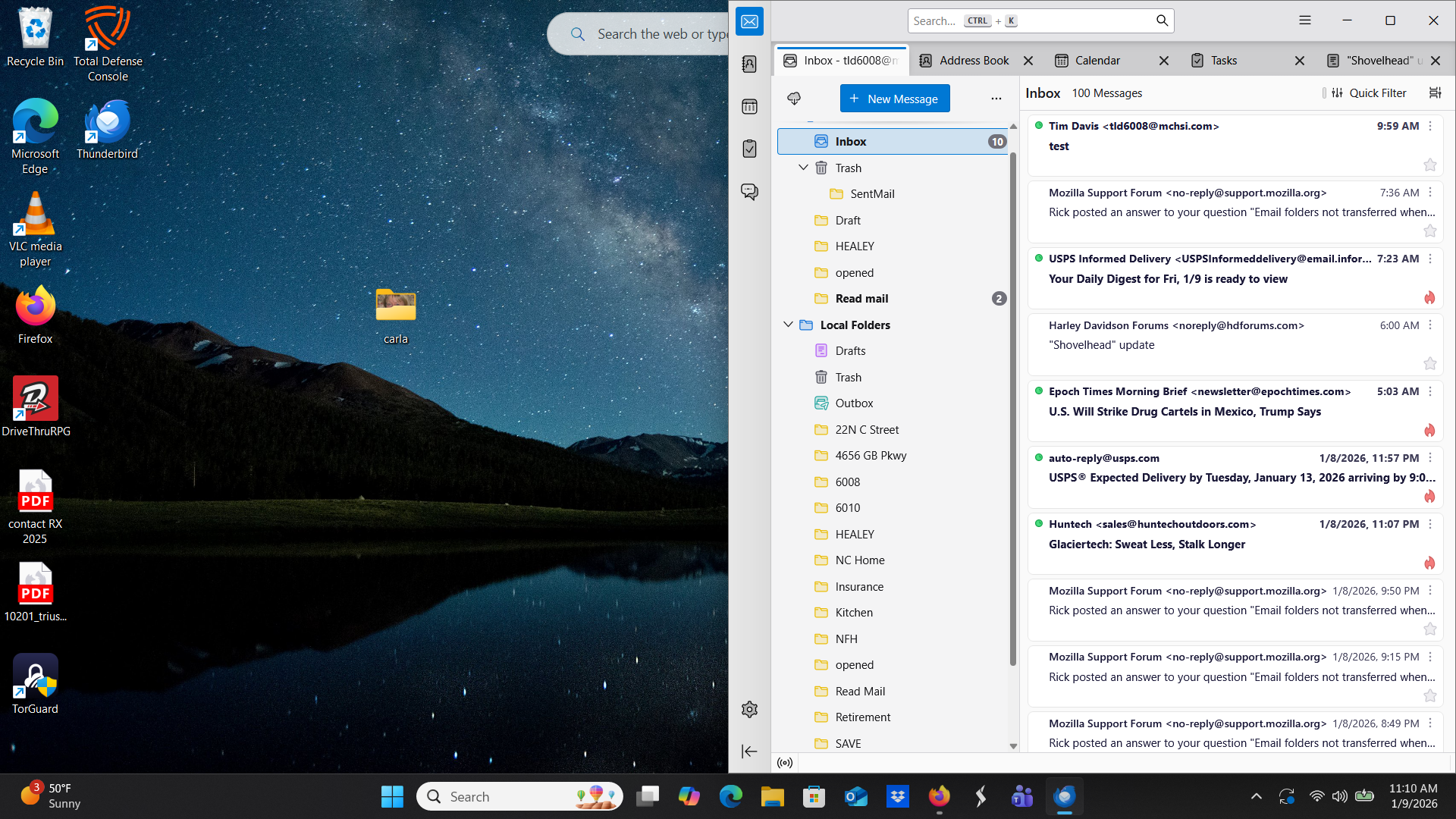
Sub-folders are folders within other folders. Your screen image shows no sub-folders of your inbox and no sub-folders in the Local Folders account.
I don't see six folders from the server. What do you mean "moved by Thunderbird" when talking about folders? Which six folders are you seeing from the server that have messages in them? We are interested only in the folders under your IMAP account in the folder pane. We are not interested in local folders yet. No messages should be in them yet. Are messages in them?
Why is a SentMail folder in the trash? Can you move it out of trash to the same level as your inbox? Click and drag. That may be why your sent messages are not getting saved. Then check account settings > copies & folders and make sure that sent mail is directed to go to that folder.
Why are there two unread messages in "Read mail"? Oh, maybe that means "to read", not "already read"?
I'm not used to seeing a drafts folder in local folders. In your IMAP account, where there should be a drafts folder, you don't have one, but you do have a user-created "draft" folder there. What happened? Did you move the IMAP drafts folder to local folders? Then create your own "draft" folder in its place?
This is a brand new account, but it is not set up correctly. In addition to the problems I already mentioned, there is no spam (or junk or bulk) folder.
If it were my computer, I would delete the IMAP account and try again to set it up properly. See what happens when Thunderbird gets the settings. Make sure to check IMAP and not POP. Make sure to use your whole e-mail address as your username. Check the settings again against the ones from Mediacom. And don't make any changes or move any folders or create any folders without me at your side.
If after deleting and re-creating the account, it still looks as it does now, I don't know what to do. I can only suspect something on your computer that would be disabled if you ran Windows in safe mode with networking.
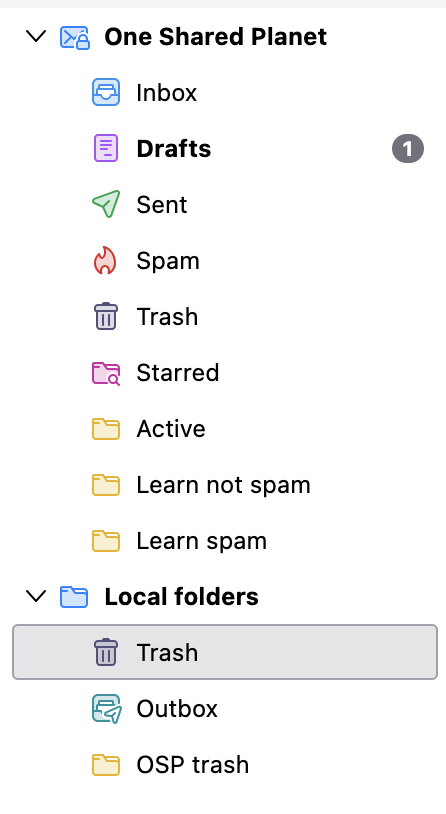
See my screen image for how accounts should look. Special IMAP server folders have special icons next to them. User-created folders have icons that look like Manila folders. IMAP accounts should have folders for inbox, drafts, sent, spam, and trash. I don't know if you created any folders for the same purposes that those folders have. One should not do that. Just use the IMAP server folders.
Now I notice that your SentMail folder, which should not be in the trash, also doesn't have the icon that it should have.
I don't see six folders from the server. What do you mean "moved by Thunderbird" when talking about folders? Which six folders are you seeing from the server that have messages in them? all the folders ABOVE the LOCAL FOLDERS were not put there by me and 3 of them are copies of those under the LOCAL FOLDERS and have content
We are interested only in the folders under your IMAP account in the folder pane. We are not interested in local folders yet. No messages should be in them yet. Are messages in them? YES
Why is a SentMail folder in the trash? Can you move it out of trash to the same level as your inbox? Click and drag. I moved it but did not put it there to start with. The sent mail was selected to go to the folder in Local Folders I moved it under IMAP That may be why your sent messages are not getting saved. Then check account settings > copies & folders and make sure that sent mail is directed to go to that folder.
Why are there two unread messages in "Read mail"? Oh, maybe that means "to read", not "already read"? Those were messages from a few years ago I had not opened, I deleted them I'm not used to seeing a drafts folder in local folders. In your IMAP account, where there should be a drafts folder, you don't have one, but you do have a user-created "draft" folder there. What happened? Did you move the IMAP drafts folder to local folders? Then create your own "draft" folder in its place? I did not create anything under the IMAP folder just under the local folder. Although there are folders there that were moved/copied from my Mediacom account that are populated I just didn't move them there
This is a brand new account, but it is not set up correctly. In addition to the problems I already mentioned, there is no spam (or junk or bulk) folder.
If it were my computer, I would delete the IMAP account and try again to set it up properly. See what happens when Thunderbird gets the settings. Make sure to check IMAP and not POP. Make sure to use your whole e-mail address as your username. Check the settings again against the ones from Mediacom. And don't make any changes or move any folders or create any folders without me at your side.
If after deleting and re-creating the account, it still looks as it does now, I don't know what to do. I can only suspect something on your computer that would be disabled if you ran Windows in safe mode with networking.
I deleted and reinstalled Thunderbird. I seem to be getting mail without a problem now but when the account pane was populated it had all those same folders that were there in the first go around.
Here is what I would do to start from scratch and try to get a properly set-up IMAP account.
- Disable Total Defense and keep it disabled.
- Do not do anything with folders, either in the IMAP account or in local folders until the IMAP account is set up properly.
- Create a new Thunderbird profile (where a user's accounts and messages are stored) and delete the old one. <alt> if needed to show menu > Help > Troubleshooting information > about:profiles. Create a new profile. Re-start Thunderbird. <alt> if needed to show menu > Help > Troubleshooting information > about:profiles > set the new profile as the default and remove the old one.
- Re-start Thunderbird to ensure that the new default profile is being used.
- Create a new account. Let Thunderbird find the settings. Make sure that it's an IMAP account.
- Check the new account. Does it look like my last screen image? Does it have all the IMAP server folders that it should have? Does it have the folders that you created on the server? If not, right click on the account name in the folder pane, select "Subscribe", and check all the folders. Expand the inbox in that list of folders to subscribe to if there are sub-folders of the inbox. Send a test message to yourself. Does it get sent? Received? Saved in the "Sent" folder? Are there connection issues? Do all the folders have the messages in them that they have on the server? If there are problems, check the settings that Thunderbird found against the settings that Mediacom says are needed (see attached image).
- If/when everything looks good, copy the user-created folders from the IMAP folders to the local folders. Right click on a folder > Copy et cet.
When you have problems, start a new discussion. We will hope that someone who knows something that I don't will respond.
If this approach does not work, see if Mediacom has an export function that would let you save the messages from the server folders on your computer. You could worry about putting them into an e-mail client later.
tld6008 said
I deleted and reinstalled Thunderbird. I seem to be getting mail without a problem now but when the account pane was populated it had all those same folders that were there in the first go around.
Maybe re-installing Thunderbird helped a little if Total Defense affected the first installation. I don't know if it could have. I don't know any other reason why re-installing would help. The problems are almost certainly not in the program; they are in the accounts. My last message has my suggestions for dealing with account problems.
All the folders look like they did with the first attempt the ones that had content still have content under the IMAP folder. None of the ones under the LOCAL FOLDER have content I sent the test message and it came through and all looked good there Mediacom does not have an export function I selected subscribe and for the first time doing that I saw all the folders and noticed that the some were checked and thats why they are populated in the folder pane, no idea how they got checked. I have tried to select more of them but nothing comes across to Thunderbird. Thanks for you help I will start a new query tomorrow
tld6008 said
All the folders look like they did with the first attempt the ones that had content still have content under the IMAP folder. None of the ones under the LOCAL FOLDER have content I sent the test message and it came through and all looked good there Mediacom does not have an export function I selected subscribe and for the first time doing that I saw all the folders and noticed that the some were checked and thats why they are populated in the folder pane, no idea how they got checked. I have tried to select more of them but nothing comes across to Thunderbird. Thanks for you help I will start a new query tomorrow
Again: we don't care about local folders. They should not have any messages. They don't even need to exist. We will worry about them and create them after you have a working IMAP account.