


How can I get 24-hour clock format widgets?

When opening a new page in Firefox I am shown a few widgets.
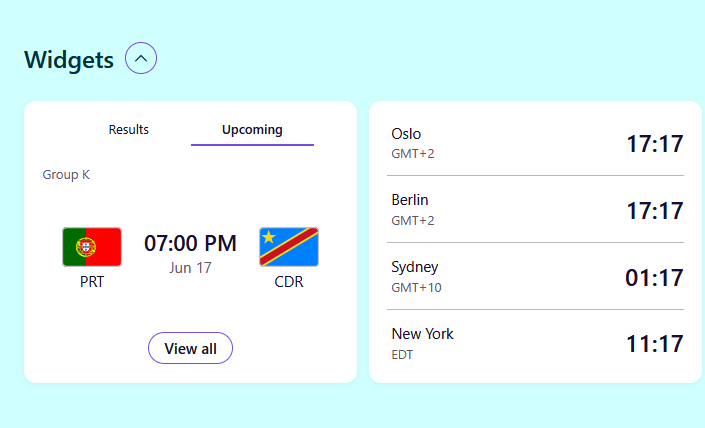
It shows the time of sports events and different timezones. But it shows this in a non-local time format - the 12 hour format (so it says 06:00 PM instead of 18:00).
In about:config I found a setting called "browser.newtabpage.activity-stream.widgets.clocks.hourFormat" but what are the acceptable formats to use here? It's not a boolean value, and by default nothing is there. I tried writing 24, HH:mm, and some other things, but didn't notice a difference.
Opaite Mbohovái (4)

hi, try in about:config, set browser.newtabpage.activity-stream.widgets.clocks.hourFormat to 24h or a locale like en-GB then restart browser
I discovered that the Clock widget actually has a built in GUI option to switch to 24 hour format. This sets browser.newtabpage.activity-stream.widgets.clocks.hourFormat to "24" and is effective immediately, no restart required.
However, this does not impact the Sports widget, which seems to ignore the setting.
Moambuepyre reking67 rupive
hi, it's good that you checked this, the time format settings work for the clock widget. Apparently, the sports widget uses its own time formatting

If you’re looking for 24-hour clock widgets, check the widget or clock settings for a 24-hour, military, or display option. Some devices also let you switch the system time format, which automatically updates compatible widgets. It would be helpful to know which device or platform you’re using for more specific options.