


text display unreadable, pixillated
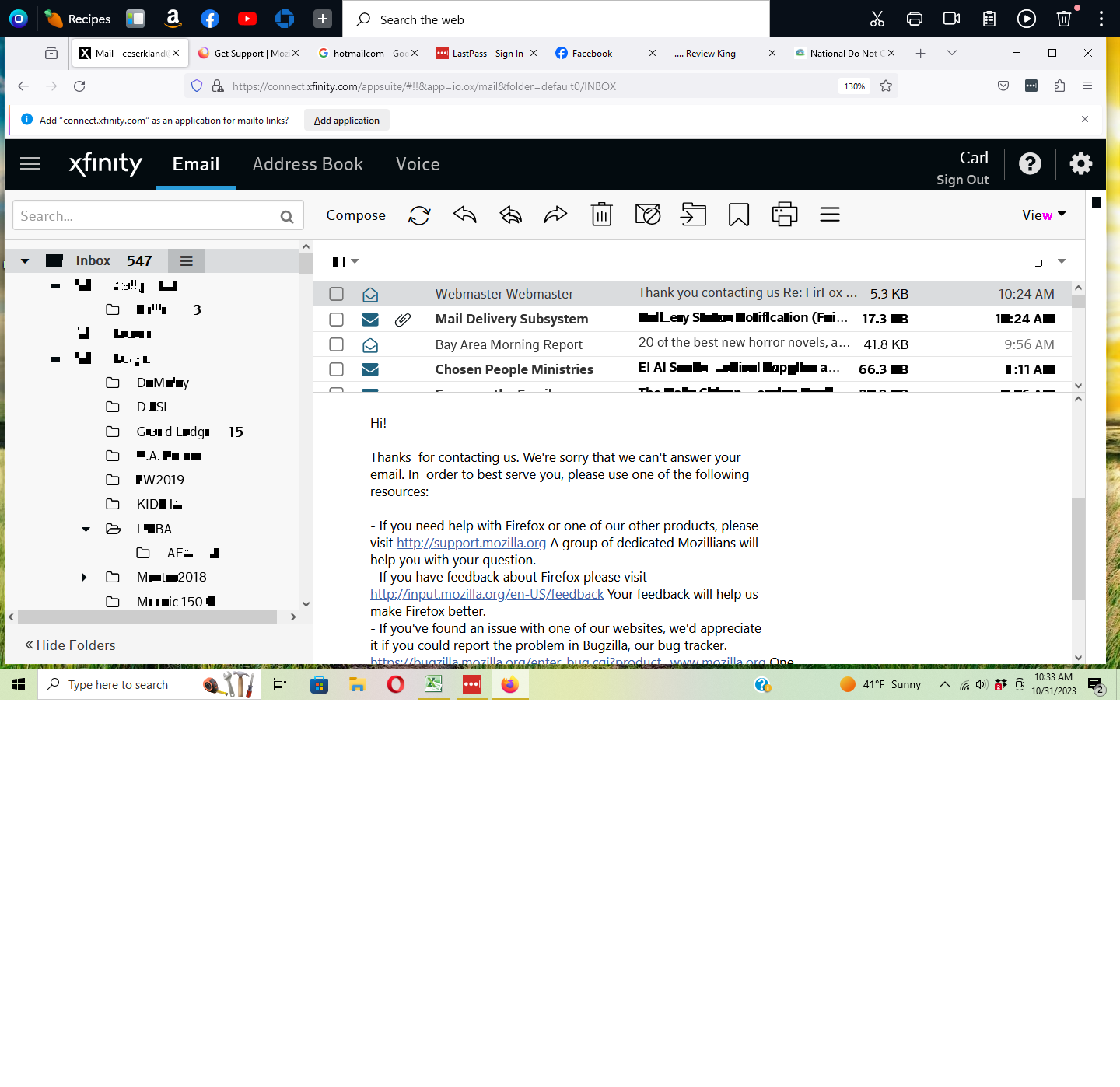
Firefox displays text in a garbled, unreadable fashion. HP desktop, 64-bit Windows. This is why I stopped using FireFox years ago; I wanted to see if it had improved. Is there a solution? See attached PAINT file of screen image.
Firefox displays text in a garbled, unreadable fashion. HP desktop, 64-bit Windows. This is why I stopped using FireFox years ago; I wanted to see if it had improved. Is there a solution? See attached PAINT file of screen image.
Opaite Mbohovái (1)
Where did you get your wildtangent Firefox version (third-party build) from?
distributionID: wildtangent-001
updateChannel: release-cck-wildtangent
You can try to disable hardware acceleration in Firefox.
- Settings -> General -> Performance
remove checkmark: [ ] "Use recommended performance settings"
remove checkmark: [ ] "Use hardware acceleration when available" - https://support.mozilla.org/en-US/kb/performance-settings
Close and restart Firefox after modifying the setting to apply changes.
You can check if there is an update for your graphics display driver and check for hardware acceleration related issues.